
1. Introduction
The Testing Timers ACT G5 Pacing Watch is a digital timepiece designed to assist students with time management during standardized tests such as the ACT. It features pre-programmed sections for standard and extended times, along with custom timing options. The watch provides visual cues to help users monitor elapsed time and maintain pacing without audible alerts or vibrations, ensuring compliance with exam regulations.

Image 1.1: The ACT G5 Pacing Watch with its packaging, highlighting its design for test preparation.
Key Features:
- Pre-programmed ACT Sections: Includes English (35 min), Math (50 min), Reading (40 min), Science (40 min), Writing (40 min).
- Extended Time Options: Supports 1.5× extended time for all ACT sections.
- Custom Timing Functionality: Allows setting specific time limits for other exams like SAT, LSAT, GMAT, GRE, MCAT, SSAT, and AP exams.
- Blinking Markers: Visual indicators around the display edge show elapsed time proportionally.
- Silent Operation: Designed to be noise-free and vibration-free for exam environments.
- Durable and Reusable: Constructed for long-term use and sharing.

Image 1.2: An infographic detailing the product features, including extended time options, preset timed sections, and approval for tests.
2. Setup
2.1 Initial Power On
The ACT G5 Pacing Watch comes with a pre-installed battery designed for over 5 years of use. The device should power on automatically or by pressing any button. No initial charging or complex setup is required.
2.2 Basic Time Setting (If Applicable)
While primarily a test timer, the watch may display current time. Refer to the on-screen prompts or button labels for adjusting the standard time display if needed. This function is separate from the test timing modes.
3. Operating Instructions
3.1 Watch Overview
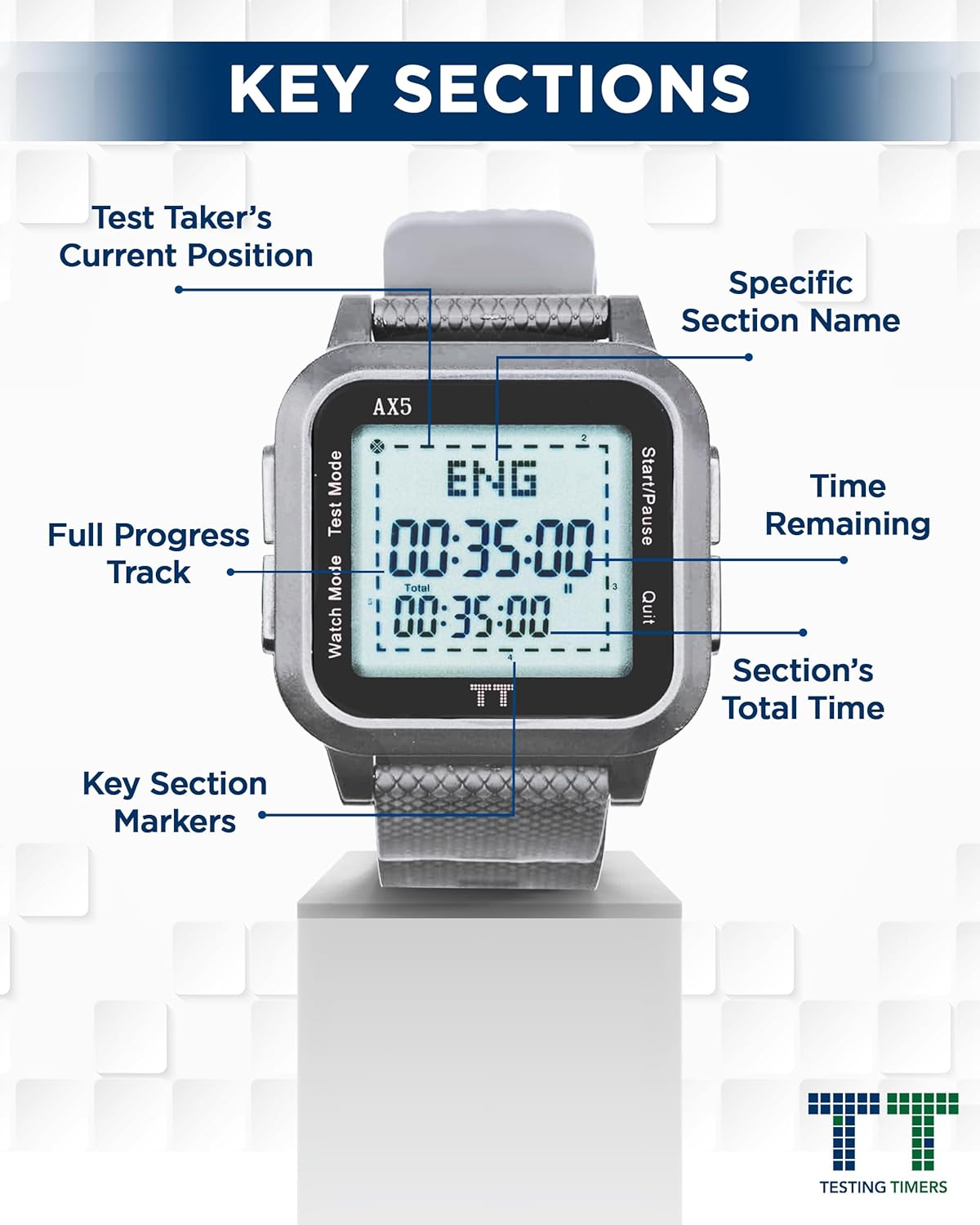
Image 3.1: A detailed diagram illustrating the watch's buttons and screen indicators, including 'Watch Mode', 'Test Mode', 'Start/Pause', 'Quit', 'Test Taker's Current Position', 'Specific Section Name', 'Time Remaining', 'Section's Total Time', and 'Key Section Markers'.
- Watch Mode Button: Used to switch between different modes or settings.
- Test Mode Button: Activates the test timing functions and allows selection of test sections.
- Start/Pause Button: Initiates or temporarily halts the timer during a test section.
- Quit Button: Exits the current test section or menu.
3.2 Selecting a Test Section
- Press the Test Mode button to enter the test selection menu.
- Use the Watch Mode or Test Mode buttons to scroll through the available pre-programmed sections:
- English (35 minutes)
- Math (50 minutes)
- Reading (40 minutes)
- Science (40 minutes)
- Writing (40 minutes)
- Extended Time (1.5×) for each section
- Customized Time
- Once the desired section is displayed, press the Start/Pause button to confirm selection and begin the timer.

Image 3.2: An infographic detailing the pre-programmed test sections and the flexibility for custom settings for various exams.
3.3 Using Custom Timing
To set a custom time limit for other tests:
- Navigate to the Customized Time option in the test selection menu.
- Press Start/Pause to enter the custom time setting interface.
- Use the Watch Mode and Test Mode buttons to adjust hours, minutes, and seconds.
- Press Start/Pause again to confirm the custom time and begin the countdown.
3.4 Monitoring Elapsed Time with Blinking Markers
The watch features a unique visual pacing system:
- The perimeter of the watch display has blinking markers.
- These markers illuminate or blink to visually represent the proportion of time that has elapsed in the current section.
- For example, if a section has four parts (like the ACT Reading section), the markers may divide the display into four segments, indicating when to move to the next passage.
- This visual feedback helps maintain pacing without requiring constant attention to the numerical countdown.
3.5 Pausing and Quitting a Test Section
- To temporarily pause the timer during a test section, press the Start/Pause button. Press it again to resume.
- To exit a test section before it concludes, press the Quit button. This will typically reset the timer for that section.
4. Maintenance
4.1 Cleaning
To clean the watch, wipe it gently with a soft, dry, or slightly damp cloth. Avoid using harsh chemicals, abrasive cleaners, or submerging the watch in water.
4.2 Battery Information
The ACT G5 Pacing Watch is powered by a long-lasting battery, typically providing over 5 years of operation. The watch does not feature an external off switch, as it is designed for continuous readiness. Battery replacement requires specialized tools (jeweler's screwdrivers) and should ideally be performed by a qualified technician to avoid damage to the device or compromise its water resistance.
4.3 Storage
Store the watch in a cool, dry place away from direct sunlight and extreme temperatures. Keep it protected from impacts or pressure that could damage the screen or casing.
5. Troubleshooting
5.1 Display Issues
- Blank Screen: If the screen is blank, ensure the battery is not depleted. Although designed for long life, extreme cold or prolonged disuse might affect performance.
- Faint Display: A faint display could indicate a low battery.
5.2 Incorrect Timing or Functionality
- Timer Not Starting/Stopping: Ensure buttons are pressed firmly. If unresponsive, try pressing the Quit button to reset the current operation, then re-select the desired test section.
- Inaccurate Time: Verify that the correct test section or custom time has been selected. If the issue persists, a factory reset (if available, consult support) might be necessary.
5.3 General Unresponsiveness
If the watch becomes unresponsive, allow it to sit for a few minutes. If the issue continues, it may indicate a battery or internal component issue. Refer to the Support section for further assistance.
6. Specifications
| Item Model Number | ACT G5 |
| Brand | Testing Timers |
| Package Dimensions | 4.45 x 3.9 x 2.28 inches |
| Item Weight | 2.4 ounces |
| Battery Life | 5+ years (typical) |
| Manufacturer | Testing Timers |
| Date First Available | September 10, 2019 |
7. Warranty Information
For specific warranty details regarding your Testing Timers ACT G5 Pacing Watch, please refer to the documentation included with your purchase or contact Testing Timers customer support directly. General warranty terms typically cover manufacturing defects under normal use conditions.
8. Customer Support
If you encounter any issues or have questions not addressed in this manual, please contact Testing Timers customer support. Contact information can typically be found on the product packaging or the official Testing Timers website.
For additional resources and product information, visit the Testing Timers Store on Amazon.