
Introduction
The Kenwood DRV-A301W is a high-definition car dash camera designed to record video and capture photos while driving and when the vehicle is parked. It features a 2.7-inch display, built-in GPS, and wireless connectivity for convenient operation and data management.

Image: Kenwood DRV-A301W Dash Cam mounted on a windshield, displaying a clear road view.
Setup and Unboxing
The DRV-A301W package includes all necessary components for installation and immediate use. Carefully unpack all items and ensure everything is present before proceeding with installation.

Image: All components included in the Kenwood DRV-A301W Dash Cam package.
Box Contents:
- Kenwood DRV-A301W Dash Cam Unit
- Adhesive Mount
- Suction Cup Mount
- Cigarette Lighter Power Adapter (12.5 ft cable)
- USB Cable
- Cable Clips (for wire management)
- User Manual
- Warranty Card
Installation
Proper installation ensures optimal recording performance and driver safety. Choose a mounting location that does not obstruct your view of the road.
Mounting Options:
The DRV-A301W offers two primary mounting options: an adhesive mount and a suction cup mount. Both mounts attach magnetically to the dash cam unit.
- Adhesive Mount: Provides a more permanent and discreet installation. Ensure the windshield surface is clean and dry before applying.
- Suction Cup Mount: Offers flexibility for repositioning the camera. Ideal for temporary setups or if you frequently move the camera between vehicles.

Image: Adhesive and Suction Cup Mounts for the DRV-A301W.
Recommended Placement:
Mount the dash camera to the center of the windshield, ideally behind the rear-view mirror. This position facilitates optimal video recording and minimizes obstruction to your driving view. The bracket allows for angle adjustment after mounting.

Image: Dash Cam mounted on the windshield, displaying its screen.
Power Connection:
The DRV-A301W is powered by your vehicle's battery via the included cigarette lighter power adapter. This adapter supports both 12V and 24V applications. The 12.5-foot cable connects to the camera's miniUSB port.
For neat cable management, use the provided cable clips to secure the power cable along the windshield trim or dashboard, preventing it from interfering with driving controls or visibility.
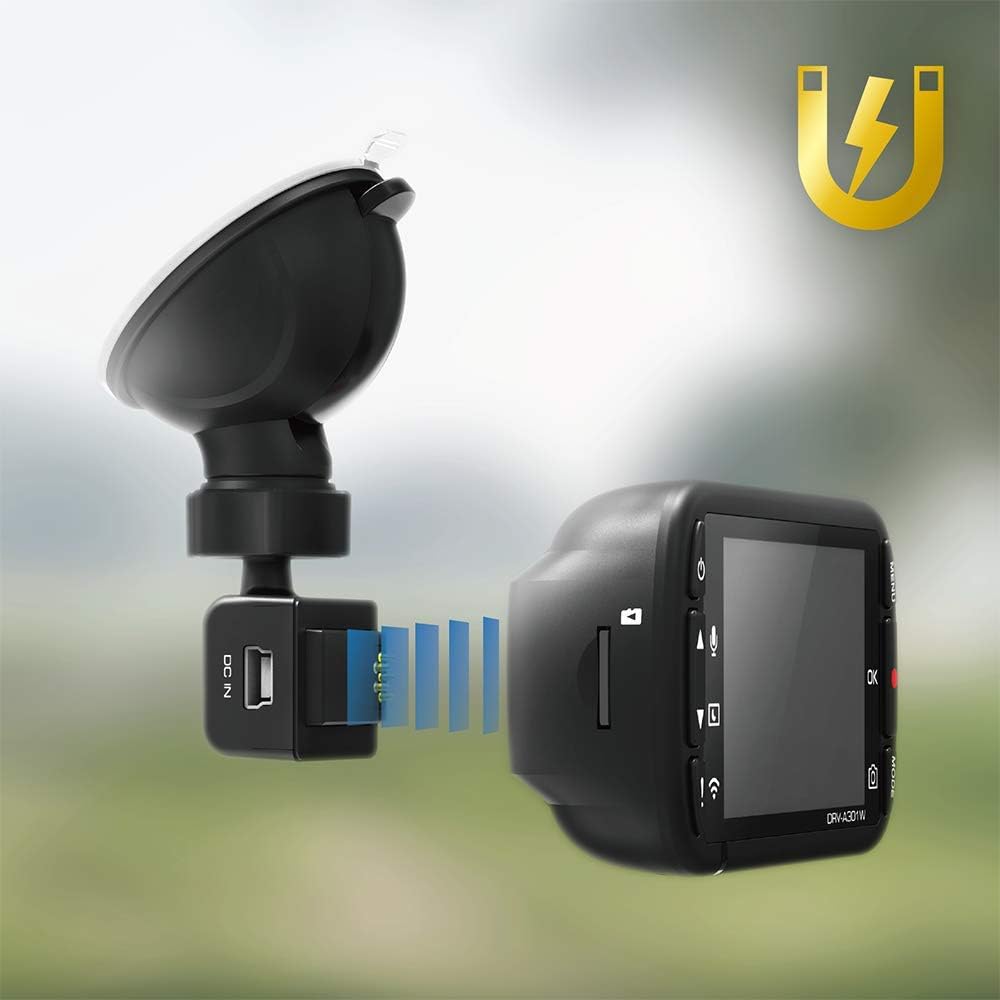
Image: Magnetic attachment of the dash cam to its mount.
Operating Instructions
Basic Recording:
The dash cam records Full HD (1920x1080) video using a 1/2.8" CMOS image sensor and an F1.8 lens with a 136-degree field of view. HDR (High Dynamic Range) technology ensures clear images in varying light conditions.

Image: Full HD recording capability with 2 million pixels.

Image: HDR technology for balanced exposure.
GPS Functionality:
The built-in GPS receiver records time, GPS position (longitude and latitude), and can stamp travel speed directly onto video and image files.

Image: Built-in GPS for location and speed data.
2.7" LCD Screen:
The 2.7-inch LCD screen (960 x 240 x RGB resolution) provides live video playback, recorded video/photo playback, and displays essential information like time, date, GPS signal, and recording status. Push-button controls manage Power, Menu, and Record functions.
Wi-Fi Connectivity and App:
Connect the dash cam to your smartphone via Wi-Fi using the dedicated app. The app allows for:
- Dash cam configuration and settings adjustment.
- Live viewing of recorded footage.
- Downloading recorded videos and photos to your smartphone.

Image: Smartphone app interface for the Kenwood Dash Cam.
Screen Saver:
Activate the screen saver option to blank the display during operation, showing only time and date. This prevents screen glare and distraction while driving.
Parking Mode Recording:
The dash cam supports 24-hour parking mode monitoring. This feature requires a separate hardwire kit (not included) to ensure continuous power when the vehicle is off.
- Motion Detection: Records automatically if motion is detected around the parked vehicle.
- G-Sensor: Detects impacts or sudden movements and automatically saves the corresponding footage as an emergency file.
- Time-Lapse Recording: Records continuously at a low frame rate to save storage space while monitoring.

Image: Parking Mode Recording activated by impact.

Image: G-sensor detecting impacts from multiple directions.
Night Vision:
The F1.8 aperture lens allows significant light intake, enhancing night vision capabilities for clear recordings in low-light conditions.
Loop Recording:
The dash cam continuously records, overwriting the oldest files when the microSD card is full. It supports microSDXC cards up to 128GB.

Image: MicroSDXC card support.
Maintenance
Regular maintenance ensures the longevity and optimal performance of your dash cam.
- Clean the Lens: Use a soft, lint-free cloth to gently clean the camera lens regularly to ensure clear recordings.
- Format SD Card: Periodically format the microSD card (e.g., monthly) to prevent data corruption and maintain optimal recording performance. Back up important files before formatting.
- Check Mount Security: Ensure the dash cam mount is securely attached to the windshield, especially if using the suction cup mount, which may lose suction in extreme temperatures.
- Temperature Management: Avoid prolonged exposure to extreme heat. If the camera overheats, it may temporarily cease operation until it cools down. Remove the camera from the windshield if parked for extended periods in hot weather.
Troubleshooting
Here are solutions to common issues you might encounter:
- Dash Cam Not Recording: Ensure a microSD card is inserted and formatted. Check power connection.
- Poor Video Quality: Clean the lens. Ensure HDR is enabled for varying light conditions.
- App Connectivity Issues: Ensure Wi-Fi is enabled on the dash cam and your smartphone. If using Apple CarPlay/Android Auto, you may need to disconnect it to connect to the dash cam's Wi-Fi.
- Collision Sensor Too Sensitive/Insensitive: Adjust the G-sensor sensitivity settings via the dash cam menu or smartphone app.
- Overheating: If the camera stops working due to heat, allow it to cool down. Consider removing it from direct sunlight when parked.
- Difficulty Accessing Files: Files can be accessed via the smartphone app (Wi-Fi), by removing the microSD card and using a card reader, or by connecting the dash cam directly to a computer via USB.
Specifications
| Feature | Detail |
|---|---|
| Product Dimensions | 1.81 x 3.62 x 1.46 inches |
| Item Weight | 10.6 ounces |
| Video Capture Resolution | 1080p Full HD (1920x1080) |
| Image Sensor | 1/2.8" CMOS, 2.13 million pixels |
| Lens | F1.8, 136-degree Field of View (FOV) |
| Display | 2.7" LCD (960 x 240 x RGB) |
| Special Features | Built-In GPS, G-Sensor, HDR, Parking Mode Recording, Wireless Link |
| Connectivity Technology | USB, Wi-Fi |
| Mounting Type | Adhesive Mount, Suction Mount (magnetic attachment) |
| Power Source | 12V/24V Vehicle Power (via cigarette lighter adapter) |
| Memory Card Support | microSDXC (up to 128GB) |
Warranty and Support
For warranty information, please refer to the included Warranty Card in your product package. For further assistance or technical support, please visit the official Kenwood website or contact Kenwood customer service.
Manufacturer: KENWOOD
Date First Available: September 10, 2019