
1. Introduction
Thank you for choosing the BulbAmerica Projector Lamp for NEC PA703W. This product is a high-quality replacement lamp assembly designed to restore optimal brightness and performance to your NEC PA703W projector. It features a genuine original OEM bulb, ensuring superior brightness, longevity, and color accuracy compared to generic alternatives. This manual provides essential information for safe installation, operation, and maintenance to ensure the best performance and lifespan of your new projector lamp.
2. Safety Information
Please read and understand all safety instructions before attempting to install or operate the projector lamp. Failure to follow these instructions may result in electric shock, fire, or personal injury.
- Disconnect Power: Always unplug the projector from the power outlet and allow it to cool down completely (at least 30 minutes) before replacing the lamp.
- Hot Surfaces: Projector lamps operate at high temperatures. Do not touch the lamp or surrounding areas immediately after use.
- Eye Protection: Never look directly into the projector lens or a bare lamp, as intense light can cause eye damage.
- Handle with Care: Projector lamps contain glass and should be handled carefully to prevent breakage. Do not touch the glass bulb directly with bare hands, as oils can reduce lamp life.
- Proper Disposal: Dispose of old lamps according to local regulations. Lamps may contain mercury.
- Ventilation: Ensure the projector's ventilation openings are not blocked to prevent overheating.
3. Package Contents
Verify that all items are present and undamaged upon opening the package:
- 1 x BulbAmerica Projector Lamp for NEC PA703W (Housing Assembly with Original OEM Bulb)
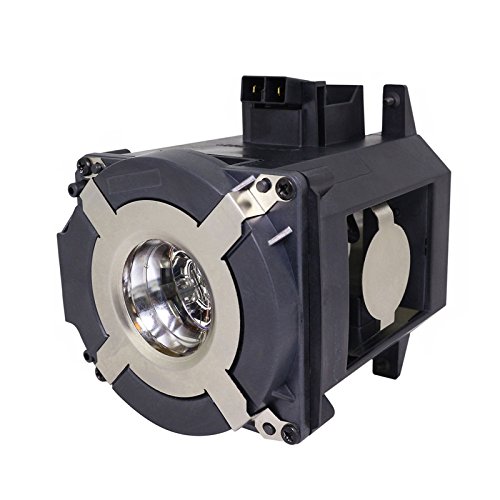
Image 1: BulbAmerica Projector Lamp for NEC PA703W, showing the lamp assembly within its housing.
4. Setup and Installation
Follow these steps carefully to replace the projector lamp. Refer to your NEC PA703W projector's user manual for specific instructions on accessing the lamp compartment.
- Power Off and Cool Down: Turn off the NEC PA703W projector and unplug its power cord from the electrical outlet. Allow the projector to cool down for at least 30 minutes to prevent burns.
- Locate Lamp Compartment: Identify the lamp compartment cover on your projector. This is typically secured by one or more screws.
- Remove Lamp Cover: Using a suitable screwdriver, carefully loosen and remove the screw(s) securing the lamp compartment cover. Set the cover and screws aside in a safe place.
- Remove Old Lamp: Locate the old lamp assembly. It will usually have a handle or a wire bail. Loosen the screw(s) that secure the lamp assembly in place. Gently pull the handle or bail to slide the old lamp assembly out of the projector.
- Install New Lamp: Carefully unpack the new BulbAmerica projector lamp. Hold the new lamp assembly by its housing, avoiding touching the glass bulb. Align the new lamp assembly with the slot in the projector and gently slide it into place until it is fully seated.
- Secure New Lamp: Tighten the screw(s) that secure the new lamp assembly. Ensure it is firmly in place to prevent movement.
- Replace Lamp Cover: Reattach the lamp compartment cover and secure it with the screw(s) you removed earlier. Ensure the cover is properly closed and fastened.
- Reconnect Power: Plug the projector's power cord back into the electrical outlet.
- Reset Lamp Timer: This is a critical step. Power on the projector. Navigate to the projector's On-Screen Display (OSD) menu. Locate the 'Lamp Timer' or 'Lamp Hours' option and select 'Reset Lamp Timer'. Consult your NEC PA703W projector manual for the exact menu path. Failure to reset the lamp timer may result in inaccurate lamp life readings or premature lamp warning messages.
5. Operating Instructions
After successful installation and lamp timer reset, your projector is ready for use.
- Power On: Turn on your NEC PA703W projector as you normally would.
- Verify Operation: Confirm that the projector powers on, displays an image, and that there are no lamp warning indicators.
- Optimal Performance: The new OEM bulb will provide optimal brightness and color. Allow a few minutes for the lamp to reach full brightness after powering on.
6. Maintenance
Proper maintenance helps extend the life of your projector and lamp.
- Air Filter Cleaning: Regularly clean or replace the projector's air filters to ensure proper airflow and prevent overheating, which can shorten lamp life. Refer to your projector's manual for filter maintenance.
- Lamp Life Monitoring: Keep an eye on the lamp hour counter in your projector's OSD menu. Replace the lamp when it approaches its rated lifespan or when you notice a significant decrease in brightness or a change in color quality.
- Cool Down Cycle: Always allow the projector to complete its cool-down cycle after turning it off. Do not unplug the projector immediately after powering it down, as this can damage the lamp.
- Storage: If storing a spare lamp, keep it in its original packaging in a cool, dry place away from direct sunlight and extreme temperatures.
7. Troubleshooting
If you encounter issues after installing the new lamp, consider the following:
- Lamp Not Lighting:
- Ensure the lamp assembly is fully seated and secured.
- Verify the lamp compartment cover is correctly closed and fastened.
- Check that the projector is properly plugged in and receiving power.
- Dim Image or Poor Color:
- Confirm the lamp timer was reset after installation.
- Check the projector's picture settings (brightness, contrast, color).
- Ensure the projector's air filters are clean.
- Lamp Warning Indicator:
- If the lamp warning light persists after installation, ensure the lamp timer was reset.
- If the lamp is new and the timer was reset, re-check the lamp installation.
If problems persist, consult your NEC PA703W projector's user manual or contact BulbAmerica customer support.
8. Specifications
| Brand | BulbAmerica |
| Model Number | NP42LP |
| Compatible Projector | NEC PA703W |
| Bulb Type | Genuine Original OEM (UHP, P-VIP, SHP, NSH) |
| Item Weight | 1.5 Pounds |
| Package Dimensions | 10 x 10 x 10 inches |
| UPC | 675650366679 |
9. Warranty and Support
BulbAmerica is committed to providing high-quality products and customer satisfaction.
- Warranty: The Replacement Lamp for NEC PA703W projector is completely covered under our 180-day warranty, which protects against any defective products.
- Return Policy: We offer a 30-day return policy for your peace of mind.
- Customer Support: For technical assistance, warranty claims, or any other inquiries, please refer to the contact information provided with your purchase or visit the official BulbAmerica website.