
1. Introduction
The Paww WaveCast is a portable Bluetooth 5.0 audio transmitter designed to wirelessly stream audio from non-Bluetooth devices to Bluetooth headphones or speakers. It features aptX Low Latency technology for synchronized audio and an extended range of up to 100 feet (30 meters). The device supports connecting to two audio receivers simultaneously, making it suitable for shared listening experiences.
Video: Introducing Paww WaveCast. This video provides an overview of the Paww WaveCast Portable Bluetooth Audio Transmitter and its primary functions.
2. What's in the Box
- Paww WaveCast Portable Bluetooth Audio Transmitter
- User Manual
- Micro-USB Charging Cable
3. Safety Information
Please read and follow these safety guidelines to ensure proper use and prevent damage to the device or injury:
- Handle batteries with care.
- Avoid exposing the device to water or extreme temperatures.
- Do not use the device while sleeping or operating machinery.
- Keep out of reach of children.
4. Product Overview
The Paww WaveCast features a compact design with integrated audio jacks and intuitive controls.

Image: Top view of the Paww WaveCast, highlighting the central power/pairing button, two headphone icons indicating dual connection capability, and four LED battery/status indicators.

Image: The Paww WaveCast with its single 3.5mm audio jack extended, ready for connection to standard audio ports.
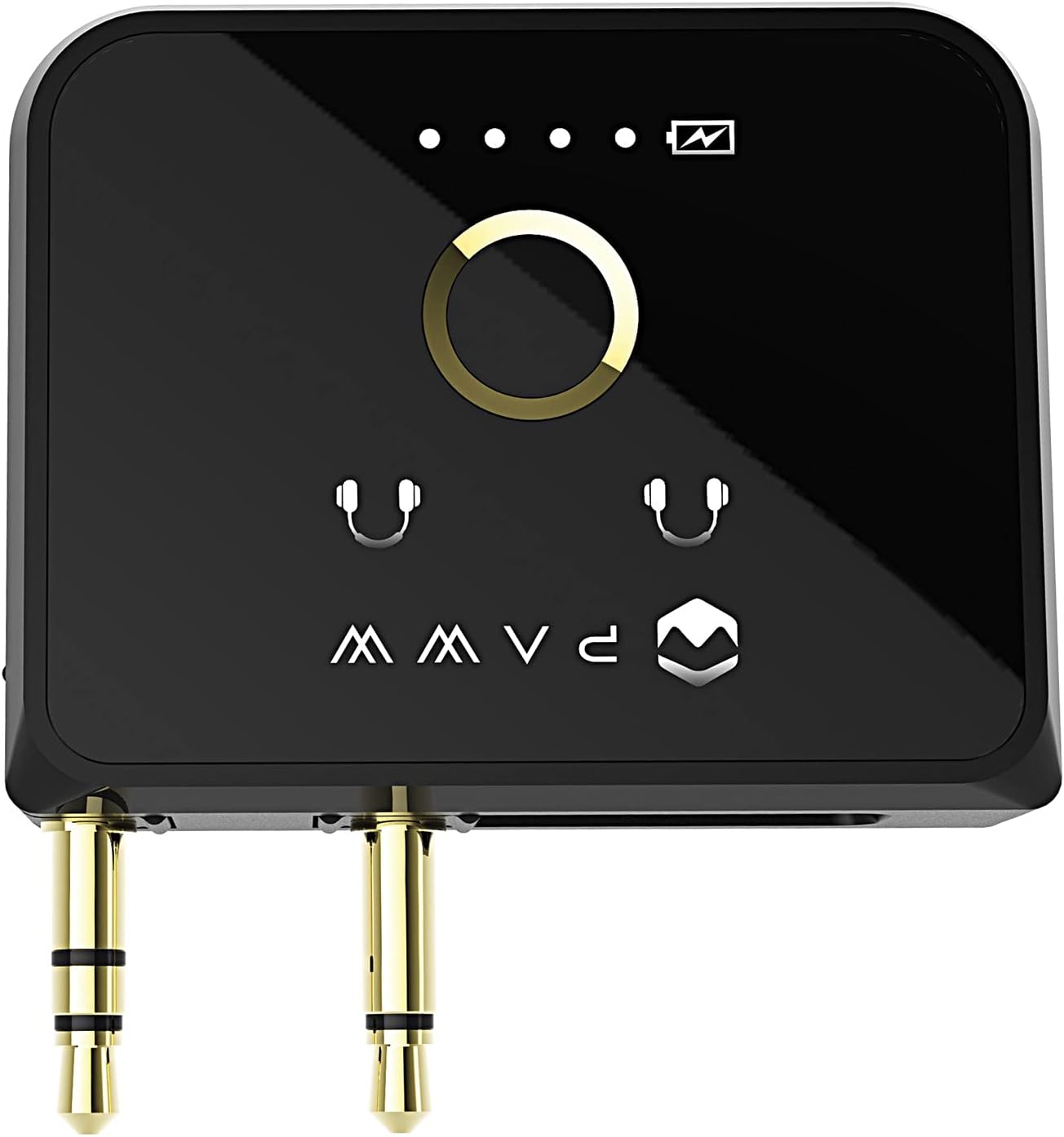
Image: The Paww WaveCast with both dual 3.5mm audio jacks extended, suitable for in-flight entertainment systems or other dual-jack audio sources.

Image: Side view of the Paww WaveCast, displaying the micro-USB charging port.
5. Setup
5.1 Charging the Device
Before first use, fully charge your WaveCast. Connect the supplied micro-USB cable to the charging port on the device and the other end to a USB power source. A full charge takes approximately 30 minutes and provides up to 10 hours of playtime.
5.2 Pairing with Bluetooth Headphones/Speakers
- Ensure your WaveCast is charged and powered on.
- Press and hold the central button on the WaveCast until the LED indicators begin to flash, indicating pairing mode.
- Place your Bluetooth headphones or speakers in pairing mode (refer to their respective manuals for instructions).
- The WaveCast will automatically search for and connect to nearby Bluetooth devices. Once connected, the LED indicator(s) will show a steady light.
- To connect a second pair of headphones, repeat steps 2-4.
5.3 Connecting to an Audio Source
The WaveCast is compatible with any device that has a 3.5mm audio output port.
- Single 3.5mm Port: Extend the single 3.5mm audio jack from the WaveCast and insert it into the audio output port of your device (e.g., TV, gym equipment, Nintendo Switch).
- Dual 3.5mm Ports (e.g., In-flight Entertainment): Extend both 3.5mm audio jacks from the WaveCast and insert them into the corresponding dual audio ports of the entertainment system.
6. Operating Instructions
6.1 Power On/Off
- Power On: Press and hold the central button for a few seconds until the LED indicators light up.
- Power Off: Press and hold the central button for a few seconds until the LED indicators turn off.
6.2 Audio Streaming
Once connected to an audio source and paired with your Bluetooth headphones/speakers, audio will automatically stream wirelessly. The WaveCast's aptX Low Latency codec ensures minimal audio delay, providing a synchronized experience for video content.
6.3 Extended Range
The WaveCast utilizes Bluetooth 5.0 technology to offer an extended wireless range of up to 100 feet (30 meters) in optimal conditions, allowing for greater freedom of movement while listening.
7. Maintenance
- Clean the device with a soft, dry cloth. Do not use harsh chemicals or abrasive materials.
- Store the device in a cool, dry place when not in use.
- Avoid dropping the device or subjecting it to strong impacts.
- To preserve battery life, charge the device regularly and avoid fully discharging it for extended periods.
8. Troubleshooting
- No Audio: Ensure the WaveCast is fully charged, powered on, and correctly plugged into the audio source. Verify that your headphones/speakers are paired and powered on. Check the volume levels on both the audio source and your receiving device.
- Pairing Issues: Make sure both the WaveCast and your headphones/speakers are in pairing mode. Try turning both devices off and on again. Ensure no other Bluetooth devices are interfering with the pairing process.
- Poor Audio Quality/Disconnections: Ensure the WaveCast and receiving device are within the 100-foot range and there are no significant obstructions. Reduce interference from other wireless devices.
- Charging Problems: Verify the micro-USB cable is securely connected to both the WaveCast and the power source. Try a different USB cable or power adapter.
9. Specifications
| Brand | Paww |
| Model Number | PW-2019WC-BK |
| Connectivity Technology | Wireless (Bluetooth 5.0) |
| Power Source | Battery Powered (1 Lithium Ion battery included) |
| Battery Life | Approximately 10 hours playtime (30 min charge) |
| Special Feature | Lightweight, aptX Low Latency |
| Material | Aluminum |
| Item Weight | 6.7 ounces |
| Package Dimensions | 6.1 x 4.13 x 2.13 inches |
10. Warranty and Support
10.1 Warranty Information
For detailed warranty information regarding your Paww WaveCast, please refer to the warranty card included with your product or visit the official Paww website. Warranty terms and conditions may vary by region.
10.2 Customer Support
If you encounter any issues or have questions not covered in this manual, please contact Paww customer support through their official website or the contact information provided with your purchase. You can also visit the Paww Store on Amazon for additional resources.