
Introduction
This manual provides instructions for the proper use and maintenance of your COLOR TREE remote controller, designed for various Daikin air conditioner models. Please read this manual thoroughly before operating the device.
Compatible Daikin Air Conditioner Models: BRC4C65, BRC7EB518, BRC7E618, BRC7E619, BRC4C66, BRC7F530W, BRC7FA532F, BRC7C58, BRC7G53, BRC7C52, BRC4C61, BRC4C62, BRC7G53, BRC7C510, BRC7EB530W, BRC7GA53, BRC79A53, BRC79A56, BRC7C59, BRC7C58, BRC7CA52, BRC7EA618, BRC7C62, BRC7E530, BRC7E530W, BRC7C528, BRC7F528, BRC7EA66, BRC7EA63W, BRC7F532F, BRC4C651, BRC1D528, BRC7E531.
Package Contents
- 1 x COLOR TREE Remote Controller (Model: SKU01741)
Note: 2 AAA batteries are required and are not included in the package.
Setup
1. Battery Installation
- Locate the battery compartment cover on the back of the remote controller.
- Slide the cover downwards or press the latch to open it.
- Insert two (2) AAA batteries, ensuring the positive (+) and negative (-) terminals align correctly with the markings inside the compartment.
- Replace the battery compartment cover until it clicks securely into place.
Important: Always use new batteries and replace both batteries at the same time. Do not mix old and new batteries or different types of batteries.
Operating Instructions
This remote controller is pre-programmed for compatible Daikin air conditioner models. No additional setup or pairing is typically required after battery installation.
Remote Controller Layout
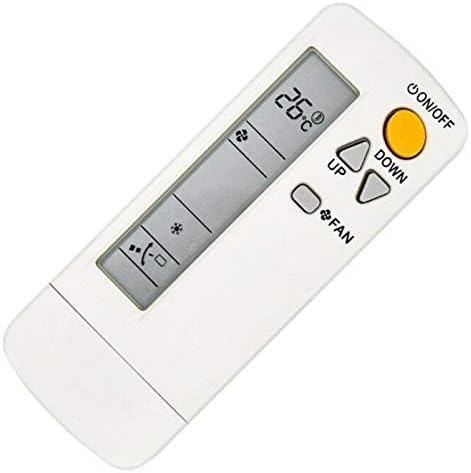
The remote controller features an LCD screen displaying current settings and various buttons for controlling your air conditioner. Key buttons include:
- ON/OFF Button: Powers the air conditioner on or off.
- UP/DOWN Buttons: Adjust the temperature setting.
- FAN Button: Cycles through fan speed settings.
- MODE Button: (If present, often under a slide cover) Selects operating modes (e.g., Cool, Heat, Dry, Fan).
- SWING Button: (If present) Controls the louver swing function.
- TIMER Button: (If present) Sets the on/off timer.
Basic Operation
- Power On/Off: Press the ON/OFF button to turn the air conditioner on or off.
- Adjusting Temperature: Use the UP or DOWN arrow buttons to set your desired temperature. The current temperature will be displayed on the LCD screen.
- Changing Fan Speed: Press the FAN button repeatedly to cycle through available fan speeds (e.g., Auto, Low, Medium, High).
- Selecting Operating Mode: If your remote has a MODE button (often under a sliding cover), press it to select the desired operating mode (e.g., Cool, Heat, Dry, Fan).

Some models may feature a sliding cover to reveal additional functions such as MODE, SWING, and TIMER settings. Refer to the markings on your specific remote for detailed button functions.
Maintenance
Cleaning the Remote Controller
- Wipe the remote controller with a soft, dry cloth.
- Do not use liquid cleaners, abrasive cleaners, or chemical sprays, as these can damage the surface or internal components.
Battery Care
- Remove batteries if the remote controller will not be used for an extended period to prevent leakage.
- Dispose of used batteries according to local regulations.
Troubleshooting
| Problem | Possible Cause | Solution |
|---|---|---|
| Remote not responding | Dead or incorrectly installed batteries. | Replace batteries with new AAA batteries, ensuring correct polarity. |
| Remote not controlling AC unit | Obstruction between remote and AC unit sensor. Remote is too far from AC unit. AC unit sensor is dirty or blocked. | Ensure a clear line of sight to the AC unit. Move closer to the AC unit. Clean the AC unit's infrared receiver. |
| LCD screen is dim or blank | Low battery power. | Replace batteries. |
Specifications
- Brand: COLOR TREE
- Model Number: SKU01741
- Compatible Devices: Daikin Air Conditioners (Specific models listed in Introduction)
- Power Source: 2 x AAA Batteries (not included)
- Special Features: Infrared, Pre-Programmed
- Color: Black (Remote body is typically white/light grey with black accents)
Warranty and Support
This product is typically covered by the retailer's standard return policy. For specific warranty information or technical support, please refer to the seller or the original purchase documentation.
For further assistance, please contact your point of purchase.