Introduction
The Denon PMA-600NE is a stereo integrated amplifier designed to deliver high-fidelity audio performance. It features robust power output, versatile connectivity options including digital inputs and Bluetooth, and a built-in phono pre-amplifier, making it suitable for a wide range of audio sources and setups. This manual provides detailed instructions for the setup, operation, and maintenance of your PMA-600NE amplifier.

Figure 1: Front view of the Denon PMA-600NE Integrated Amplifier.
Key Features
- 70W x 2 Channels (4 Ohm): Provides ample power to drive a wide range of speakers.
- Built-in DAC: High-resolution 192kHz/24bit Digital-to-Analog Converter for superior digital audio playback.
- Phono Pre-Amp: Integrated phono equalizer for direct connection of turntables with Moving Magnet (MM) cartridges.
- Bluetooth Connectivity: Seamless wireless streaming from compatible devices.
- Analog Mode: Disengages digital circuits and Bluetooth for a pure analog audio experience.
- Advanced High Current (AHC) Single-Push-Pull Circuit: Delivers powerful and detailed sound.
- Multiple Digital Inputs: Two optical and one coaxial input for connecting various digital sources.
- Subwoofer Pre-Out: Dedicated output for connecting an active subwoofer.
Video 1: An overview of the Denon PMA-600NE Stereo Integrated Amplifier's features and capabilities.
Setup
1. Unpacking and Placement
Carefully remove the amplifier and all accessories from the packaging. Place the PMA-600NE on a stable, flat surface with adequate ventilation to prevent overheating. Avoid placing it near heat sources or in direct sunlight.
2. Connecting Speakers
The PMA-600NE supports one pair of stereo speakers with an impedance of 4 to 16 ohms. Use high-quality speaker cables for optimal sound performance.
- Ensure the amplifier is turned off and unplugged from the power outlet.
- Connect the positive (+) terminal of the left speaker to the L (+) terminal on the amplifier.
- Connect the negative (-) terminal of the left speaker to the L (-) terminal on the amplifier.
- Repeat the process for the right speaker, connecting to the R (+) and R (-) terminals.
- Tighten all speaker terminal connections securely.
3. Connecting Audio Sources
The PMA-600NE offers various inputs for your audio components.
- CD Player: Connect your CD player to the "CD" analog input using RCA cables.
- Turntable (Phono): Connect your turntable to the "PHONO" input. Ensure your turntable has a Moving Magnet (MM) cartridge. If your turntable has a Moving Coil (MC) cartridge or no built-in pre-amp, an external phono pre-amp may be required.
- Digital Sources (TV, Blu-ray Player): Use optical cables to connect to "OPTICAL 1" or "OPTICAL 2" inputs, or a coaxial cable to the "COAXIAL" input.
- Other Analog Devices (Network Player, Auxiliary): Connect to the "NETWORK" or "AUX" analog inputs using RCA cables.
- Subwoofer: Connect an active subwoofer to the "PRE OUT SUBWOOFER" RCA output.

Figure 2: Angled view showing the front panel controls and inputs.
Operation
1. Power On/Off
Press the POWER button on the front panel or the remote control to turn the amplifier on or off.
2. Input Selection
Rotate the INPUT SELECTOR knob on the front panel or use the input selection buttons on the remote control to choose your desired audio source (CD, Phono, Optical 1/2, Coaxial, Network, Aux, Bluetooth).

Figure 3: Denon PMA-600NE with its included remote control.
3. Volume Control
Adjust the listening volume using the large VOLUME knob on the front panel or the VOLUME +/- buttons on the remote control.
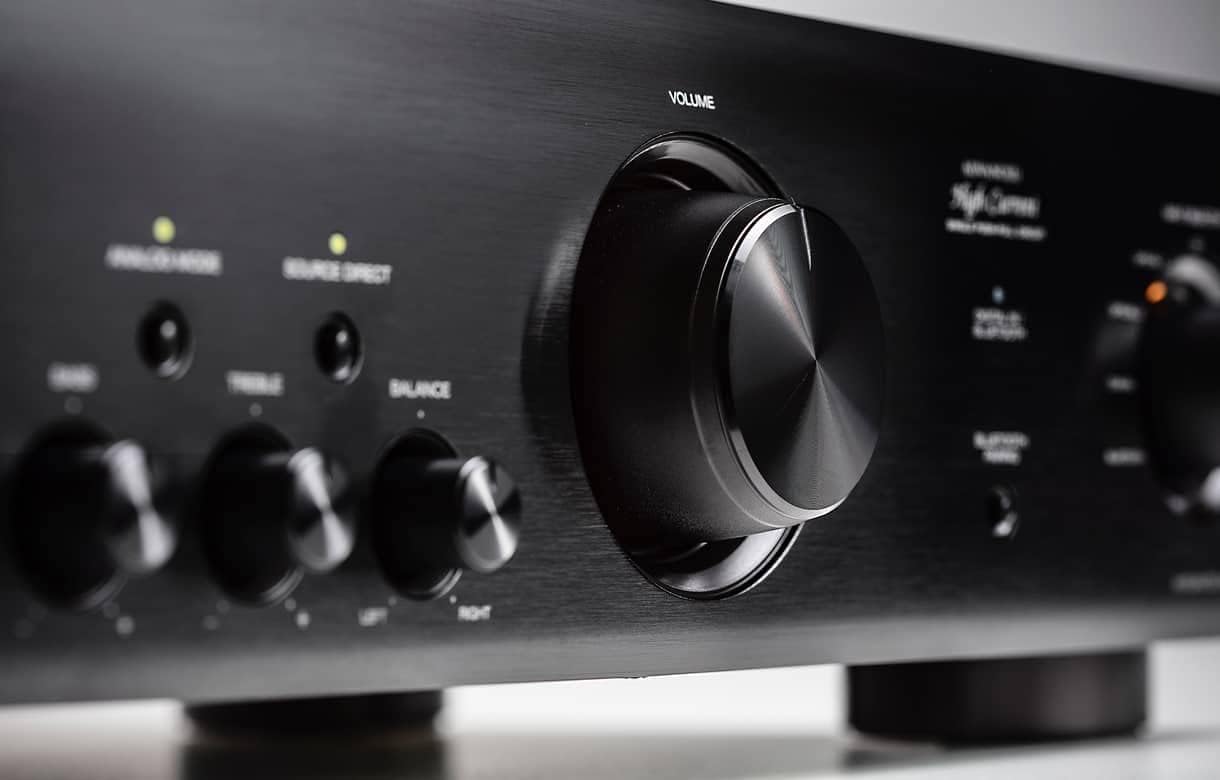
Figure 4: Close-up view of the volume control knob.
4. Tone Controls and Balance
Use the BASS, TREBLE, and BALANCE knobs on the front panel to fine-tune the sound to your preference. The SOURCE DIRECT button bypasses these controls for a purer audio path.
5. Analog Mode
Press the ANALOG MODE button to disable all digital circuits and Bluetooth, providing an uncompromised analog audio experience. This is ideal for listening to analog sources like turntables or CD players connected via RCA.
6. Bluetooth Pairing
To pair a Bluetooth device:
- Select "Bluetooth" as the input source using the INPUT SELECTOR.
- Press and hold the BLUETOOTH PAIRING button on the front panel until the Bluetooth indicator flashes.
- Enable Bluetooth on your mobile device and select "Denon PMA-600NE" from the list of available devices.
- Once paired, the Bluetooth indicator will glow steadily.
7. Headphone Use
Connect headphones to the PHONES jack on the front panel. Connecting headphones will automatically mute the speaker outputs.
Maintenance
- Cleaning: Wipe the unit with a soft, dry cloth. Do not use abrasive cleaners or solvents.
- Ventilation: Ensure proper ventilation by keeping the top and sides of the amplifier clear of obstructions.
- Power Cord: Regularly check the power cord for any damage.
Troubleshooting
| Problem | Possible Cause | Solution |
|---|---|---|
| No power | Power cord not connected; Power outage | Check power cord connection; Check household circuit breaker |
| No sound | Incorrect input selected; Speaker cables loose; Volume too low; Mute activated | Select correct input; Check speaker connections; Increase volume; Deactivate mute |
| Bluetooth pairing fails | Device too far; Amplifier not in pairing mode; Interference | Move device closer; Re-enter pairing mode; Reduce interference from other devices |
| Humming noise from speakers | Ground loop; Poor cable shielding; Nearby electronic interference | Ensure proper grounding; Use shielded cables; Move amplifier away from other electronics |
Specifications
| Feature | Detail |
|---|---|
| Power Output | 70W + 70W (4 ohms, 1 kHz, THD 0.7%) |
| Frequency Response | 20 Hz – 20 kHz |
| Input Sensitivity/Impedance | PHONO (MM): 2.5 mV / 47 kohms CD, NETWORK, AUX, RECORDER: 100 mV / 47 kohms |
| Digital Inputs | 2 Optical, 1 Coaxial |
| Analog Inputs | PHONO (MM), CD, NETWORK, AUX, RECORDER |
| Output Terminals | Speakers A/B, Headphone, Subwoofer Pre-Out |
| Bluetooth | Supported |
| Dimensions (W x D x H) | 17.1 x 12.1 x 4.76 inches (434 x 307 x 121 mm) |
| Weight | 18 pounds (8.2 kg) |
| Power Consumption | 180 W (Standby: 0.3 W) |
What's in the Box
The following items are included with your Denon PMA-600NE:
- Denon PMA-600NE Stereo Integrated Amplifier
- Remote control unit
- R03/AAA batteries (for remote control)
- Quick Start Guide CD-ROM (contains Owner's Manual)
- Safety Instructions
- Cautions on Using Batteries
- Power Cord
Warranty and Support
Your Denon PMA-600NE amplifier is covered by a manufacturer's warranty. Please refer to the warranty information provided in the Quick Start Guide CD-ROM for details regarding coverage and duration.
For technical support, product registration, or service inquiries, please visit the official Denon website or contact Denon customer service. Contact information can typically be found in the included documentation or on the Denon website.