1. Introduction
Thank you for choosing the Amazon Basics Large Dehumidifier. This manual provides important information for the proper setup, operation, and maintenance of your dehumidifier. Please read this manual thoroughly before using the appliance to ensure safe and efficient operation. Keep this manual for future reference.
Important Safety Information
- Always place the dehumidifier on a level, stable surface.
- Ensure proper clearance around the unit for adequate airflow.
- Do not operate the unit with a damaged power cord or plug.
- Unplug the unit before cleaning or performing any maintenance.
- Keep out of reach of children and pets.
2. Product Overview
The Amazon Basics Large Dehumidifier is designed to effectively reduce humidity in spaces up to 2,500 square feet, maintaining optimal indoor humidity between 45-55% for enhanced comfort and air quality.

Figure 2.1: Front view of the Amazon Basics Large Dehumidifier.
Key Components
- Control Panel: Located on the top of the unit for easy access to settings.
- Air Inlet: Where humid air enters the unit.
- Air Outlet: Where dehumidified air exits the unit.
- Water Tank: Collects condensed water. Features a visible water level indicator.
- Reusable Filter: Located behind the air inlet, designed for easy cleaning.
- Caster Wheels: For easy mobility of the unit.

Figure 2.2: Overview of the dehumidifier's key features including the control panel, auto-defrost, overflow protection, and auto-restart functionality.
Control Panel
The intuitive control panel allows for effortless dehumidification. It includes buttons for power, fan speed, timer, and humidity settings, along with indicator lights for various functions.

Figure 2.3: Detail of the control panel and water tank full indicator (A).
3. Setup
Unpacking and Placement
- Carefully remove the dehumidifier from its packaging.
- Place the unit upright on a firm, level surface in the desired location. Ensure there is at least 8 inches (20 cm) of space around the unit for proper air circulation.
- Allow the unit to stand upright for at least 24 hours before plugging it in. This allows the refrigerant to settle.
Power Connection
Plug the grounded power cord into a suitable electrical outlet. The unit is designed for standard household electrical supply.
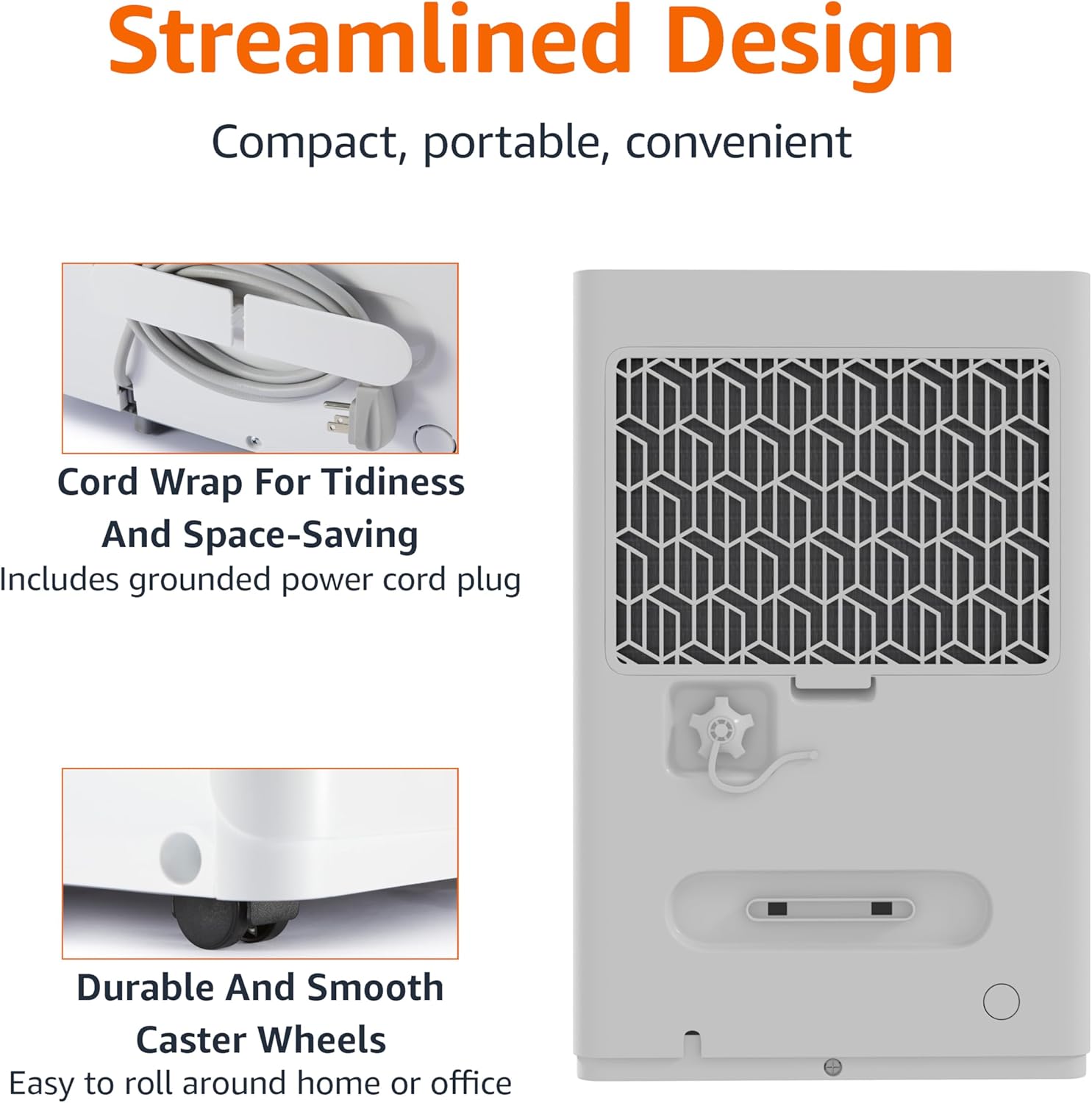
Figure 3.1: The dehumidifier features a cord wrap for tidiness and durable caster wheels for easy movement.
4. Operating Instructions
Turning On/Off
- Press the Power button on the control panel to turn the unit on or off.
Setting Humidity Level
The dehumidifier maintains optimal indoor humidity between 45-55%. You can adjust the target humidity using the control panel.
- Use the Up and Down arrow buttons to set your desired humidity level. The display will show the current humidity.
Timer Function
The unit features a timer for scheduled operation.
- Press the Timer button to set the desired operating time (from 0.5 to 24 hours). The unit will turn off or on after the set time.

Figure 4.1: The dehumidifier is ideal for standard 8 ft / 2.4 m ceilings and features a schedule on/off timer from 0.5 to 24 hours.
Auto-Defrost
The auto-defrost feature prevents frost build-up on the coils, ensuring continuous and efficient operation, especially in cooler environments.
Auto Re-start Function
In the event of a power outage, the dehumidifier will automatically resume operation with your previous settings once power is restored, providing consistent humidity control without manual intervention.
5. Maintenance
Emptying the Water Tank
When the water tank is full, the unit will stop operating and an indicator light will illuminate. The water tank has a capacity of 1.59 gallons (6 liters).
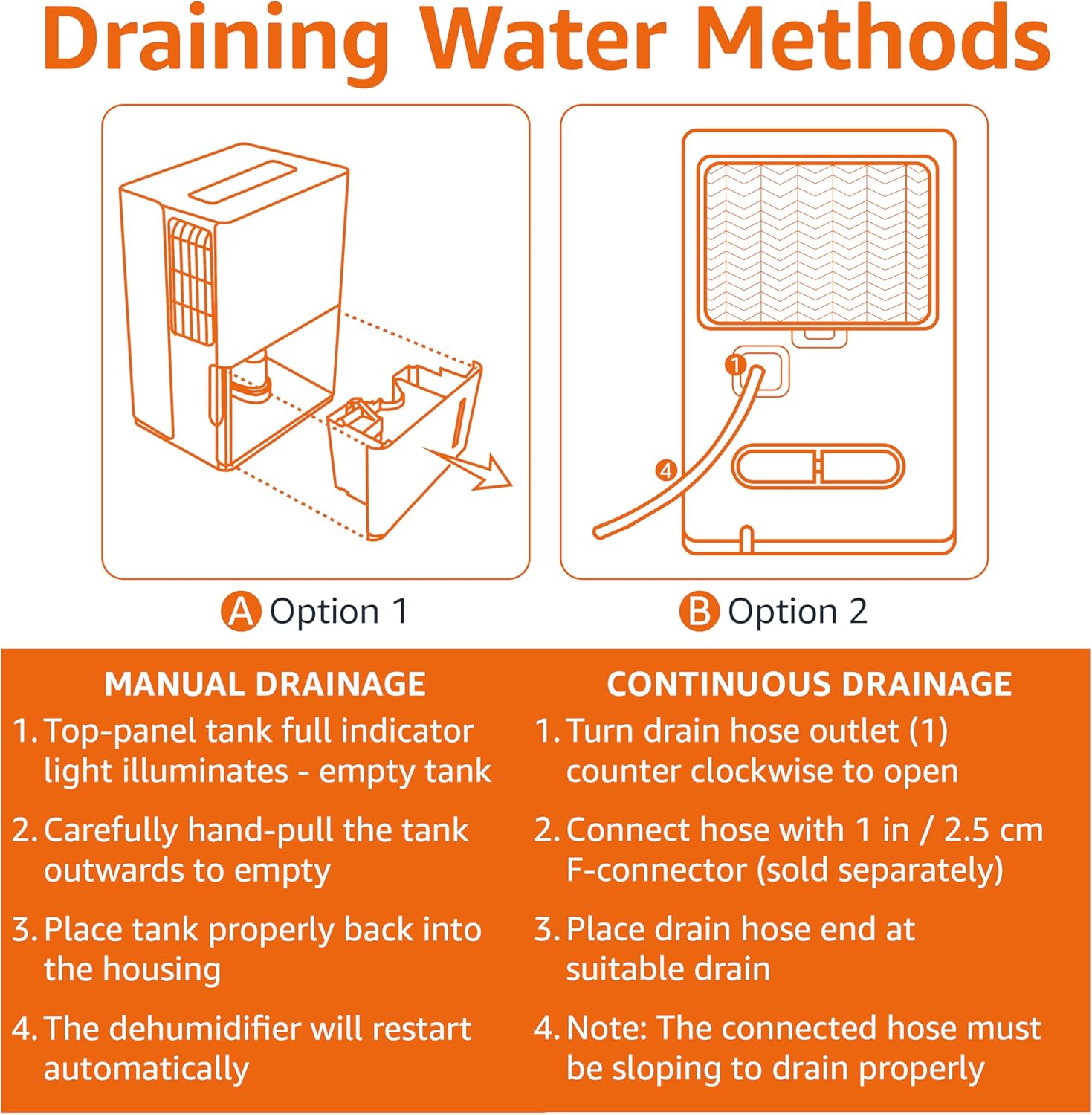
Figure 5.1: Manual and Continuous Drainage Methods.
Manual Drainage (Option 1)
- When the top-panel tank full indicator light illuminates, carefully pull the tank outwards to empty.
- Empty the collected water.
- Place the tank properly back into the housing. The dehumidifier will restart automatically.
Continuous Drainage (Option 2)
- Turn the drain hose outlet counter-clockwise to open.
- Connect a standard garden hose (sold separately) with a 1 inch / 2.5 cm F-connector to the outlet.
- Place the drain hose end at a suitable drain (e.g., floor drain, sink).
- Note: The connected hose must be sloping downwards to drain properly.
Cleaning the Reusable Filter
The reusable filter is simple to clean, ensuring the unit performs at its best without frequent replacements.
- Unplug the dehumidifier from the power outlet.
- Remove the filter from the back of the unit.
- Clean the filter with warm, soapy water. Rinse thoroughly.
- Allow the filter to air dry completely before reinserting it into the unit.
- Plug the dehumidifier back in.
6. Troubleshooting
If you experience issues with your dehumidifier, please refer to the following common troubleshooting steps. For more detailed assistance, consult the full User Manual PDF or contact customer support.
| Problem | Possible Cause | Solution |
|---|---|---|
| Dehumidifier does not turn on. | No power supply; Power cord not securely plugged in. | Check power outlet and ensure cord is fully inserted. |
| Unit is not collecting water. | Water tank is full or not properly seated; Air filter is clogged; Room temperature is too low. | Empty and re-seat water tank; Clean air filter; Ensure room temperature is above 41°F (5°C). |
| Unit is running but humidity is not decreasing. | Room size exceeds unit capacity; Doors/windows are open; Air filter is clogged. | Ensure unit is appropriate for room size; Close all doors and windows; Clean air filter. |
| Unit is noisy. | Unit is not on a level surface; Air filter is dirty. | Place unit on a level surface; Clean air filter. |
7. Specifications
| Feature | Detail |
|---|---|
| Brand | Amazon Basics |
| Model Name | MDUDP-35AEN1-BA8 |
| Capacity | 35 Pints per Day |
| Floor Area Coverage | Up to 2500 Square Feet |
| Tank Volume | 35 Pints (1.59 Gallons / 6 Liters) |
| Product Dimensions (D x W x H) | 11.1"D x 15.43"W x 24.25"H |
| Item Weight | 39.2 Pounds |
| Color | White |
| Energy Certification | Energy Star Certified |
| Operation Mode | Standard |
| Manufacturer | Amazon |
| UPC | 810004816732 |
8. Warranty and Support
Limited Warranty
This Amazon Basics Dehumidifier comes with a 1-year limited warranty from the date of purchase. This warranty covers defects in materials and workmanship under normal use. For full warranty terms and conditions, please refer to the official User Manual PDF available online or contact Amazon Basics customer support.
Protection Plans
Extended protection plans are available for purchase to provide additional coverage beyond the standard manufacturer's warranty. These plans offer peace of mind for longer periods.
- 3-Year Protection Plan: Extends coverage for an additional 3 years.
- 4-Year Protection Plan: Extends coverage for an additional 4 years.
- Complete Protect: A monthly plan covering all eligible past and future purchases.
For details on purchasing these plans, please visit the product page on Amazon.com or contact Amazon customer service.
Customer Support
For any questions, technical assistance, or warranty claims, please contact Amazon customer support through your Amazon account or visit the Amazon Basics Store online.
You can also access the official User Manual (PDF) for detailed instructions and diagrams: Download User Manual (PDF)


