
1. Introduction
Thank you for choosing the TechCare Air Purifiers VT-H4. This air purifier is designed to improve indoor air quality by effectively removing various airborne particles. Please read this manual thoroughly before operating the device to ensure proper use, maintenance, and safety.

Image 1: TechCare Air Purifiers VT-H4 unit with its packaging and a replacement filter.
The VT-H4 features a multi-stage filtration system, including a True HEPA filter and an activated carbon filter, to capture dust, pollen, pet dander, smoke, and odors. Its compact design and quiet operation make it suitable for bedrooms, offices, and other personal spaces.

Image 2: Illustration demonstrating the air purifier's effectiveness in trapping various airborne particles such as odors, mold spores, smoke, dust, viruses, and pollen.
2. Safety Instructions
- Read all instructions before using the appliance.
- Do not operate the air purifier with a damaged cord or plug.
- Keep the cord away from heated surfaces.
- Do not use the appliance in wet or damp environments.
- Always unplug the air purifier before moving, cleaning, or replacing the filter.
- Do not block air inlets or outlets.
- This appliance is for indoor use only.
- Keep out of reach of children.
3. Product Overview
3.1 Components
- Main Unit (Air Purifier)
- Composite Filter (Pre-filter, True HEPA, Activated Carbon)
- Power Cord
3.2 Control Panel
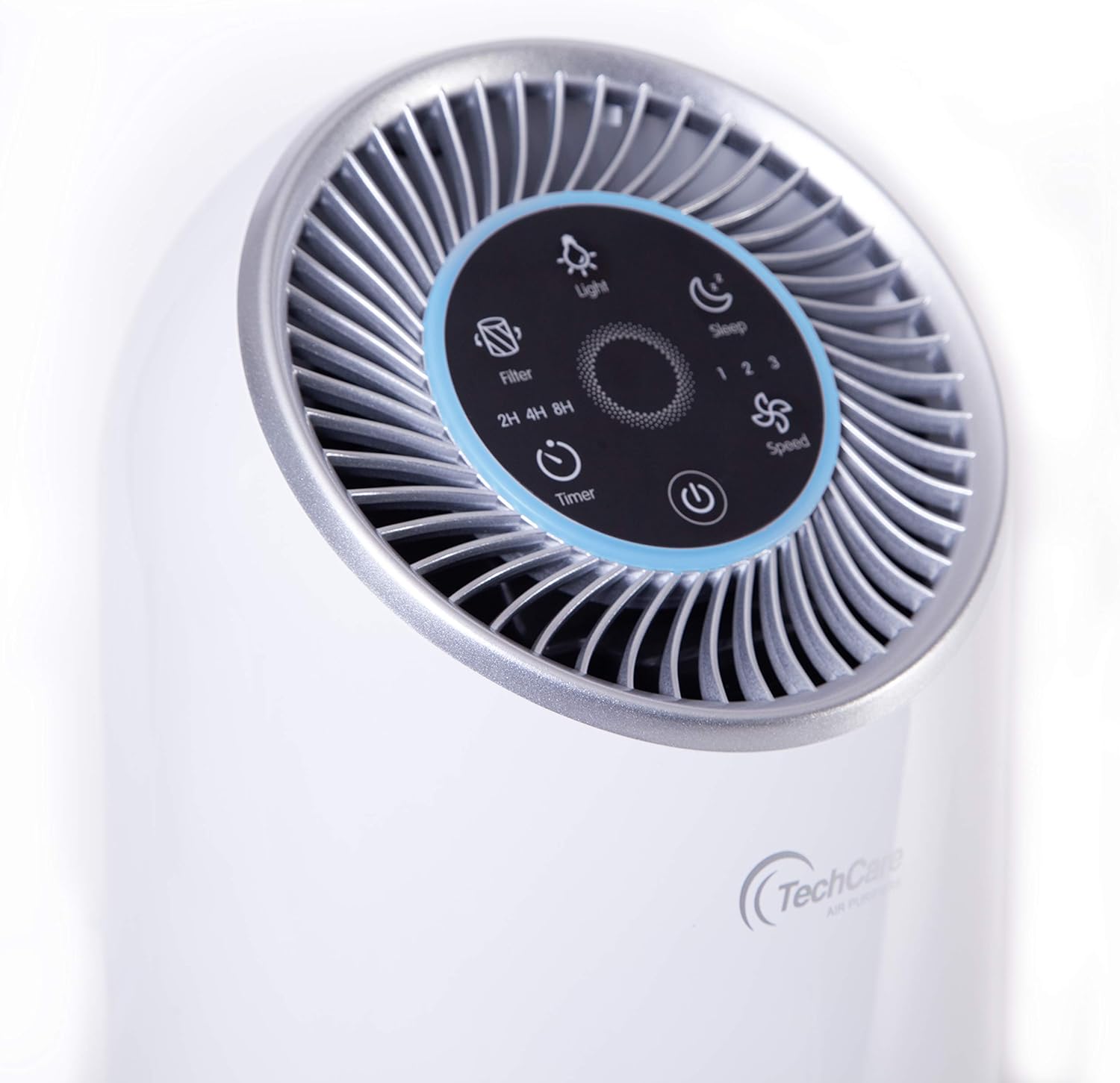
Image 3: Detailed view of the air purifier's top control panel, showing buttons for Light, Sleep Mode, Fan Speed (1, 2, 3), Timer (2H, 4H, 8H), Filter Reset, and Power.
The control panel is located on the top of the unit and features touch-sensitive buttons for various functions:
- Power Button: Turns the unit on or off.
- Speed Button: Adjusts fan speed (1, 2, 3).
- Sleep Mode Button: Activates quiet operation and dims lights.
- Light Button: Controls the night light feature.
- Timer Button: Sets operation duration (2, 4, or 8 hours).
- Filter Reset Button: Indicates when to replace the filter and resets the filter life counter.
4. Setup
4.1 Unpacking and Placement
- Carefully remove the air purifier from its packaging.
- Place the unit on a firm, level surface. Ensure there is at least 15 cm (6 inches) of space around all sides for proper air circulation.
- Avoid placing the unit near heat sources, direct sunlight, or in areas with excessive moisture.
4.2 Filter Installation
The air purifier comes with a filter pre-installed, but it may be wrapped in plastic for protection. Remove all packaging from the filter before first use.
- Turn the air purifier upside down.
- Twist the base cover counter-clockwise to unlock and remove it.
- Remove the plastic bag from the composite filter.
- Insert the filter back into the unit, ensuring it is seated correctly.
- Replace the base cover and twist clockwise to lock it securely.

Image 4: Step-by-step diagram illustrating the process of accessing and replacing the air filter from the bottom of the TechCare Air Purifiers VT-H4. It also shows the three stages of filtration: Fine Preliminary Filter, True HEPA Filter, and Activated Carbon Filter.

Image 5: Close-up view of the air purifier's lower section, highlighting the air intake vents and the filter compartment.
5. Operating Instructions
5.1 Power On/Off
- Plug the power cord into a standard electrical outlet.
- Touch the Power Button on the control panel to turn the unit on. It will start at the default fan speed.
- Touch the Power Button again to turn the unit off.
5.2 Adjusting Fan Speed
- With the unit on, touch the Speed Button to cycle through fan speeds: 1 (Low), 2 (Medium), 3 (High).
- Speed 1 is the quietest setting, suitable for continuous operation.
- Speed 3 provides maximum air purification for faster results.
5.3 Sleep Mode

Image 6: The air purifier in Sleep Mode, positioned beside a bed, illustrating its quiet operation at 25 dB. A noise level chart is also visible, comparing 25 dB (Whispering) to 52 dB (High Speed) and other common sounds.
- Touch the Sleep Mode Button to activate sleep mode.
- In sleep mode, the fan operates at its lowest speed (approximately 25 dB) and all indicator lights dim or turn off to ensure a disturbance-free environment.
- Touch any button to exit sleep mode.
5.4 Night Light Function
- Touch the Light Button to turn the night light on or off.
- The night light provides a soft ambient glow.
5.5 Timer Function
- Touch the Timer Button to set the operating time for 2, 4, or 8 hours.
- The unit will automatically turn off once the set time has elapsed.
- To cancel the timer, cycle through the options until no timer indicator is lit.
6. Maintenance
6.1 Filter Replacement
The filter life indicator light will illuminate when it's time to replace the filter (approximately every 6-8 months, depending on usage and air quality).

Image 7: A close-up photograph of the cylindrical composite air filter, showing its multi-layered structure.
- Unplug the air purifier from the power outlet.
- Turn the unit upside down and remove the base cover.
- Remove the old filter. Dispose of it properly.
- Insert a new TechCare Air Purifiers VT-H4 replacement filter (ensure all packaging is removed).
- Replace and lock the base cover.
- Plug in the air purifier.
- Press and hold the Filter Reset Button for 3-5 seconds until the indicator light turns off. This resets the filter life counter.
Note: Do not wash the filter. It is designed for replacement only.
6.2 Cleaning the Unit
- Always unplug the unit before cleaning.
- Wipe the exterior of the air purifier with a soft, dry cloth.
- Do not use abrasive cleaners or solvents.
- Periodically vacuum the air intake vents to remove dust buildup.
7. Troubleshooting
| Problem | Possible Cause | Solution |
|---|---|---|
| Unit does not turn on. | Not plugged in; Power outage; Filter not installed correctly. | Ensure power cord is securely plugged in; Check power supply; Reinstall filter and ensure base cover is locked. |
| Weak airflow. | Filter is dirty or clogged; Air inlets/outlets blocked. | Replace the filter; Ensure nothing is obstructing air vents. |
| Unusual noise. | Filter not seated correctly; Foreign object inside unit. | Check and reseat the filter; Unplug and inspect for foreign objects. |
| Odor persists. | Filter needs replacement; Strong odor source. | Replace the activated carbon filter; Identify and remove the odor source if possible. |
| Filter indicator light remains on after replacement. | Filter reset button not pressed. | Press and hold the Filter Reset Button for 3-5 seconds. |
8. Specifications
- Model: VT-H4
- Brand: TechCare Air Purifiers
- Product Dimensions: 8 x 8 x 16 inches
- Item Weight: 6.35 Pounds
- Color: White
- Floor Area Coverage: 215 sq. ft.
- Noise Level: 28 dB (lowest setting)
- Controller Type: Button Control
- Filtration System: True HEPA, Activated Carbon, Pre-filter
9. Warranty and Support
TechCare Air Purifiers products are manufactured to high-quality standards. For information regarding warranty coverage, please refer to the warranty card included with your purchase or visit the official TechCare Air Purifiers website.
If you encounter any issues or have questions about your VT-H4 air purifier, please contact our customer support team. Provide your model number (VT-H4) and purchase details for faster assistance.
- Customer Support: Refer to your product packaging or the brand's official website for contact information.
- Online Resources: Visit the TechCare Air Purifiers Store on Amazon