
1. Introduction and Overview
The Hall Research HD-AUD-IO is an advanced HDMI 2.0 device designed for comprehensive audio management within HDMI signals. It functions as both an audio inserter and extractor, an EDID manager, an equalizer, and supports HDCP 2.2 and 1.4. This device facilitates the embedding of external audio into an HDMI stream and the de-embedding of audio from an HDMI stream to analog or digital outputs.
Key functionalities include:
- Supports 4K/60 4:4:4 video resolution, HDR, and HDCP 2.2 & 1.4 content protection.
- Extracts both L/R analog and digital audio from the HDMI input.
- Embeds either L/R analog or digital audio into the HDMI output.
- Capable of generating an HDMI output with embedded audio even without an HDMI input.
- Offers EDID pass-through or emulation for display compatibility.
- Features a configurable digital input for muting audio and/or video.
- Provides 18 Gbps bandwidth, ensuring compatibility with HDMI 2.0b specifications.
- Backwards compatible with HDMI 1.4 and DVI specifications.
- Supports multi-channel digital and 2-channel analog audio formats.
- Includes RS-232 control for advanced management.
2. Setup and Installation
2.1 Package Contents
Verify that all items are present in the package:
- HD-AUD-IO unit
- 2 Rack mounting brackets
- 4 Terminal blocks
- Power Supply
- 4 Power plug adapters
2.2 Physical Installation
The HD-AUD-IO can be placed on a flat surface or mounted in a rack using the provided brackets. Ensure adequate ventilation around the unit.
2.3 Connecting the Device
- HDMI Input: Connect your HDMI source (e.g., Blu-ray player, computer) to the HDMI IN port on the HD-AUD-IO.
- HDMI Output: Connect your HDMI display (e.g., TV, projector) to the HDMI OUT port.
- Audio Output (De-embedding):
- For analog audio, connect to the L/R AUDIO OUT terminal block.
- For digital audio, connect to the DIGITAL AUDIO OUT (Coaxial or Optical) ports.
- Audio Input (Embedding):
- For analog audio, connect your external audio source to the L/R AUDIO IN terminal block.
- For digital audio, connect to the DIGITAL AUDIO IN (Coaxial or Optical) ports.
- Power: Connect the provided power supply to the DC 5V port on the unit and then to an electrical outlet.
- RS-232 Control: For advanced control, connect an RS-232 cable from a control system to the RS-232 port.
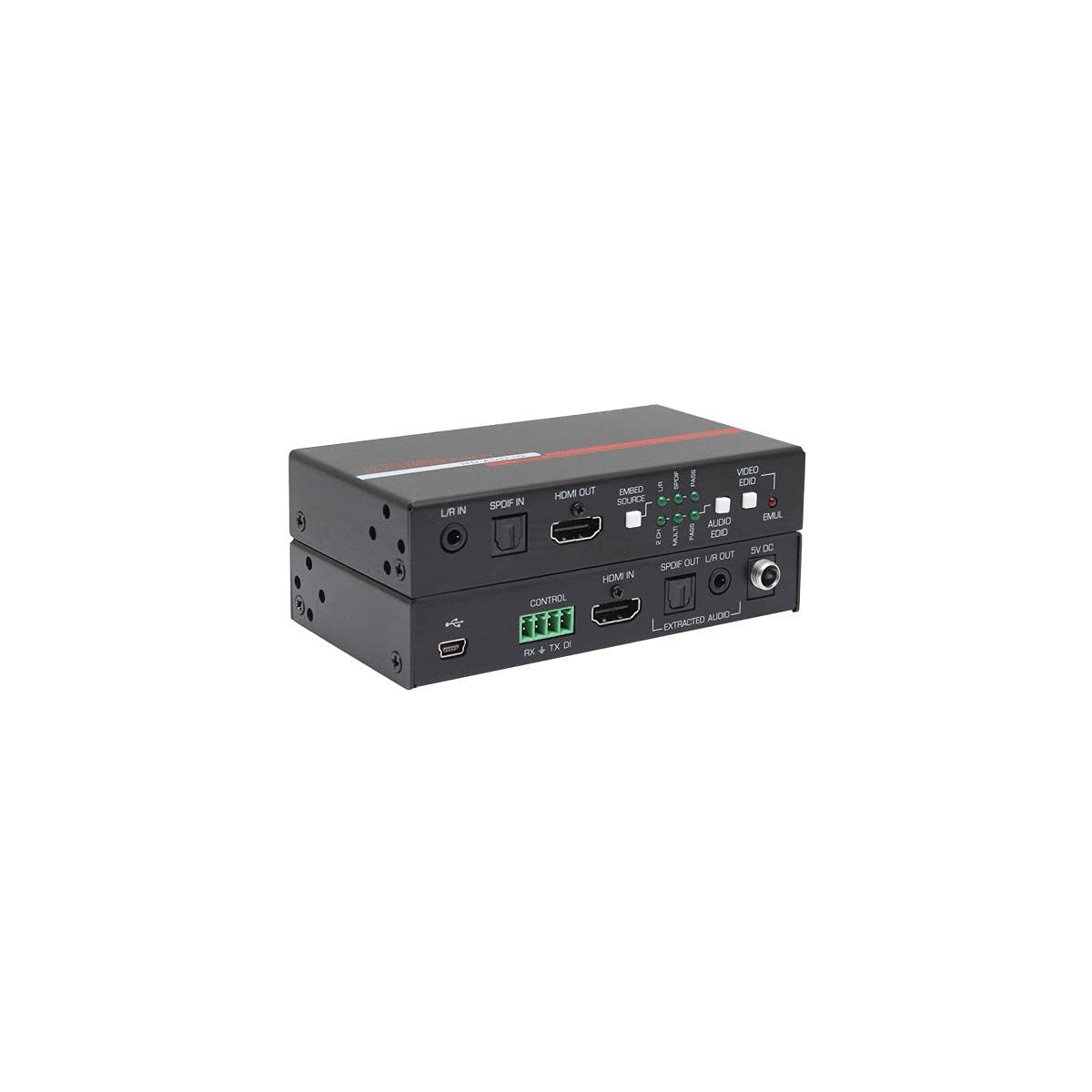
Figure 1: Front and rear view of the HD-AUD-IO unit, illustrating the HDMI, audio, and control ports for connection.
3. Operating Instructions
3.1 Audio De-embedding
When an HDMI signal is connected to the HDMI IN port, the HD-AUD-IO automatically extracts the audio. This audio is simultaneously available on the L/R AUDIO OUT (analog) and DIGITAL AUDIO OUT (coaxial/optical) ports. Connect these outputs to your amplifier, soundbar, or audio receiver.
3.2 Audio Embedding
To embed external audio into the HDMI output, connect your analog or digital audio source to the corresponding L/R AUDIO IN or DIGITAL AUDIO IN ports. The device will then insert this audio into the HDMI stream that is sent to the HDMI OUT port. This is useful for adding commentary, background music, or other audio content to your video signal.
The unit can also generate an HDMI output with embedded audio even if no HDMI input is present, allowing for audio-only HDMI streams.
3.3 EDID Management
The HD-AUD-IO features EDID (Extended Display Identification Data) management. EDID is crucial for ensuring compatibility between the source and display. The device can either pass through the EDID from the connected display or emulate a specific EDID. This can resolve display compatibility issues, especially with varying resolutions or audio formats.
To cycle through EDID emulation modes, press and hold the Video EDID button for approximately 3 seconds. Repeat until the desired mode is achieved. Observe the display for changes in resolution or audio capabilities.
3.4 Muting Function
A configurable digital input allows for muting of audio and/or video. Refer to the detailed RS-232 command set for configuration options related to this feature.
3.5 RS-232 Control
For integration into professional AV systems, the HD-AUD-IO can be controlled via RS-232 commands. This allows for remote configuration of audio embedding/de-embedding, EDID settings, and other operational parameters. Consult the separate RS-232 command protocol document for detailed instructions and command syntax.
4. Maintenance
The HD-AUD-IO is designed for reliable operation with minimal maintenance. Follow these guidelines:
- Cleaning: Disconnect power before cleaning. Use a soft, dry cloth to wipe the exterior of the unit. Do not use liquid or aerosol cleaners.
- Ventilation: Ensure that the ventilation openings are not blocked. Do not place the unit in an enclosed space without adequate airflow.
- Environment: Operate the device within the specified temperature and humidity ranges. Avoid exposure to direct sunlight, excessive heat, or moisture.
5. Troubleshooting
If you encounter issues with your HD-AUD-IO, refer to the following common troubleshooting steps:
5.1 No Video Output
- Check Connections: Ensure all HDMI cables are securely connected to the HDMI IN and HDMI OUT ports.
- Power: Verify the power supply is connected and the unit is receiving power.
- Source/Display: Test the HDMI source and display directly to confirm they are functioning correctly.
- EDID Settings: Incorrect EDID settings can cause display issues. Try cycling through the EDID emulation modes by pressing and holding the Video EDID button for 3 seconds until a compatible mode is found.
- HDCP: Ensure both source and display support the necessary HDCP version (2.2 or 1.4).
5.2 No Audio Output (De-embedding)
- Audio Output Connections: Confirm that analog (L/R AUDIO OUT) or digital (DIGITAL AUDIO OUT) cables are correctly connected to your audio system.
- Audio System Input: Ensure your amplifier or receiver is set to the correct input source for the audio.
- Source Audio Format: Verify that the HDMI source is outputting an audio format supported by the HD-AUD-IO and your audio system.
- Mute Function: Check if the mute function is active via RS-232 control.
5.3 No Audio Embedding
- Audio Input Connections: Ensure external audio sources are correctly connected to the L/R AUDIO IN or DIGITAL AUDIO IN ports.
- Source Audio Level: Verify the external audio source is active and providing an adequate signal level.
- HDMI Output Audio: Confirm that the display connected to HDMI OUT is configured to play audio from the HDMI input.
6. Specifications
| Feature | Specification |
|---|---|
| Model Number | HD-AUD-IO |
| Brand | Hall Research |
| Interface Type | HDMI |
| HDMI Version Support | HDMI 2.0b (18 Gbps bandwidth), backwards compatible with HDMI 1.4 and DVI |
| HDCP Support | HDCP 2.2 & 1.4 |
| Video Resolution | Up to 4K/60 4:4:4, HDR |
| Audio Support | Multi-channel digital, 2-channel analog |
| Control | RS-232 |
| Mounting Type | Rack Mount |
| Number of Pins | 19 (HDMI) |
| Upper Temperature Rating | 158 Degrees Fahrenheit (70 Degrees Celsius) |
| Product Dimensions | 4.47"L x 2.53"W (113.5mm L x 64.3mm W) |
| Item Weight | 1.1 pounds (0.5 kg) |
| Material | Copper (likely referring to internal components/connectors) |
| UPC | 608415712138 |
7. Warranty Information
Hall Research products are designed for reliability and performance. This product is covered by a manufacturer's warranty against defects in materials and workmanship. The specific terms and duration of the warranty may vary by region and purchase date. Please refer to the official Hall Research website or your purchase documentation for detailed warranty information.
Retain your proof of purchase for warranty claims.
8. Technical Support
For technical assistance, product inquiries, or troubleshooting beyond the scope of this manual, please contact Hall Research technical support. Support resources, including FAQs, firmware updates, and contact information, are available on the official Hall Research website.
When contacting support, please have your product model number (HD-AUD-IO) and a detailed description of the issue ready.
Hall Research Official Website: www.hallresearch.com
