
PARKSIDE PSSA 4 A1
PARKSIDE PSSA 4 A1 Cordless Screwdriver User Manual
Model: PSSA 4 A1 (IAN-100364036)
1. Introduction
Thank you for choosing the PARKSIDE PSSA 4 A1 Cordless Screwdriver. This manual provides important information regarding the safe operation, setup, maintenance, and troubleshooting of your new tool. Please read this manual thoroughly before first use and keep it for future reference.
Safety First: Always observe all safety warnings and instructions provided in this manual to prevent electric shock, fire, and/or serious injury.
2. Product Overview
The PARKSIDE PSSA 4 A1 is a versatile 4V cordless screwdriver designed for various light-duty screwing tasks. It features an integrated LED work light, a USB charging port, and a handle that can be adjusted for straight or pistol grip operation, offering enhanced flexibility and comfort.
2.1 Components
- Cordless Screwdriver Unit
- USB Charger
- Bit Set
- Storage Case

Figure 2.1: The PARKSIDE PSSA 4 A1 Cordless Screwdriver, illustrating its ability to pivot from a straight to a pistol grip configuration for ergonomic use.

Figure 2.2: The screwdriver shown in its straight, inline operating position, ideal for reaching into narrow spaces.

Figure 2.3: The screwdriver in its pistol grip configuration, providing a comfortable and secure hold for general screwing tasks.

Figure 2.4: The complete set, including the screwdriver, USB charger, and various bits, neatly organized within its durable storage case.
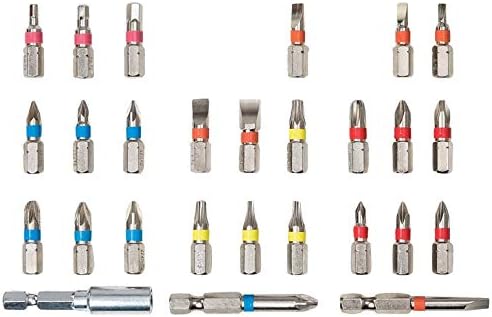
Figure 2.5: A selection of the included screwdriver bits, featuring various head types and sizes for diverse applications.
3. Setup
3.1 Charging the Battery
The PARKSIDE PSSA 4 A1 is powered by an integrated Lithium-ion battery. Before first use, fully charge the battery. The battery is partially charged from the factory.
- Connect the USB charger to the charging port on the screwdriver.
- Plug the USB charger into a suitable power source (e.g., USB wall adapter, computer USB port).
- The charging indicator light will illuminate during charging and change color or turn off when fully charged (refer to the specific indicator behavior in your product's quick start guide if available).
- Charging time may vary. Do not overcharge the battery.
Note: Use only the supplied USB charger or a compatible charger with the correct voltage and current specifications.
3.2 Installing Screwdriver Bits
The screwdriver uses standard 1/4-inch hex shank bits.
- Ensure the screwdriver is switched off and the rotation direction switch is in the neutral (locked) position.
- Insert the desired screwdriver bit firmly into the magnetic bit holder at the front of the tool until it clicks into place.
- To remove a bit, simply pull it straight out from the bit holder.
4. Operating Instructions
4.1 Powering On/Off
To operate the screwdriver, press and hold the trigger switch. Release the trigger switch to turn the screwdriver off.
4.2 Selecting Rotation Direction
A slide switch located near the trigger controls the rotation direction (forward/reverse) and also acts as a lock.
- Slide the switch to the left for forward rotation (for tightening screws).
- Slide the switch to the right for reverse rotation (for loosening screws).
- Position the switch in the center to lock the trigger and prevent accidental activation.
4.3 LED Work Light
The integrated LED work light automatically illuminates when the trigger switch is pressed, providing visibility in dimly lit work areas.

Figure 4.1: The integrated LED light illuminating the work area, enhancing visibility during operation.
4.4 Adjusting Handle Position
The handle of the PSSA 4 A1 can be adjusted to two positions: straight or pistol grip.
- To change the handle position, locate the pivot release button (often red or clearly marked) near the handle joint.
- Press and hold the release button.
- Pivot the handle to the desired position (straight or pistol grip) until it locks securely into place. Ensure it is fully locked before use.
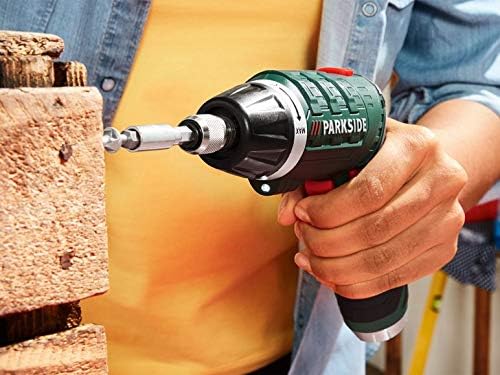
Figure 4.2: A user demonstrating the application of the screwdriver for fastening into a wooden block, showcasing its practical use.

Figure 4.3: The screwdriver being used in a confined space, highlighting its compact design and maneuverability, especially in the straight configuration.
5. Maintenance
Regular maintenance ensures the longevity and optimal performance of your PARKSIDE PSSA 4 A1 Cordless Screwdriver.
5.1 Cleaning
- Always disconnect the charger before cleaning.
- Wipe the tool's exterior with a clean, dry, or slightly damp cloth. Do not use harsh chemicals or abrasive cleaners.
- Keep the ventilation openings free from dust and debris. Use compressed air if necessary.
5.2 Storage
- Store the screwdriver and its accessories in the original storage case in a dry, cool place, away from direct sunlight and moisture.
- Keep out of reach of children.
5.3 Battery Care
- To maximize battery life, avoid completely discharging the battery.
- Charge the battery regularly, even if the tool is not in frequent use (e.g., every 3-6 months).
- Store the battery at a partial charge (around 50%) if storing for extended periods.
6. Troubleshooting
If you encounter issues with your PARKSIDE PSSA 4 A1, refer to the following common problems and solutions:
| Problem | Possible Cause | Solution |
|---|---|---|
| Screwdriver does not turn on. | Battery is discharged. Trigger lock is engaged. | Charge the battery fully. Disengage the trigger lock by sliding the direction switch to forward or reverse. |
| Screwdriver loses power quickly. | Battery not fully charged. Battery nearing end of life. | Ensure battery is fully charged before use. If battery life significantly degrades, consider contacting support for replacement options. |
| Bit slips or does not engage. | Bit not fully inserted. Incorrect bit size for screw. Worn bit. | Push bit firmly into the holder until it clicks. Use the correct size and type of bit for the screw head. Replace worn bits. |
If the problem persists after attempting these solutions, please contact PARKSIDE customer support.
7. Specifications
| Feature | Detail |
|---|---|
| Brand | PARKSIDE |
| Model Number | IAN-100364036 |
| Product Dimensions | 15 x 5 x 5 cm |
| Weight | 1.23 kg |
| Battery Type | Lithium-ion |
| Voltage | 4 Volt |
| Power Source | Battery-Powered |
| No-Load Speed | 200 RPM |
| Max Torque | 5 Newtonmeter |
| Special Features | Automatic shutdown, LED work light, Pivoting handle |
| Included Components | Screwdriver, USB charger, Bit set, Storage case |
| Color | Black |
8. Warranty and Support
For warranty information, product registration, or technical support, please refer to the warranty card included with your product or visit the official PARKSIDE website. You may also contact PARKSIDE customer service directly for assistance with any issues not covered in this manual.
Please have your model number (PSSA 4 A1 / IAN-100364036) and purchase date ready when contacting support.