
KCMYTONER ATUSEL-KS-DB03-3
KCMYTONER Wireless Smart Doorbell User Manual
Model: ATUSEL-KS-DB03-3
Introduction
This manual provides detailed instructions for the installation, operation, and maintenance of your KCMYTONER Wireless Smart Doorbell system. Please read this manual thoroughly before using the product to ensure proper function and longevity.
Product Features
- Extended Wireless Range: Up to 1312ft (400m) in open space, 131-262ft (40-80m) indoors with obstacles.
- Long Battery Life: Doorbell button battery (CR2032) lasts 6-10 years (assuming 30 presses/day).
- Multiple Chimes & Volume Levels: 48 selectable ringtones and 4 adjustable volume levels.
- Visual Alerts: Built-in LED indicators on both receiver and transmitter for visual notification.
- Weatherproof Design: IP54 waterproof rating for the transmitter, suitable for outdoor use.
- Expandable System: Each receiver can pair with up to 32 transmitters (e.g., magnetic sensors, PIR motion sensors). Each transmitter can pair with multiple receivers.
- Night Light Function: Receiver features a ringtone rhythm lamp that can also function as a gentle night light with 7 brightness levels.
- Power-off Memory: Retains settings after power loss.

Image: Overview of the KCMYTONER Wireless Doorbell Kit highlighting its key features including wireless range, battery life, number of ringtones, night light function, and IP54 waterproof rating.
Package Contents
Your KCMYTONER Wireless Smart Doorbell package includes:
- 3 x Wireless Doorbell Receivers
- 3 x Doorbell Buttons (Transmitters)
- Mounting Hardware (screws, anchors, adhesive tape)
- User Manual (this document)

Image: The complete set of three wireless doorbell receivers and three doorbell buttons included in the package.
Specifications
| Specification | Value |
|---|---|
| Doorbell Volume | 85-97dB |
| Working Frequency | 433.92 MHz |
| Wireless Range (Open Space) | 1312ft (400m) |
| Wireless Range (Indoor with Obstacles) | 131-262ft (40-80m) |
| Receiver Operating Voltage | 80-275V |
| Receiver Standby Power Consumption | 100mW |
| Transmitter Waterproof Rating | IP54 |
| Transmitter Battery Type | CR2032 (included) |
| Transmitter Battery Lifespan | 6-10 years |
| Receiver Operating Temperature | -20℃ to 70℃ |
| Doorbell Button Operating Temperature | -40℃ to 70℃ |
| Receiver Operating Humidity | <90%RH |
| Doorbell Button Operating Humidity | <95%RH |
| Item Weight | 14 ounces |
| Model Number | ATUSEL-KS-DB03-3 |
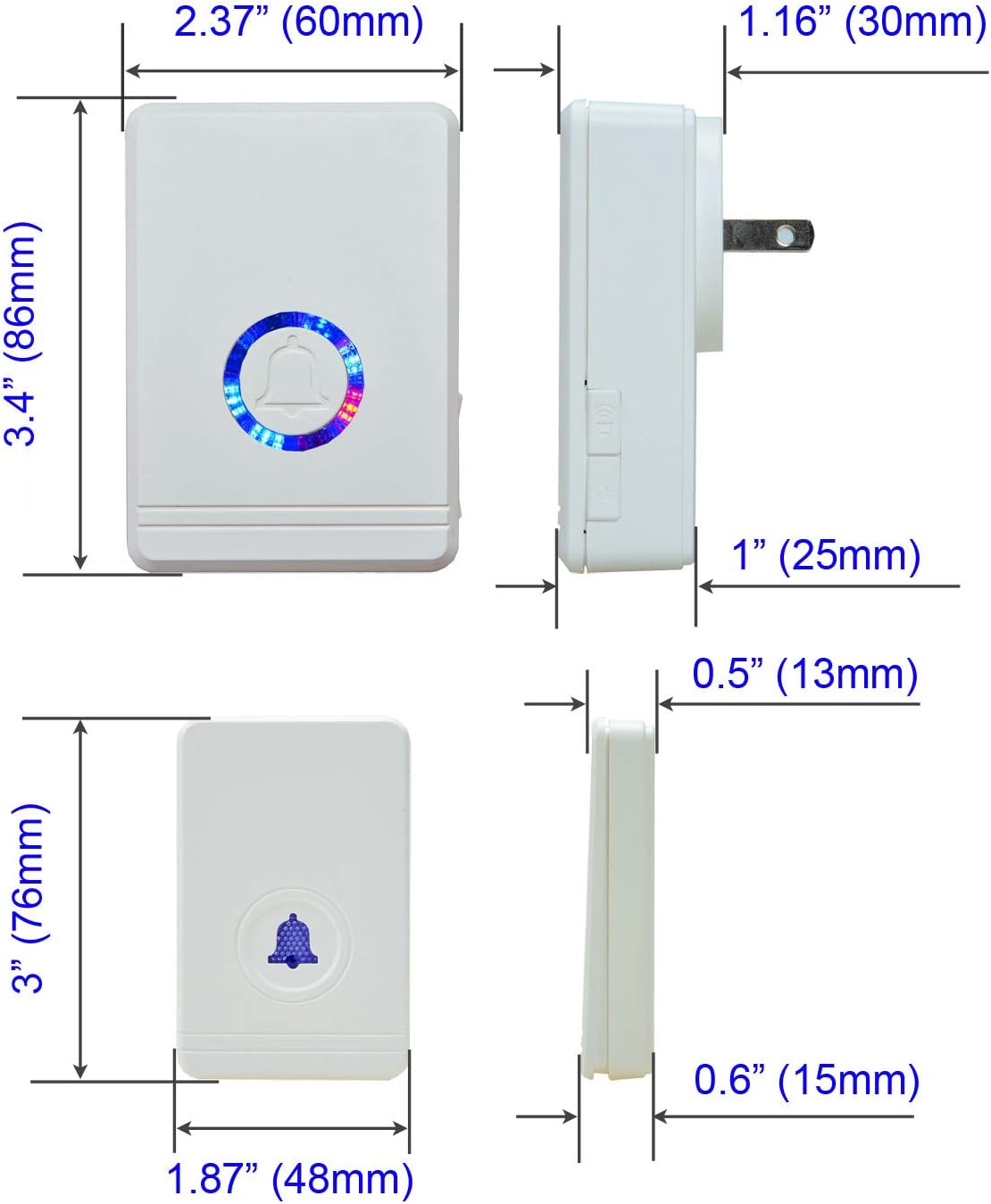
Image: Detailed dimensions of both the wireless doorbell receiver and the doorbell button (transmitter).
Setup and Installation
1. Receiver Placement
Plug the wireless receiver into any standard electrical outlet within the desired listening range. For optimal performance, avoid placing the receiver near large metal objects or other electronic devices that may cause interference.
2. Doorbell Button (Transmitter) Installation
The doorbell button can be installed using either the provided adhesive tape or screws.
- Adhesive Installation: Clean the desired surface thoroughly. Peel off the protective film from the back of the adhesive tape and firmly press the doorbell button onto the surface for at least 30 seconds.
- Screw Installation: Mark the desired mounting holes. Drill pilot holes if necessary. Secure the doorbell button to the surface using the provided screws and anchors.
Ensure the doorbell button is placed in a location where it is easily accessible to visitors and protected from direct, prolonged exposure to extreme weather, despite its IP54 rating.

Image: Visual representation of the wireless range of the doorbell system within a typical home environment, showing the doorbell button and receiver placement.
Operating Instructions
1. Pairing Transmitters and Receivers
Your doorbell set comes pre-paired. If you need to re-pair or add new transmitters/receivers:
- Plug in the receiver.
- Press and hold the volume button on the receiver for 5 seconds until the LED indicator flashes rapidly. This indicates pairing mode.
- Immediately press the doorbell button (transmitter) you wish to pair. The receiver will chime once to confirm successful pairing.
- Repeat for additional doorbell buttons or receivers.
2. Changing Ringtones
To select a different chime:
- Press the "Music" button on the receiver to cycle through the 48 available ringtones.
- Once you find your desired ringtone, press the doorbell button to confirm and set it. The receiver will remember this selection even after power loss.

Image: The doorbell receiver displaying its music rhythm lamp feature, which visually responds to the selected chime.
3. Adjusting Volume
Press the "Volume" button on the receiver to cycle through the 4 available volume levels.
4. Night Light Function
The receiver's LED ring can function as a night light:
- Press the dedicated "Light" button (often indicated by a sun or lightbulb icon) on the receiver to cycle through 7 levels of brightness, including OFF.

Image: The doorbell receiver illuminated as a night light in a darkened setting, demonstrating its gentle glow.
5. Expanding Your System
The KCMYTONER Wireless Smart Doorbell system is highly expandable. You can add more doorbell buttons, receivers, or other compatible wireless sensors (like magnetic door sensors or PIR motion sensors) to create a comprehensive alert system for your home or business. Follow the pairing instructions (Section 1) for each new device.

Image: A visual guide illustrating the expandability of the system, showing how additional doorbell buttons, receivers, door magnet sensors, and infrared sensors can be integrated.
Maintenance
Battery Replacement (Doorbell Button)
The doorbell button uses a CR2032 coin cell battery, designed for 6-10 years of life. When the button's LED no longer illuminates or the signal becomes weak, it's time to replace the battery.
- Carefully open the doorbell button casing using a small screwdriver or pry tool.
- Remove the old CR2032 battery.
- Insert a new CR2032 battery with the positive (+) side facing up.
- Close the casing securely.
Cleaning
Wipe the doorbell receiver and button with a soft, dry cloth. Do not use abrasive cleaners or solvents. Ensure the doorbell button's surface is free from dirt or debris that might obstruct the button press.
Weather Resistance
The doorbell button (transmitter) is IP54 waterproof, meaning it is protected from dust ingress and splashing water from any direction. While designed for outdoor use, extreme conditions like prolonged heavy rain or submersion should be avoided to ensure maximum lifespan.

Image: The doorbell button depicted in different weather scenarios (snow, sun, rain) to illustrate its resilience and IP54 waterproof rating, along with its wide operating temperature range.
Troubleshooting
| Problem | Possible Cause | Solution |
|---|---|---|
| Doorbell does not ring. |
|
|
| Short wireless range. |
|
|
| Ringtone changes unexpectedly. |
|
|
Warranty and Support
KCMYTONER products are designed for reliability and performance. For any issues or questions not covered in this manual, please contact KCMYTONER customer support through the retailer's platform or the official brand website. Please have your model number (ATUSEL-KS-DB03-3) and purchase details ready when contacting support.
For more information and product updates, visit the official KCMYTONER store: KCMYTONER Store on Amazon.
Ask a question about this manual
Ask about setup, troubleshooting, compatibility, parts, safety, or missing instructions. Manuals+ will review the question and use this page’s manual context to help answer it.