
SciencePurchase 636601449841
SciencePurchase Cash Vault for Kids - Instruction Manual
Model: 636601449841
Introduction
Thank you for purchasing the SciencePurchase Cash Vault for Kids. This electronic money bank is designed to provide a fun and secure way for children to save their money. It features a password-protected vault, automatic bill feeding, a coin slot, and interactive sound and light effects. Please read this manual carefully to ensure proper operation and longevity of your product.

Image: The SciencePurchase Cash Vault, showing its main features including the coin slot, bill entrance, keypad, and vault door knob.

Image: An annotated diagram highlighting the various parts and features of the Cash Vault.
Setup
Battery Installation
The Cash Vault requires batteries for its electronic functions (sound, lights, automatic bill feed, and password protection). Batteries are not included.
- Locate the battery compartment on the bottom or back of the vault.
- Using a screwdriver (not included), open the battery compartment cover.
- Insert the required number and type of batteries (e.g., AA batteries, typically 3) according to the polarity indicators (+/-).
- Replace the battery compartment cover and secure it with the screw.
Initial Power On
Once batteries are installed, the vault is ready for use. The default password is 0000.
Operating Instructions
Depositing Money
The Cash Vault accepts both coins and paper bills.
- For Coins: Insert coins into the coin slot located on the top of the vault.
- For Bills: Insert paper bills into the bill entrance slot on the front of the vault. The vault will automatically feed the bills inside.

Image: Demonstrating how to deposit both coins and paper bills into the Cash Vault.
Opening the Vault
To access the contents of your vault, you must enter the correct 4-digit PIN.
- Enter your 4-digit PIN using the keypad. The default PIN is 0000.
- If the correct PIN is entered, a green light will illuminate, and a short jingle will play.
- Within 10 seconds of the green light, twist the knob clockwise and pull the door open. If you do not open the door within 10 seconds, it will relock, and you will need to re-enter the PIN.
- If an incorrect PIN is entered, a red light will flash, and a voice will announce, "Wrong password, please try again!"
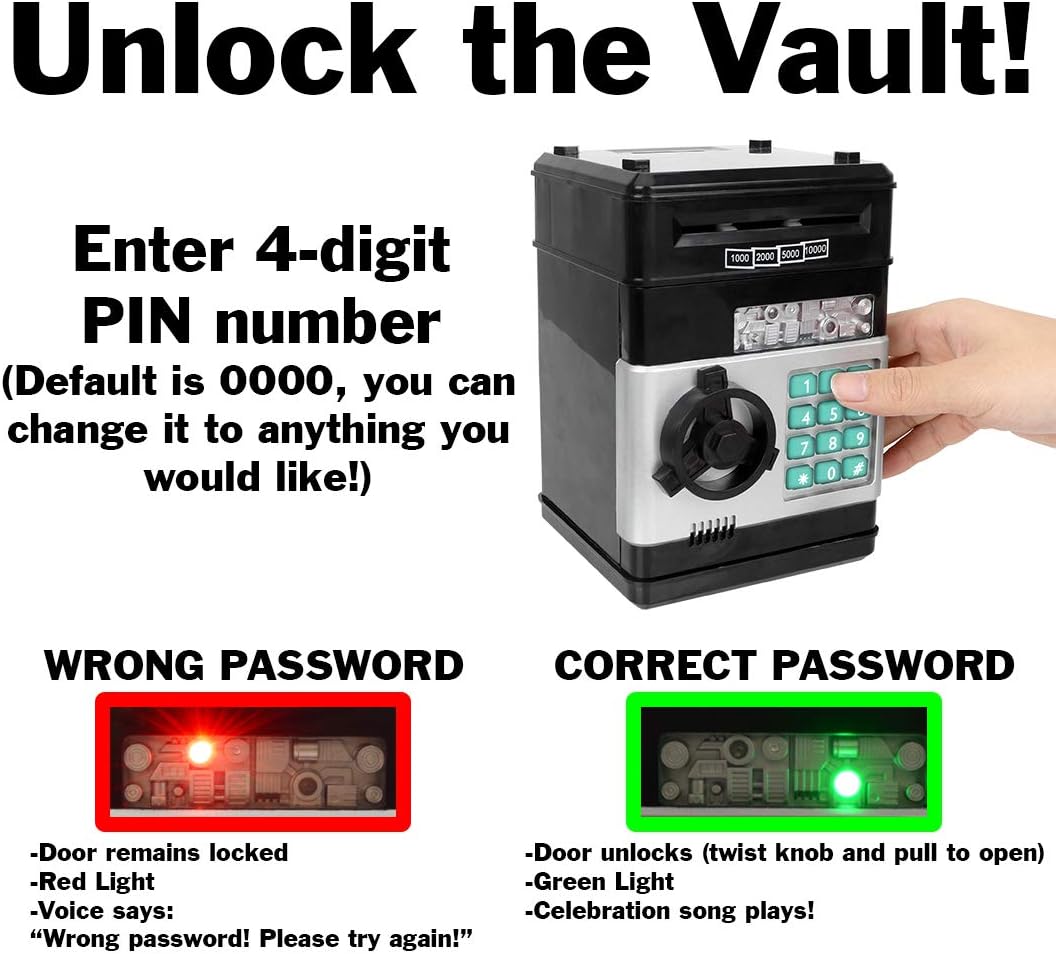
Image: Visual guide for entering the PIN and the corresponding light and sound feedback for correct and incorrect entries.
Storage Capacity
The Cash Vault offers a generous storage space for your money and small valuables.

Image: The interior of the Cash Vault, illustrating its ample storage space for various valuables.
Changing the PIN
You can change the 4-digit PIN to a personalized code.
- With the vault door open, press and hold the * (asterisk) button.
- While holding the * button, enter your new 4-digit PIN.
- Release the * button. Your new PIN is now set.
- Test the new PIN with the door open before closing it to ensure it works correctly.
Music Mode
The vault features a song mode with 9 different short songs.
- Press the # (pound) button to switch to music mode.
- Once in music mode, press any number from 1 to 9 on the keypad to play a different song.

Image: Instructions for activating and using the music mode feature on the Cash Vault.
Maintenance
Cleaning
To clean the exterior of the vault, wipe it with a soft, dry cloth. Do not use abrasive cleaners or immerse the product in water.
Storage
Store the vault in a cool, dry place away from direct sunlight and extreme temperatures. If storing for an extended period, remove the batteries to prevent leakage.
Troubleshooting
| Problem | Possible Cause | Solution |
|---|---|---|
| Vault does not power on or respond. | Batteries are dead or incorrectly installed. | Check battery polarity. Replace with new batteries. |
| Door does not open after entering correct PIN. | Door not opened within 10 seconds. | Re-enter PIN and open the door immediately after the green light and jingle. |
| Vault repeatedly says "Wrong password". | Incorrect PIN entered or PIN was changed and forgotten. | Ensure you are entering the correct 4-digit PIN. If forgotten, refer to the product packaging or manufacturer's website for a master reset procedure if available (not specified in current data). The default is 0000. |
| Bills are not automatically feeding. | Low batteries or obstruction in the bill slot. | Replace batteries. Check for any foreign objects in the bill entrance. |
Specifications
- Brand: SciencePurchase
- Model: 636601449841
- Product Dimensions: 4.8"D x 4.8"W x 7.7"H
- Lock Type: Electronic
- Color: Black
- Capacity: 178 Cubic Inches
- Material: Plastic
- Item Weight: 1.37 Pounds
- Power Source: Batteries (not included, required for electronic functions)
- Features: Password protection, automatic bill feed, coin slot, sound effects, lights, music mode.
Warranty Information
SciencePurchase products are manufactured with quality and care. For specific warranty details, please refer to the product packaging or contact SciencePurchase customer support. Keep your purchase receipt as proof of purchase.
Customer Support
If you have any questions or require assistance with your SciencePurchase Cash Vault, please visit the official SciencePurchase website or contact their customer service department.
Online Support: Visit the SciencePurchase Store on Amazon
Ask a question about this manual
Ask about setup, troubleshooting, compatibility, parts, safety, or missing instructions. Manuals+ will review the question and use this page’s manual context to help answer it.