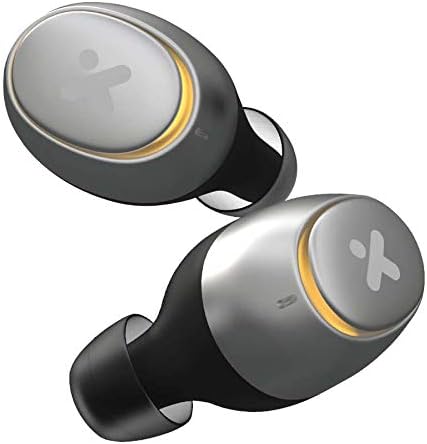
Thank you for choosing the X-mini Liberty+ True Wireless Earbuds. These earbuds are designed to provide a seamless and high-quality audio experience with advanced features such as Bluetooth 5.0 connectivity, IPX7 water resistance, extended playtime, and fast charging capabilities. This manual will guide you through the setup, operation, and maintenance of your new earbuds.
Image: The X-mini Liberty+ True Wireless Earbuds, showcasing their sleek design.
Package Contents
Before you begin, please ensure all items are present in the package:
X-mini Liberty+ True Wireless Earbuds (Left and Right)
Portable Charging Case
USB Charging Cable
Multiple Sizes of Ear Tips
User Manual (this document)
Image: The X-mini Liberty+ earbuds, charging case, USB cable, and ear tips as included in the product packaging.
Setup
1. Charging the Earbuds and Case
For first-time use, fully charge both the earbuds and the charging case. The charging case provides up to 54 hours of total playtime.
Place the earbuds into the charging case, ensuring they are correctly seated.
Connect the USB charging cable to the charging port on the case and plug the other end into a USB power source (e.g., computer, wall adapter).
The LED indicators on the charging case will show the charging status. A full charge typically takes approximately 1.5 hours for the case and 1 hour for the earbuds.
The X-mini Liberty+ supports fast charging, providing 2 hours of playtime with just 15 minutes of charging.
Image: The X-mini Liberty+ earbuds placed inside their charging case, with blue LED indicators showing charging status.
2. Pairing with Your Device
The X-mini Liberty+ earbuds utilize Bluetooth 5.0 for stable and seamless connectivity.
Open the charging case. The earbuds will automatically enter pairing mode (indicated by flashing LED lights on the earbuds).
On your smartphone or Bluetooth-enabled device, go to the Bluetooth settings.
Search for available devices and select "X-mini Liberty+" from the list.
Once connected, the earbud LEDs will stop flashing, and you will hear a confirmation tone.
The earbuds will automatically reconnect to the last paired device when removed from the case, if Bluetooth is enabled on the device.
Operating Instructions
Power On/Off
Power On: Open the charging case, and the earbuds will automatically power on. Alternatively, press and hold the touch control area on both earbuds for 3 seconds.
Power Off: Place the earbuds back into the charging case and close the lid. They will automatically power off and begin charging. Alternatively, press and hold the touch control area on both earbuds for 5 seconds.
Music Playback Controls (Touch Control)
Play/Pause: Single tap on either earbud.
Next Track: Double tap the right earbud.
Previous Track: Double tap the left earbud.
Volume Up: Triple tap the right earbud.
Volume Down: Triple tap the left earbud.
Call Management
Answer/End Call: Single tap on either earbud during an incoming call.
Reject Call: Press and hold either earbud for 2 seconds during an incoming call.
AI Activation (Voice Assistant)
Activate your device's voice assistant (Siri or Google Assistant) with a simple touch.
Activate Voice Assistant: Press and hold either earbud for 2 seconds (when not on a call).
Maintenance
Cleaning
Regular cleaning helps maintain optimal performance and hygiene.
Use a soft, dry, lint-free cloth to wipe the earbuds and charging case.
For ear tips, remove them from the earbuds and clean with a mild soap solution if necessary, then rinse thoroughly and dry completely before reattaching.
Do not use abrasive cleaners, alcohol, or chemical solvents.
Storage and Battery Care
Store the earbuds in their charging case when not in use to protect them and keep them charged.
Avoid exposing the earbuds and case to extreme temperatures (hot or cold) or direct sunlight for prolonged periods.
To preserve battery life, charge the case regularly, even if not using the earbuds frequently.
Image: The X-mini Liberty+ charging case in its closed state, ready for storage or transport.
Water Resistance (IPX7)
The X-mini Liberty+ earbuds are IPX7 water-resistant, meaning they can withstand immersion in water up to 1 meter for 30 minutes. This makes them suitable for workouts and light rain.
Do not intentionally submerge the charging case, as it is not water-resistant.
Ensure earbuds are completely dry before placing them back into the charging case to prevent damage.
Troubleshooting
If you encounter issues with your X-mini Liberty+ earbuds, please refer to the following common solutions:
Problem
Possible Solution
Earbuds not pairing with device.
Ensure earbuds are fully charged.
Turn off and on Bluetooth on your device.
Forget "X-mini Liberty+" from your device's Bluetooth list and try pairing again.
Ensure earbuds are in pairing mode (flashing LEDs).
No sound from one or both earbuds.
Check device volume and earbud volume.
Ensure earbuds are properly connected to your device.
Try resetting the earbuds (refer to manufacturer's website for specific reset instructions if needed).
Clean earbud mesh to ensure no blockage.
Charging case not charging.
Check the USB cable and power adapter. Try a different cable or adapter.
Ensure the charging port is clean and free of debris.
Microphone quality is poor.
Ensure the microphone opening on the earbuds is not obstructed.
Test in a quieter environment.
Ensure a strong Bluetooth connection.
Specifications
Feature
Detail
Model Name
X-mini Liberty+ (XAM42)
Connectivity Technology
Bluetooth 5.0
Water Resistance Level
IPX7 (Earbuds only)
Playtime (Earbuds)
Up to 9 hours per charge
Total Playtime (with Case)
Up to 54 hours
Fast Charging
15 minutes charge for 2 hours playtime
Control Method
Touch Control
Voice Assistant
Siri, Google Assistant
Battery Type
Lithium Ion
Product Dimensions
8.7 x 6 x 2.35 cm
Item Weight
80 g
Material
Plastic
Warranty and Support
X-mini products are built with quality and reliability in mind. Your X-mini Liberty+ True Wireless Earbuds come with a standard manufacturer's warranty against defects in materials and workmanship.
Warranty Period: Please refer to the warranty card included in your product packaging or visit the official X-mini website for specific warranty terms and duration applicable in your region.
Customer Support: For technical assistance, troubleshooting beyond this manual, or warranty claims, please contact X-mini customer support through their official website or the contact information provided in your product documentation.
Online Resources: Visit the official X-mini website for FAQs, updated drivers (if applicable), and additional support resources.