
Lixada LixadaL0686EU
Lixada DMX-512 Mini Moving Head LED Stage Light User Manual
Model: LixadaL0686EU
Brand: Lixada
1. Introduction
This user manual provides detailed instructions for the operation and maintenance of your Lixada DMX-512 Mini Moving Head LED Stage Light. This professional stage light features 9/11 DMX channels, an LED display for easy operation, and low power consumption. Its effect with different shapes will certainly bring you a wonderful visual experience.
2. Safety Information
Please read all safety instructions carefully before operating this device. Failure to follow these instructions may result in electric shock, fire, or serious injury.
- Power Supply: Ensure the power supply voltage matches the device's requirements (AC 100-240V).
- Ventilation: Do not block ventilation openings. Ensure adequate airflow around the unit to prevent overheating.
- Environment: This device is intended for indoor use only. Do not expose to rain, moisture, or extreme temperatures.
- Mounting: Always secure the device with a safety cable when hanging. Ensure the mounting surface or truss can support the weight of the fixture.
- Maintenance: Disconnect from power before cleaning or performing any maintenance. Refer all servicing to qualified personnel.
- Minimum Distance: Maintain a minimum distance of 0.20m from flammable materials.
- Surface Temperature: The maximum temperature of the external surface can reach 120°C. Avoid direct contact during operation.
3. Product Overview
The Lixada Mini Moving Head Light is a compact yet powerful lighting fixture designed for various applications, from home parties to professional DJ shows.

Figure 3.1: Front view of the Lixada Mini Moving Head LED Stage Light, displaying the lens, LED display, and control buttons.

Figure 3.2: The Lixada Mini Moving Head Light packaged with its power cable and user manual, showing the EU plug type.
Key Features:
- Professional 9/11 channel DMX-512 control.
- Integrated LED display for easy menu navigation and operation.
- Low power consumption for energy efficiency.
- Sound sensor design for controlling colors and speed with music.
- Four versatile control modes: DMX512, Master-Slave, Voice Control, and Automatic.
- Includes a mounting bracket for flexible installation on trusses, walls, or floors.
- Compact and lightweight design, ideal for various event settings.
4. Setup
4.1 Unpacking
Carefully remove the fixture from its packaging. Check for any signs of damage during transit. Ensure all components listed in the packing list are present:
- Lixada Mini Moving Head Light
- Power Cable
- Mounting Bracket
- Screws for bracket
- User Manual
4.2 Mounting
The fixture can be mounted in various orientations using the included mounting bracket. Always ensure the mounting surface is stable and capable of supporting the fixture's weight.
- Truss Mounting: Attach the mounting bracket to a suitable truss clamp (not included) and secure it to the truss. Always use a safety cable.
- Wall Mounting: Secure the bracket to a sturdy wall using appropriate screws and anchors.
- Floor Placement: The fixture can be placed directly on a flat, stable surface.

Figure 4.1: Example of multiple Lixada Mini Moving Head Lights mounted on a truss, demonstrating their use in a stage setup.
4.3 Connections
Connect the power cable to the fixture and then to a suitable power outlet (AC 100-240V). For DMX control, connect a DMX cable from your DMX controller to the DMX IN port of the first fixture. For multiple fixtures, daisy-chain them by connecting the DMX OUT of the first to the DMX IN of the next.

Figure 4.2: Various angles of the Lixada Mini Moving Head Light, highlighting the DMX input/output and power connections on the rear.
5. Operating Modes
The Lixada Mini Moving Head Light offers four primary operating modes, selectable via the LED display and control buttons (MENU, DOWN, UP, ENTER).
5.1 DMX512 Control
This mode allows precise control over all functions using a DMX controller. The fixture supports 9 or 11 DMX channels.
- Press the MENU button until "dXXX" (DMX address) appears.
- Use UP/DOWN to set the desired DMX starting address.
- Press ENTER to confirm.
- Consult the DMX channel chart (usually provided in the full manual) for specific channel functions (Pan, Tilt, Color, Gobo, Strobe, Dimmer, etc.).

Figure 5.1: Illustration of the fixture's pan (540°) and tilt (180°) movement range.
5.2 Master-Slave Mode
In this mode, multiple fixtures can be synchronized without a DMX controller. One fixture acts as the "Master" and controls all "Slave" fixtures.
- Set the first fixture to an automatic or sound-activated mode (Master).
- Connect the DMX OUT of the Master to the DMX IN of the first Slave.
- Set all subsequent fixtures to Slave mode (refer to the display menu for "SLAV" or similar option).
5.3 Sound Control Mode
The built-in microphone allows the light to react to music and sound, changing colors and patterns dynamically.
- Press the MENU button until "Soun" or "SoUn" appears on the display.
- Press ENTER to activate sound control.
- The light will now respond to ambient sound.
5.4 Automatic Mode
The fixture runs through pre-programmed light shows automatically, without external control.
- Press the MENU button until "Auto" or "AUto" appears on the display.
- Press ENTER to activate automatic mode.
- Some models may have multiple auto programs; use UP/DOWN to select if available.
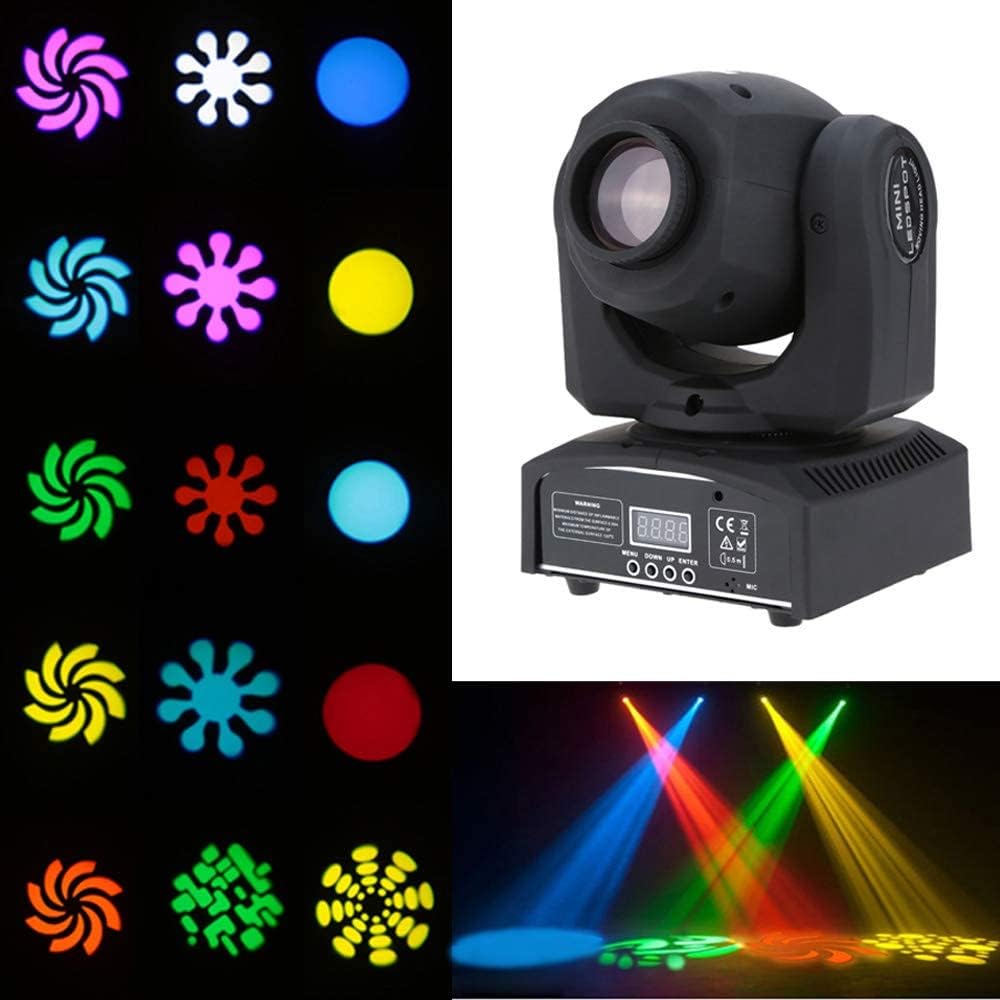
Figure 5.2: Examples of different gobo shapes and color projections.

Figure 5.3: A selection of color and gobo effects achievable with the light.

Figure 5.4: The light in action, creating dynamic effects in a party setting.
6. Maintenance
Regular maintenance ensures optimal performance and extends the lifespan of your fixture.
- Cleaning: Periodically clean the lens and housing with a soft, lint-free cloth. Do not use abrasive cleaners or solvents.
- Inspection: Regularly check power and DMX cables for damage. Ensure all mounting hardware is secure.
- Storage: When not in use, store the fixture in a dry, dust-free environment.
7. Troubleshooting
If you encounter issues with your Lixada Mini Moving Head Light, refer to the table below for common problems and solutions.
| Problem | Possible Cause | Solution |
|---|---|---|
| No power | Power cable disconnected; No power from outlet; Blown fuse. | Check power cable connection; Test outlet with another device; Replace fuse if necessary (refer to full manual for fuse type). |
| No DMX control | Incorrect DMX address; Faulty DMX cable; DMX controller issue; Incorrect DMX mode. | Verify DMX address setting; Test DMX cable; Check DMX controller output; Ensure fixture is in DMX mode. |
| Light not moving/responding | Incorrect operating mode; Motor calibration issue. | Ensure correct operating mode (DMX, Auto, Sound); Power cycle the unit. If issues persist, contact support. |
| Light flickers or behaves erratically | Unstable power supply; DMX signal interference; Overheating. | Ensure stable power; Check DMX connections and termination; Ensure proper ventilation. |
If the problem persists after trying these solutions, please contact Lixada customer support.
8. Specifications
| Feature | Detail |
|---|---|
| Brand | Lixada |
| Model Number | LixadaL0686EU |
| Dimensions (L x W x H) | 14.5 x 17 x 23.5 cm (5.7 x 6.7 x 9.3 inches) |
| Weight | 2.67 Kilograms (5.89 lbs) |
| Material | Plastic |
| Color | Blue (referring to internal components/LEDs, not external casing) |
| Light Source Type | LED (Light Emitting Diode) |
| Maximum Wattage | 25 Watts |
| Voltage | 240 Volts (AC 100-240V compatible) |
| Luminous Flux | 100 Lumen |
| Control Modes | DMX512, Master-Slave, Voice Control, Automatic |
| DMX Channels | 9/11 Channels |
| Installation Type | Wall Mount (also suitable for truss/floor) |
| Power Source | Corded Electric |
9. Warranty and Support
Lixada products are manufactured to high quality standards. For warranty information and customer support, please refer to the documentation included with your purchase or visit the official Lixada website. Keep your proof of purchase for any warranty claims.
For technical assistance or service inquiries, please contact Lixada customer service through their official channels.