
1. Introduction
The DAOKI 5-Way Navigation Button Module (Model GR-US-036) provides a compact, multi-directional input solution for various electronic projects. This module integrates five directional controls (Up, Down, Left, Right, Middle Click) and additional Set and Reset buttons, making it suitable for MCU, AVR, Arduino, and gaming applications where a small, joystick-like control is required.
This manual provides essential information for the proper installation, operation, and maintenance of your navigation button module.
2. Package Contents
Please verify that all items listed below are included in your package:
- 5 x Five-Direction Navigation Button Modules
- 1 x 8-Pin Female-to-Female Dupont Wire
- 1 x 8-Pin Female-to-Male Dupont Wire
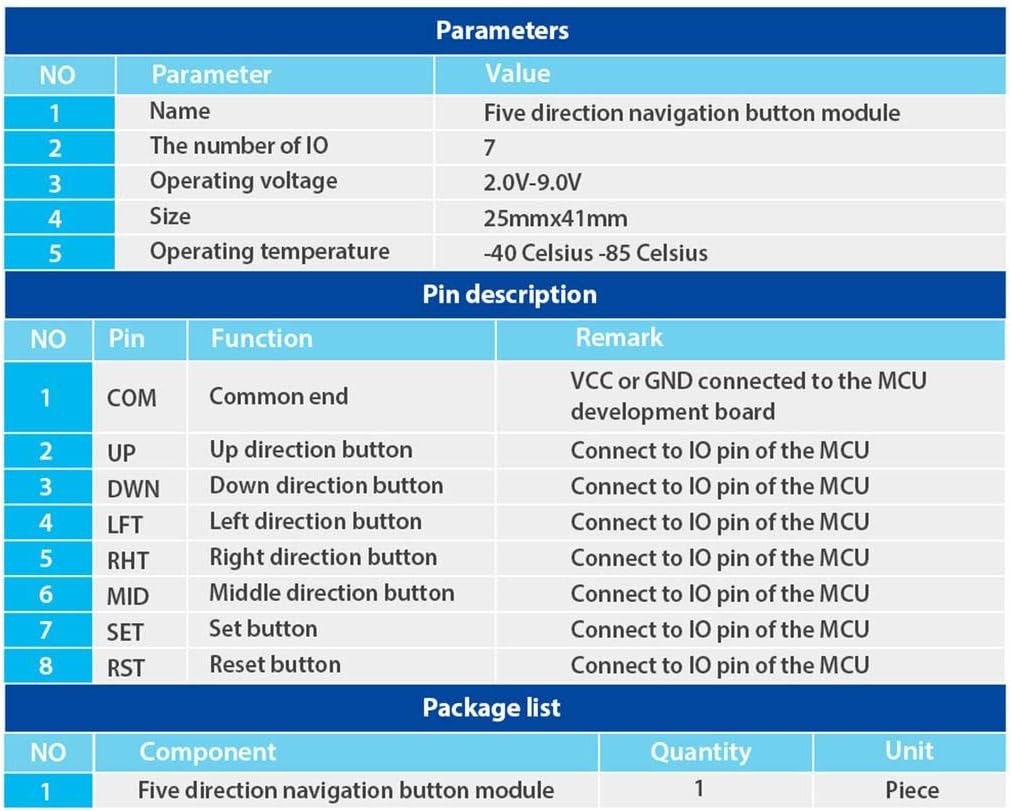
Figure 2.1: Table detailing module parameters, pin descriptions, and package contents.
3. Specifications
The following are the technical specifications for the DAOKI 5-Way Navigation Button Module:
| Parameter | Value |
|---|---|
| Operating Voltage | 2.0V - 9.0V |
| Operating Temperature | -40 °C to 85 °C |
| Dimensions (L x W) | 41 mm x 25 mm (1.61" x 0.98") |
| Number of IO Pins | 7 |
| Control Type | 5-Way Directional (Up, Down, Left, Right, Middle Click) + Set + Reset |
| Connector Type | Dupont Wire |
| Compatible Devices | Microcontrollers (MCU), Arduino, Gaming Devices |
| Material | Copper, Plastic, Stainless Steel |
| Contact Material | Gold |
| International Protection Rating | IP54 |

Figure 3.1: Module dimensions for integration planning.
4. Pin Description
The module features 8 pins for connection to a microcontroller or development board. Understanding each pin's function is crucial for correct wiring.
| Pin | Function | Remark |
|---|---|---|
| COM | Common End | Connect to VCC or GND of the MCU development board. |
| UP | Up Direction Button | Connect to an IO pin of the MCU. |
| DWN | Down Direction Button | Connect to an IO pin of the MCU. |
| LFT | Left Direction Button | Connect to an IO pin of the MCU. |
| RHT | Right Direction Button | Connect to an IO pin of the MCU. |
| MID | Middle Direction Button | Connect to an IO pin of the MCU. |
| SET | Set Button | Connect to an IO pin of the MCU. |
| RST | Reset Button | Connect to an IO pin of the MCU. |

Figure 4.1: Top view of the module with pin labels.

Figure 4.2: Module with joystick cap removed, showing the internal switch.

Figure 4.3: Bottom view of the module.
5. Setup and Installation
The installation of electronic modules requires basic knowledge of electronics and practical skills. Please proceed with caution.
5.1. Power Supply Connection
- Connect the COM pin of the module to either the VCC (positive power supply) or GND (ground) of your MCU development board, depending on your circuit design and desired logic.
- Ensure the power supply voltage is within the specified range of 2.0V to 9.0V.
5.2. Data Pin Connection
- Connect the UP, DWN, LFT, RHT, MID, SET, and RST pins of the module to individual digital input/output (IO) pins on your microcontroller (MCU).
- Use the provided Dupont wires for secure connections.

Figure 5.1: Example wiring diagram for connecting the module to a development board.
5.3. Mounting
The module is designed for panel mounting. Secure it using appropriate fasteners through the mounting holes on the PCB.
6. Operating Instructions
Once correctly wired and powered, the module functions as a digital input device. Each button press (Up, Down, Left, Right, Middle, Set, Reset) will change the state of its corresponding IO pin on the MCU, which can then be read and processed by your program.
- Directional Control: Moving the joystick in any of the four cardinal directions (Up, Down, Left, Right) will activate the respective directional button.
- Middle Click: Pressing the joystick straight down activates the middle click function.
- SET Button: The 'SET' button provides an additional input for configuration or menu selection.
- RST Button: The 'RST' button can be used for reset functions or other programmed actions.
Refer to your microcontroller's programming environment and documentation for details on reading digital input states from the connected IO pins.
7. Maintenance
The DAOKI 5-Way Navigation Button Module is designed for durability and requires minimal maintenance. Follow these guidelines to ensure its longevity:
- Cleaning: Keep the module free from dust and debris. Use a soft, dry cloth for cleaning. Avoid using liquids or abrasive cleaners.
- Environment: Operate the module within its specified temperature range (-40 °C to 85 °C). Avoid exposure to extreme humidity or corrosive environments.
- Handling: Handle the module with care to prevent physical damage to the components or solder joints.
8. Troubleshooting
If you encounter issues with your DAOKI 5-Way Navigation Button Module, consider the following troubleshooting steps:
- No Response from Buttons:
- Verify all pin connections (COM, UP, DWN, LFT, RHT, MID, SET, RST) are secure and correctly wired to the MCU.
- Check the power supply voltage to ensure it is within the 2.0V-9.0V range.
- Confirm that your MCU code is correctly configured to read the digital input states from the connected IO pins.
- Test the module with a different set of Dupont wires to rule out faulty cables.
- Intermittent Button Response:
- Inspect solder joints on the module and your development board for any cold joints or shorts.
- Ensure there is no physical obstruction preventing full button travel.
- Check for electromagnetic interference if operating in a noisy electrical environment.
- Physical Damage:
- If the module has been dropped or subjected to excessive force, internal components may be damaged. Visual inspection for cracks or bent pins is recommended.
If issues persist after following these steps, consult relevant online forums or resources for microcontroller projects, or contact the manufacturer for further assistance.
9. Warranty and Support
Specific warranty information for the DAOKI 5-Way Navigation Button Module (Model GR-US-036) was not provided in the product data. For details regarding warranty coverage, technical support, or replacement parts, please refer to the retailer's return policy or contact DAOKI directly through their official channels.