Introduction
Welcome to the exciting world of Hot Wheels Track Builder! The Multi-Lane Speed Box is designed to provide endless options for cool stunts and side-by-side racing. This versatile playset allows you to transform everyday household items into thrilling race tracks and stunts. The box itself and its lid are integral parts of the track system, offering multiple connection points to expand your racing adventures. Everything fits neatly inside the bin for easy portability and storage.
What's in the Box
Your Hot Wheels Track Builder Multi-Lane Speed Box includes the following components:
- One Hot Wheels 1:64 scale vehicle
- Track pieces (various lengths and types)
- Track connectors
- 4-lane fair start gate lid clamp
- 4-lane jump and through-lane box (the main storage bin)
- 4 single flipper finishing gates
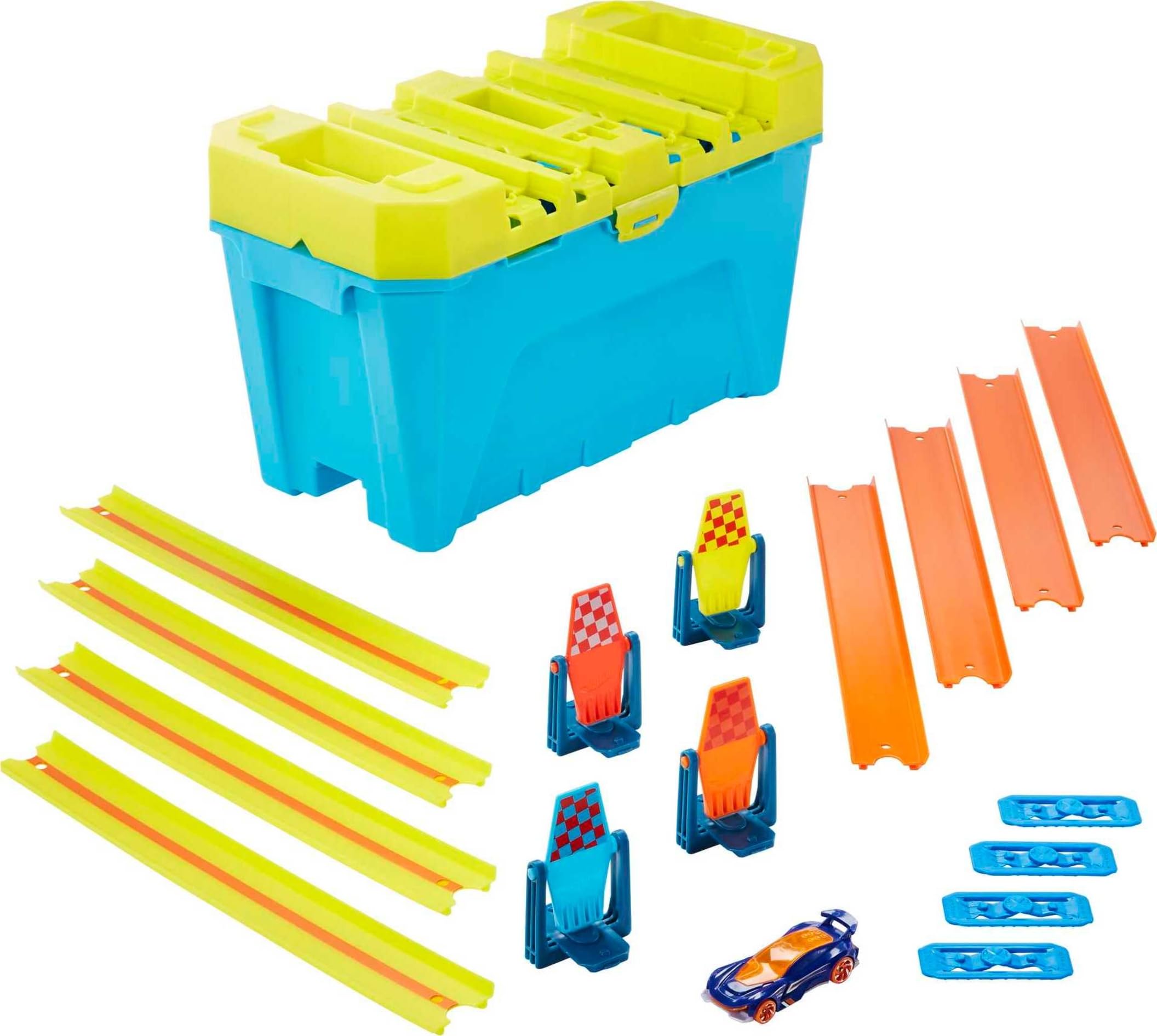
Figure 1: All included components of the Multi-Lane Speed Box, including track pieces, connectors, the main box, and a Hot Wheels car.
Setup Instructions
The Hot Wheels Track Builder Multi-Lane Speed Box is designed for flexible setup, allowing you to create various track configurations. Follow these steps for a basic gravity drop setup:
- Prepare the Base: Place the blue storage box on a flat, stable surface. This box serves as the finish line and can also be used for stunts.
- Attach the Fair Start Gate: The yellow lid of the box functions as a 4-lane fair start gate. It features a built-in clamp.
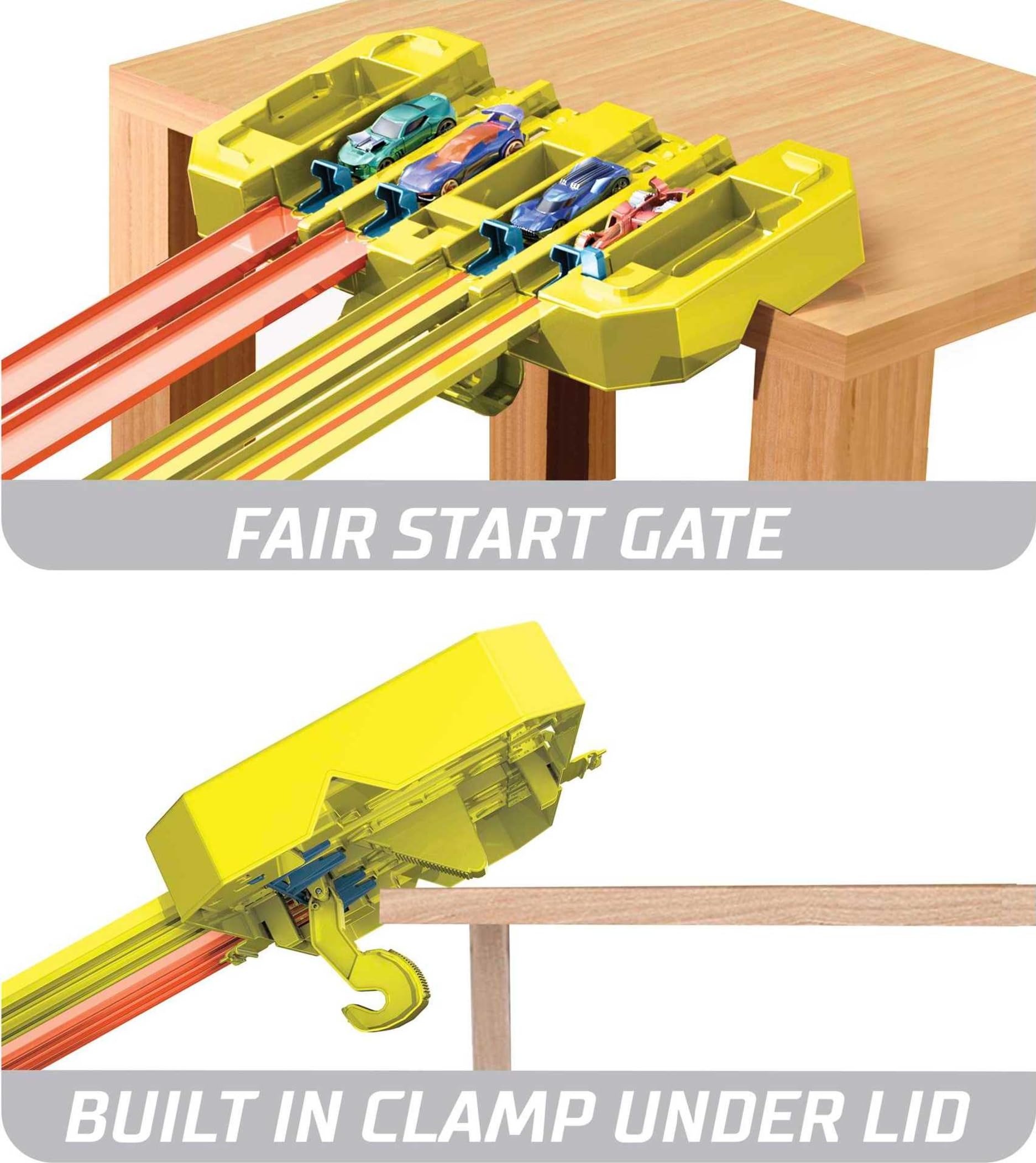
Figure 2: The yellow fair start gate with its integrated clamp, ready to be secured to a table or shelf.
Securely clamp the yellow lid to the edge of a table, chair, or shelf. Ensure it is stable and will not move during play.
- Connect the Tracks: Attach the track pieces to the fair start gate on the yellow lid. Connect the other end of the tracks to the blue storage box, which acts as the finish line. You can create a multi-lane race track descending from the clamped lid to the box.
- Position Finishing Gates: Insert the single flipper finishing gates into the designated slots on the blue storage box. These gates will flip upon a car crossing the finish line, indicating the winner.
- Load Vehicles: Place your Hot Wheels 1:64 scale vehicles into the starting slots on the fair start gate.

Figure 3: An example of a complete track setup, demonstrating the gravity drop from a table to the finish line box.
Operating Instructions
Once your track is set up, you're ready for action!
- Initiate the Race: To start the race, press the release mechanism on the fair start gate. All cars will launch simultaneously for a fair start.
- Observe the Finish: Watch as the cars race down the tracks. The flipper gates at the finish line will indicate which car crosses first.
- Explore Stunts: The blue storage box can be turned over to reveal a 4-lane jump on the bottom, providing an exciting finishing stunt. The single through-lane on the bottom of the box offers another racing option.
- Customize and Expand: Use the 4 colorful flipper gates to add flair and indicate winners. Multi-use pieces can be configured in nearly endless combinations to unlock creativity. This set is compatible with other Hot Wheels track sets for building even larger and more epic stunts.

Figure 4: A child engaging with the playset, demonstrating the ease of launching vehicles.

Figure 5: Illustrates racing and stunt possibilities using gravity drops with the track builder set.
Official Product Demonstration Video
Video 1: Official demonstration of the Hot Wheels Track Builder Multi-Lane Speed Box, showcasing various setup configurations and racing action.
Maintenance
To ensure the longevity and optimal performance of your Hot Wheels Track Builder Multi-Lane Speed Box, follow these simple maintenance guidelines:
- Cleaning: Wipe down track pieces and components with a soft, damp cloth as needed. Avoid harsh chemicals or abrasive cleaners.
- Storage: When not in use, store all components inside the blue storage box. This helps keep pieces organized and prevents loss.

Figure 6: Demonstrates how track pieces can be stored inside the main box.

Figure 7: The storage box closed, ready for transport or tidy storage.
- Inspection: Periodically check all track pieces and connectors for any signs of wear or damage. Replace any broken parts to maintain safe play.
Troubleshooting
If you encounter any issues with your Hot Wheels Track Builder Multi-Lane Speed Box, consider the following common solutions:
| Problem | Solution |
|---|---|
| Cars not launching properly. | Ensure vehicles are correctly seated in the fair start gate. Check that the release mechanism is fully engaged and then pressed firmly. |
| Tracks disconnect during play. | Verify that all track connectors are securely snapped into place. Ensure the fair start gate is firmly clamped to a stable surface. |
| Cars fall off the track. | Check track alignment and ensure there are no gaps or misalignments between pieces. Some Hot Wheels vehicles perform better on certain track types due to weight and design. |
| Flipper gates not activating. | Ensure the flipper gates are properly inserted into their slots. The car must hit the gate with sufficient speed to activate it. |
Specifications
| Feature | Detail |
|---|---|
| Product Dimensions | 7.01 x 14.02 x 8.27 inches |
| Item Weight | 1.4 pounds |
| ASIN | B07X8Z1YMJ |
| Item Model Number | GLC95 |
| Manufacturer Recommended Age | 6 years and up |
| Batteries Required | 1 Lithium Ion battery (not included, for other products in series) |
| Release Date | November 1, 2019 |
| Manufacturer | Mattel |
Warranty and Support
For detailed warranty information and customer support, please refer to the official Hot Wheels website or contact Mattel customer service directly. You can also visit the Hot Wheels Store on Amazon for additional product information and accessories.
Additional protection plans may be available for purchase:
- 2-Year Protection Plan: $3.99
- 3-Year Protection Plan: $5.99
- Complete Protect: $16.99/month (covers all eligible past and future purchases)
A digital version of the user manual is also available: User Manual (PDF)


