
1. Product Overview
The Vivo V20 Pro is a high-performance smartphone designed for advanced mobile computing and photography. It features a sleek design, powerful processor, and versatile camera system to enhance your daily digital experience.

Figure 1: Front view of the Vivo V20 Pro smartphone.
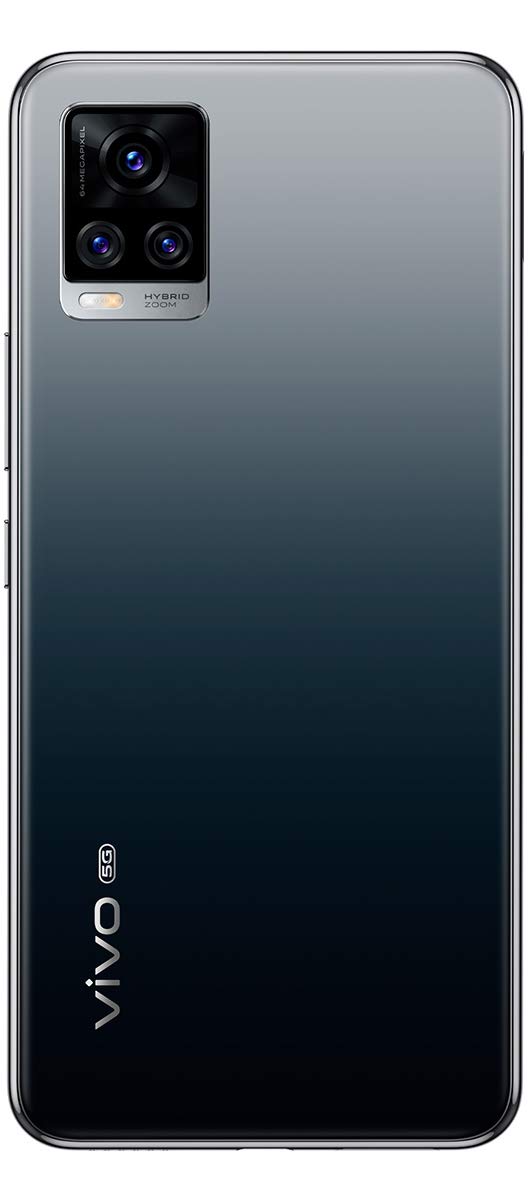
Figure 2: Rear view of the Vivo V20 Pro smartphone, showcasing the camera module and Midnight Jazz finish.
Key Features:
- Display: 6.44-inch FHD+ AMOLED Display
- Processor: Qualcomm Snapdragon 765G 5G Mobile Platform
- RAM: 8GB
- Internal Storage: 128GB
- Rear Camera: 64MP Triple Camera System
- Front Camera: 44MP Dual Selfie Camera with Eye Autofocus
- Battery: 4000mAh with 33W FlashCharge
- Operating System: Funtouch OS 11 (based on Android 10)
2. Device Layout
Familiarize yourself with the physical components and ports of your Vivo V20 Pro.

Figure 3: Right side of the device, featuring the power button and volume rocker.

Figure 4: Bottom of the device, including the USB Type-C port, speaker grille, and SIM card tray.

Figure 5: Top of the device, featuring the secondary microphone.
3. Setup
3.1 Unboxing
Upon opening the product box, you will find the following items:
- Vivo V20 Pro Handset
- Earphones
- Documentation (Quick Start Guide, Warranty Card)
- MicroUSB to USB Cable (USB Type-C)
- USB Power Adaptor (33W FlashCharge)
- SIM Ejector Tool
- Protective Case
- Protective Film (pre-applied)
3.2 SIM Card Installation
- Locate the SIM card tray on the bottom edge of the device.
- Insert the SIM ejector tool into the small hole next to the tray and press gently until the tray pops out.
- Place your Nano-SIM cards into the designated slots on the tray. The Vivo V20 Pro supports dual Nano-SIM cards.
- Carefully reinsert the SIM tray into the device until it is flush with the side.
3.3 Initial Power-On
- Press and hold the Power button (located on the right side) until the Vivo logo appears on the screen.
- Follow the on-screen instructions to complete the initial setup, including language selection, Wi-Fi connection, Google account setup, and fingerprint registration.
4. Operating Your Device
4.1 Display and User Interface
The Vivo V20 Pro features a 6.44-inch FHD+ AMOLED display with a resolution of 2400 x 1080 pixels. It supports HDR10 for enhanced visual quality and offers a maximum brightness of 600 nits. The device runs on Funtouch OS 11, based on Android 10, providing a customized and intuitive user experience.
4.2 Fingerprint Sensor
The device is equipped with an in-display fingerprint sensor for secure and convenient unlocking. To register your fingerprint, navigate to Settings > Security > Fingerprint and follow the on-screen instructions.
4.3 Navigation
Navigate through the Funtouch OS using gestures or traditional navigation buttons, configurable in Settings > System navigation.
5. Camera Features
The Vivo V20 Pro is equipped with a versatile camera system for capturing high-quality photos and videos.
5.1 Rear Camera
The rear camera module consists of a 64MP primary sensor, an 8MP multi-function camera (super wide-angle, macro, bokeh), and a 2MP monochrome camera.
- Super Night Mode: Utilizes specialized filters and noise cancellation for brighter, more detailed low-light images.
- Tripod Night Mode: Enhances stability and exposure for superior low-light photography when the device is stationary.
- Super Wide-Angle: Captures broader scenes, ideal for landscapes and group shots.
- Super Macro: Allows close-up photography with subjects as near as 2.5 cm.
- Bokeh Portrait: Creates a blurred background effect, highlighting the subject. Background blur can be adjusted after taking the photo.
- Ultra Stable Video: Provides enhanced video stabilization for smooth recordings.

Figure 6: Close-up of the triple rear camera module.
5.2 Front Camera
The dual front camera setup includes a 44MP primary sensor with eye autofocus and an 8MP super wide-angle camera.
- Eye Autofocus: Automatically tracks and focuses on your eyes for sharp selfies and videos.
- 4K Video Recording: Supports 4K video recording at 60 frames per second.
- Super Wide-Angle Selfie: Features a 105-degree field of view, ideal for group selfies, with distortion correction algorithms.
- Double Exposure Mode: Allows combining a different background with a foreground for creative effects.
- Slo-Mo Selfie Mode: Records slow-motion selfie videos at 240 frames per second.
- Art Portrait Video: Desaturates the background, leaving the subject in full color for striking video effects.
- Dual View Video: Records video simultaneously using both front and rear cameras.
6. Performance
The Vivo V20 Pro is powered by the Qualcomm Snapdragon 765G Octa-core SoC, coupled with 8GB of RAM, ensuring smooth performance for most applications and games.
- Vapor Chamber Liquid Cooling: Helps maintain optimal device temperature during intensive use, reducing core temperatures by up to 10 degrees Celsius.
- Ultra Game Mode: Optimizes gaming performance by locking incoming notifications, activating accidental touch prevention, and locking brightness.
- 5G Connectivity: Supports 5G on SA and NSA networks, providing high-speed internet access where available.
7. Battery and Charging
The device is equipped with a 4000mAh lithium-ion battery, designed to provide ample power for a full day of use.
- 33W FlashCharge: Supports fast charging, capable of charging the device to 65% in approximately 30 minutes.
- Vivo Energy Guardian (VEG): Optimizes battery usage for extended battery life.
8. Specifications
| Operating System | Android (Funtouch OS 11) |
| RAM | 8 GB |
| Internal Storage | 128 GB |
| Processor | Qualcomm Snapdragon 765G Octa-core |
| Display Size | 16.35 cm (6.44 inch) |
| Display Resolution | 2400 x 1080 pixels (FHD+ AMOLED) |
| Rear Camera | 64MP + 8MP + 2MP |
| Front Camera | 44MP + 8MP |
| Battery Capacity | 4000mAH |
| Fast Charging | 33W FlashCharge |
| Connectivity | 5G, 4G, 3G, Wi-Fi, Bluetooth |
| Dimensions | 15.9 x 0.7 x 7.4 cm |
| Weight | 170 g |
| Audio Jack | 3.5 mm |
9. In the Box
The following items are included with your Vivo V20 Pro:
- Handset
- Earphones
- Documentation
- MicroUSB to USB Cable
- USB Power Adaptor
- SIM Ejector
- Protective Case
- Protective Film (applied)
10. Warranty and Support
Your Vivo V20 Pro comes with a standard 1-year manufacturer's warranty from the date of purchase. For detailed warranty terms and conditions, please refer to the included Warranty Card or visit the official Vivo support website.
For technical assistance, troubleshooting, or service requests, please contact Vivo customer support using the contact information provided in your documentation.