
CHOUBENBEN 2019090123
User Manual
Replacement Mitsubishi Electric Mr Slim Air Conditioner Remote Control
Product Overview
This manual provides instructions for the CHOUBENBEN Replacement Remote Control, compatible with various Mitsubishi Electric Mr Slim Air Conditioner models including MS-A09WA-1, MS-A12WA-1, MS-A15WA-1, and MS-A17WA-1. This remote is designed to provide seamless control over your air conditioning unit.

Image: Front view of the replacement remote control. Note the Fahrenheit temperature display.
Setup
Battery Installation
The remote control requires two AAA 1.5V batteries (not included). Follow these steps to install them:
- Locate the battery compartment cover on the back of the remote control.
- Slide the cover downwards or in the direction indicated by an arrow to open it.
- Insert two AAA 1.5V batteries, ensuring the positive (+) and negative (-) terminals align correctly with the markings inside the compartment.
- Slide the battery compartment cover back into place until it clicks securely.
Once batteries are installed, the remote is ready for use. No programming is required for this replacement unit.
Operating Instructions
This remote control is designed to operate your Mitsubishi Electric Mr Slim Air Conditioner with intuitive button functions.
Key Functions
- ON/OFF Button: Press to turn the air conditioner unit on or off.
- MODE Button: Cycles through operating modes such as Cool, Heat, Fan, Dry, and Auto.
- Temperature Adjustment Buttons (▲/▼): Adjusts the desired temperature setting. Note: This remote displays temperature in Fahrenheit ONLY.
- FAN Button: Adjusts the fan speed (e.g., Low, Medium, High, Auto).
- VANE Button: Controls the direction of the air swing.
- SMART SET Button: Activates or deactivates a pre-set comfort setting.
- ECO COOL Button: Engages an energy-saving cooling mode.
- TIME Button: Used for setting the timer functions.
- START/STOP Buttons: Used in conjunction with the TIME button to set programmed on/off times.
- RESET CLOCK Button: Resets the internal clock of the remote.
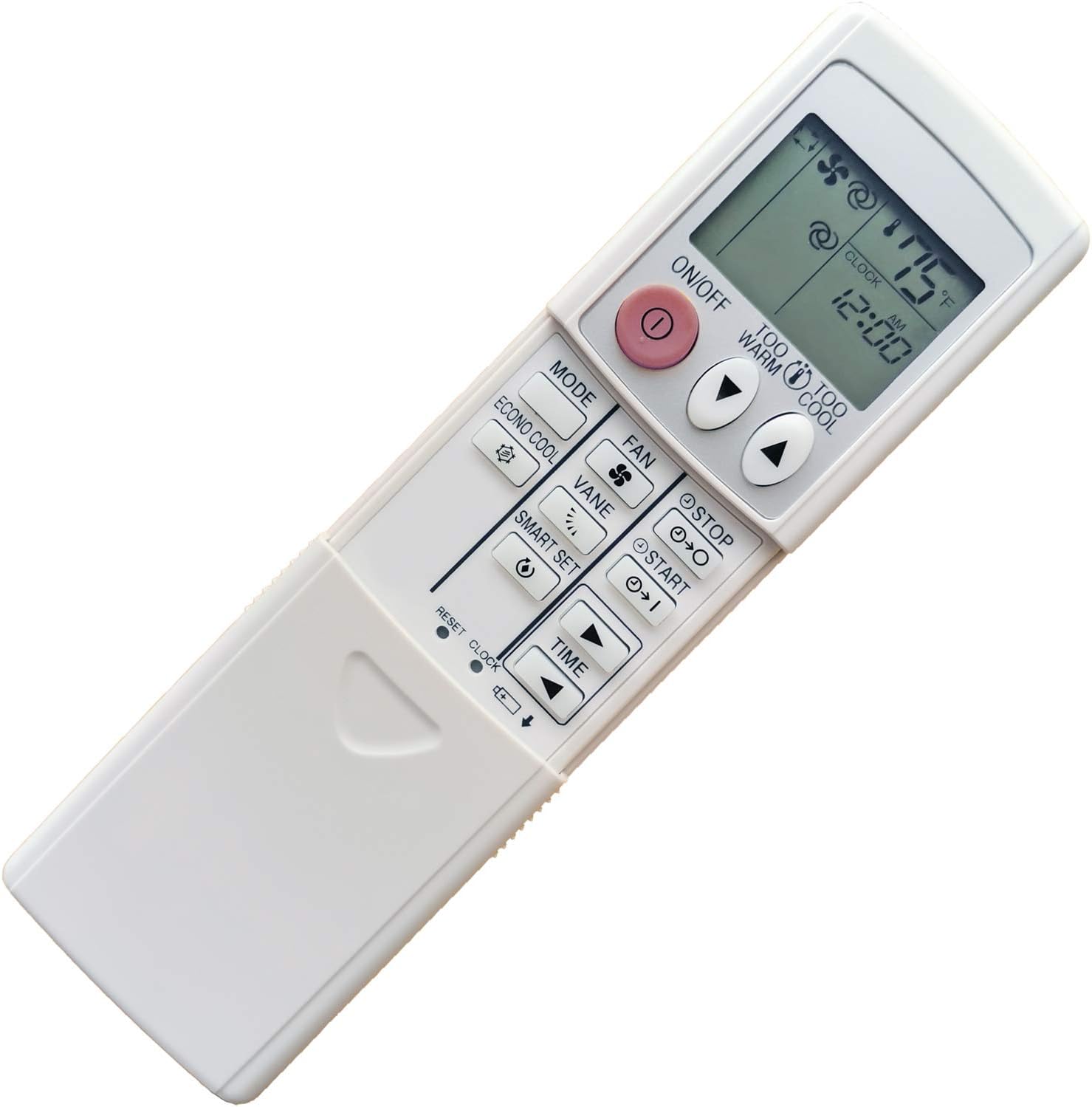
Image: Overview of the remote control's buttons and display.
Maintenance
Cleaning the Remote
To maintain the remote control's appearance and functionality:
- Wipe the surface with a soft, dry cloth.
- Do not use liquid cleaners, abrasive cleaners, or chemical sprays, as these can damage the remote's surface or internal components.
Battery Replacement
Replace batteries when the display becomes dim or the remote's response becomes sluggish. Always replace both batteries at the same time with new AAA 1.5V batteries. Dispose of used batteries according to local regulations.
Troubleshooting
| Problem | Possible Cause | Solution |
|---|---|---|
| Remote not responding. | Dead or incorrectly installed batteries. | Check battery polarity. Replace batteries with new AAA 1.5V batteries. |
| Remote range is poor. | Weak batteries or obstruction between remote and AC unit. | Replace batteries. Ensure clear line of sight to the air conditioner's receiver. |
| Display is dim or blank. | Low battery power. | Replace batteries. |
| Temperature displays in Celsius. | Incorrect remote model or setting. | This remote model is designed to display in Fahrenheit ONLY. If it displays Celsius, it may be a different model or a malfunction. |
Specifications
- Model Number: 2019090123
- Compatible Air Conditioner Models: Mitsubishi Electric Mr Slim MS-A09WA-1, MS-A12WA-1, MS-A15WA-1, MS-A17WA-1
- Power Source: 2 x AAA 1.5V Batteries (not included)
- Display Unit: Fahrenheit (°F) ONLY
- Dimensions: Approximately 8.43 x 3.43 x 0.98 inches (21.4 x 8.7 x 2.5 cm)
- Weight: Approximately 13.1 ounces (371 grams)
- Special Feature: Ergonomic design
- Brand: CHOUBENBEN
Warranty and Support
For warranty information or technical support regarding your CHOUBENBEN Replacement Remote Control, please refer to the seller's policy on the original purchase platform or contact the seller directly. This product is a replacement part and typically does not come with a manufacturer's warranty from Mitsubishi Electric.
For further assistance, you may contact the seller, REMOTE CONTROL USA, through the Amazon platform where the product was purchased.
no relevant documents
Ask a question about this manual
Ask about setup, troubleshooting, compatibility, parts, safety, or missing instructions. Manuals+ will review the question and use this page’s manual context to help answer it.