Introduction
Thank you for purchasing the Roxel RCD-S70BT Portable Boombox. This device offers versatile audio playback options including CD, USB MP3, FM radio, Bluetooth wireless streaming, and AUX input. Its compact and portable design makes it suitable for both indoor and outdoor use. Please read this manual carefully to ensure proper operation and to maximize your enjoyment of the product.
Package Contents
- Roxel RCD-S70BT Portable Boombox
- Remote Control
- AC Power Cable
- User Manual (this document)
Product Overview
Familiarize yourself with the main components and controls of your Roxel RCD-S70BT Boombox.

Figure 1: Front view of the Roxel RCD-S70BT Boombox and its remote control.

Figure 2: Detailed view of the control panel, showing buttons for power, volume, tuning, mode selection, and display.
Control Panel Functions:
- POWER Button: Turns the unit on or off.
- VOLUME Knob: Adjusts the audio output level.
- FUN/EQ Button: Switches between functions (CD, USB, FM, AUX, BT) and adjusts equalizer settings.
- TUN-/K.F Button: Tunes FM radio down or skips to previous track/file.
- TUN+/K.F Button: Tunes FM radio up or skips to next track/file.
- P/SCAN Button: Plays/pauses media or scans for FM radio stations.
- /REP/MEM Button: Stops playback, activates repeat mode, or saves FM radio stations.
- LED Display: Shows current mode, track number, time, or radio frequency.
- USB Port: For connecting USB flash drives for MP3 playback.
- AUX Input: 3.5mm jack for connecting external audio devices.
- Headphone Jack: 3.5mm jack for private listening.
Setup
1. Powering the Unit
The Roxel RCD-S70BT can be powered by AC mains or batteries.
- AC Power: Connect the supplied AC power cable to the AC IN jack on the back of the unit and then to a standard wall outlet.
- Battery Power: For portable use, open the battery compartment on the bottom of the unit and insert 4 x 'C' size batteries (not included), ensuring correct polarity.
2. Initial Setup
- Extend the FM antenna for better radio reception.
- Press the POWER button to turn on the unit.
Operating Instructions
1. Basic Operation
- Power On/Off: Press the POWER button.
- Volume Adjustment: Rotate the VOLUME knob clockwise to increase volume, counter-clockwise to decrease.
- Mode Selection: Press the FUN/EQ button repeatedly to cycle through modes: CD, USB, FM, AUX, BT.
2. CD Playback
- Open the CD compartment lid.
- Place a CD (standard audio CD or MP3 CD) onto the spindle with the label side facing up.
- Close the CD compartment lid.
- Press the FUN/EQ button to select CD mode. The display will show "CD" and then the track number.
- Press the P/SCAN button to start playback.
- Press P/SCAN again to pause playback. Press again to resume.
- Press TUN-/K.F or TUN+/K.F to skip to the previous or next track. Hold to fast forward/rewind.
- Press the /REP/MEM button repeatedly to select repeat modes (e.g., repeat one, repeat all).
3. USB MP3 Playback
- Insert a USB flash drive into the USB port.
- Press the FUN/EQ button to select USB mode. The display will show "USB" and then the track number.
- Playback will start automatically. If not, press the P/SCAN button.
- Use TUN-/K.F and TUN+/K.F buttons to navigate tracks.
4. FM Radio Operation
- Extend the telescopic antenna for optimal reception.
- Press the FUN/EQ button to select FM mode. The display will show the radio frequency.
- Auto Scan: Press and hold the P/SCAN button to automatically scan and save available FM stations.
- Manual Tuning: Press TUN-/K.F or TUN+/K.F briefly to fine-tune the frequency. Hold to scan for the next available station.
- Saving Stations: After tuning to a desired station, press and hold the /REP/MEM button until the display flashes. Use TUN-/K.F or TUN+/K.F to select a preset number, then press /REP/MEM again to confirm.
- Recalling Stations: Briefly press the /REP/MEM button to cycle through saved preset stations.
5. Bluetooth Operation
- Press the FUN/EQ button to select BT (Bluetooth) mode. The display will show "BT" and flash, indicating it's ready for pairing.
- On your Bluetooth-enabled device (smartphone, tablet, etc.), enable Bluetooth and search for available devices.
- Select "Roxel RCD-S70BT" from the list of devices.
- Once paired, the boombox will emit a confirmation sound, and the "BT" indicator will stop flashing.
- You can now play audio from your device through the boombox. Use your device or the boombox controls for playback and volume.
6. AUX Input
- Connect one end of a 3.5mm audio cable (not included) to the AUX IN jack on the boombox.
- Connect the other end to the headphone jack or audio output of your external audio device.
- Press the FUN/EQ button to select AUX mode. The display will show "AUX".
- Play audio from your external device. Volume can be controlled via the boombox or the external device.
7. Using the Remote Control
The included remote control allows for convenient operation from a distance. Ensure the remote has a working battery and is pointed towards the boombox's front panel.
- POWER: Turns the unit on/off.
- VOL+/VOL-: Adjusts volume up/down.
- MODE: Switches between CD, USB, FM, AUX, BT modes.
- PLAY/PAUSE: Starts or pauses playback.
- PREV/NEXT: Skips to previous/next track or tunes radio frequency.
- STOP: Stops playback.
- REP: Activates repeat function.
- MEM: Used for saving/recalling FM radio presets.
- EQ: Cycles through equalizer presets (Rock, Pop, Flat, Classical, Jazz).
Maintenance
- Cleaning: Use a soft, dry cloth to clean the exterior of the unit. Do not use abrasive cleaners or solvents.
- CD Lens Care: Avoid touching the CD lens. If necessary, use a specialized CD lens cleaner.
- Storage: When not in use for extended periods, remove batteries and store the unit in a cool, dry place away from direct sunlight and extreme temperatures.
- Ventilation: Ensure proper ventilation around the unit during operation to prevent overheating.
Troubleshooting
If you experience issues with your boombox, please refer to the following table for common problems and solutions.
| Problem | Possible Cause | Solution |
|---|---|---|
| No power | Power cable not connected; Batteries depleted or incorrectly inserted. | Check AC power connection; Replace batteries or ensure correct polarity. |
| No sound | Volume too low; Incorrect mode selected; Mute activated. | Increase volume; Select correct mode (CD, USB, FM, AUX, BT); Check remote for mute button. |
| CD/USB not playing | Disc/USB inserted incorrectly; Disc/USB damaged or unsupported format. | Reinsert disc/USB correctly; Try a different disc/USB; Ensure files are MP3 format for USB. |
| Poor FM reception | Antenna not extended; Weak signal. | Fully extend the telescopic antenna; Reposition the unit for better signal. |
| Bluetooth pairing failed | Boombox not in pairing mode; Device too far; Bluetooth disabled on device. | Ensure boombox is in BT mode and flashing; Move device closer; Enable Bluetooth on your device. |
| Remote control not working | Battery depleted; Obstruction between remote and unit. | Replace remote battery; Remove any obstructions. |
Specifications
Detailed technical specifications for the Roxel RCD-S70BT Portable Boombox.
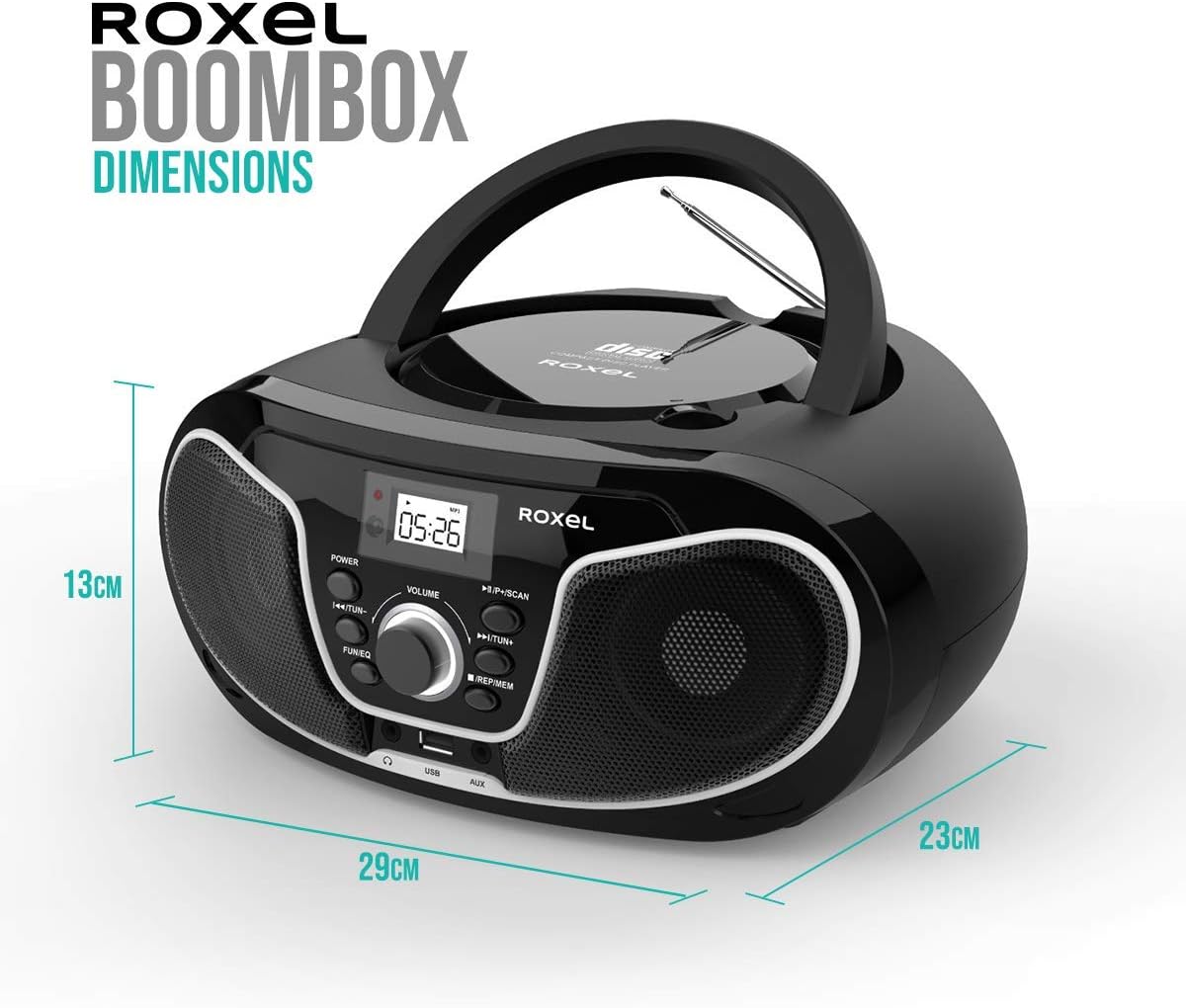
Figure 3: Dimensions of the Roxel RCD-S70BT Boombox.
| Model Number | RC-S70BT |
| Brand | Roxel |
| Product Dimensions (L x W x H) | 21 x 27 x 13 cm |
| Weight | 1.9 kg |
| Speaker Output | 2 x 4W (Total 8W) |
| Connectivity | Bluetooth, USB, AUX (3.5mm), FM Radio |
| Disc Compatibility | Audio CD, MP3 CD |
| USB Compatibility | MP3 files |
| Power Source | AC 230V ~ 50Hz or 4 x 'C' size batteries |
| Display | 4-digit LED Display |
| Country of Origin | China |
Warranty Information
The Roxel RCD-S70BT Portable Boombox comes with a one-year warranty from the date of purchase. In the event of a malfunction within the first 12 months, Roxel will repair or replace the unit. Please retain your proof of purchase for warranty claims. This warranty does not cover damage caused by misuse, accident, unauthorized modification, or normal wear and tear.
Customer Support
For further assistance, technical support, or warranty inquiries, please contact Roxel customer service. Refer to the product packaging or the official Roxel website for the most up-to-date contact information.
Note: Product specifications and design are subject to change without notice for improvement.