
1. Introduction
This manual provides detailed instructions for the installation, operation, and maintenance of your HENDUN Outdoor Door Alarm (Model WMCHD). This device is designed to enhance security for various outdoor and indoor applications, including doors, gates, sheds, and pool areas. It features IP67 waterproofing for outdoor use and a 140 dB alarm.
2. Safety Information
- The alarm produces a loud sound (140 dB). Avoid prolonged exposure to prevent hearing discomfort.
- Keep batteries out of reach of children. If swallowed, seek immediate medical attention.
- Ensure proper battery polarity during installation.
- This device is not a substitute for adult supervision, especially near pools or hazardous areas.
3. Package Contents
Verify that all items are present in the package:
- HENDUN Outdoor Door Alarm Main Unit
- Magnetic Sensor
- Remote Control
- 4 x AAA Batteries (for main unit)
- 1 x CR2032 Battery (for remote control)
- Mounting Hardware (screws, anchors, adhesive pads, strap)
- User Guide (this manual)

4. Product Overview
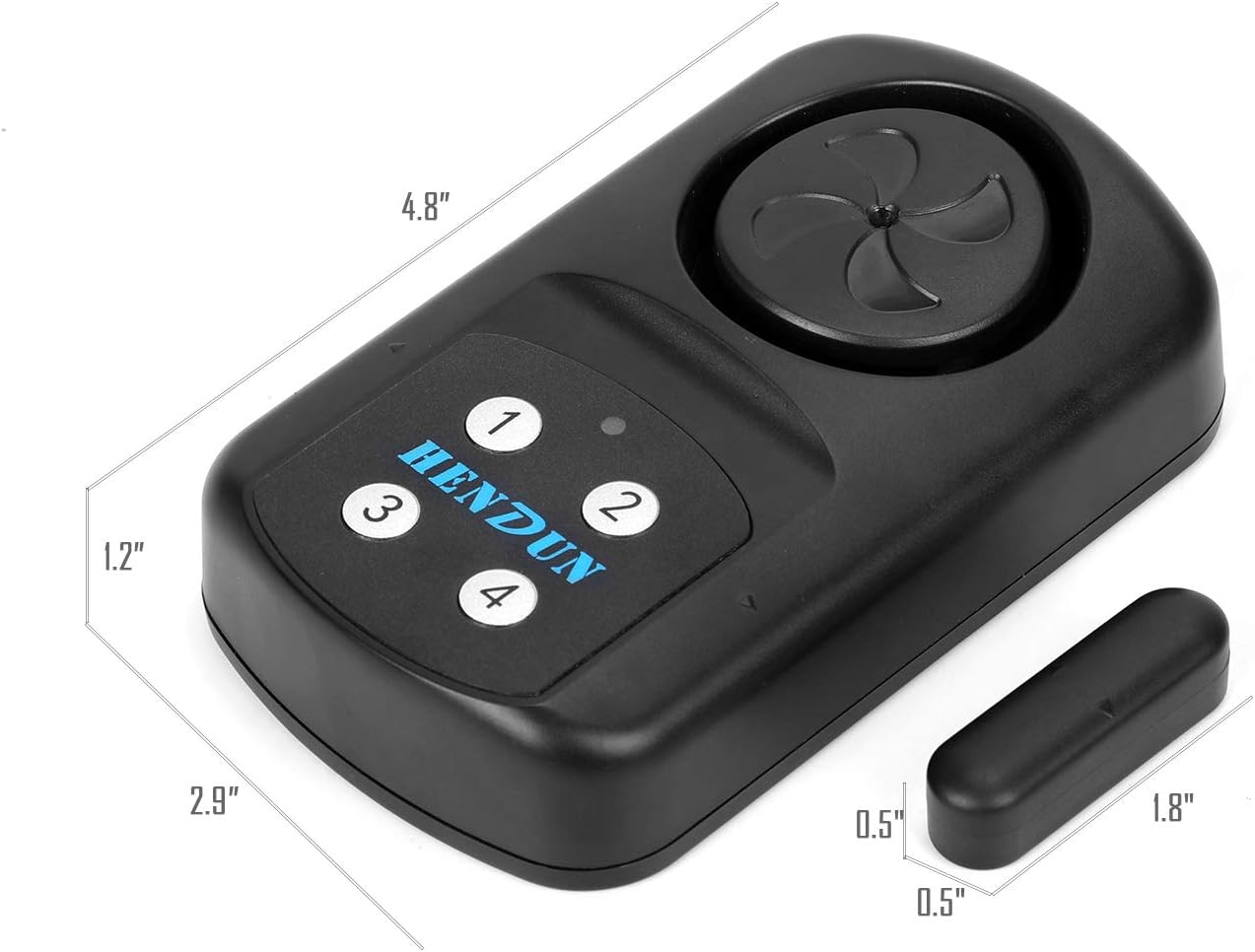
The HENDUN Outdoor Door Alarm system consists of a main alarm unit, a magnetic sensor, and a remote control for convenient operation.

Main Unit Features:
- Loud Siren: 140 dB alarm for effective deterrence.
- Keypad: Four numeric buttons for function setting (not for password entry).
- LED Indicator: For status updates.
- Battery Compartment: For 4 x AAA batteries.
Remote Control Features:
- Arm Button: Activates the alarm.
- Disarm Button: Deactivates the alarm.
- Home Button: Cycles through alarm modes (Immediate, Doorbell, SOS).
- SOS Button: Triggers an immediate SOS alarm.
5. Specifications
| Model Number | WMCHD |
| Noise Level | 140 dB |
| Waterproof Rating | IP67 |
| Power Source (Main Unit) | 4 x AAA batteries (included) |
| Power Source (Remote) | 1 x CR2032 battery (included) |
| Control Method | Remote, Touch (for mode selection) |
| Dimensions (Main Unit) | 4.72 x 2.76 x 0.98 inches (12 x 7 x 2.5 cm) |
| Item Weight | 6 ounces (170 grams) |

6. Setup and Installation
6.1 Battery Installation
- Main Unit:
- Locate the battery compartment on the back of the main alarm unit.
- Open the compartment and insert 4 x AAA batteries, ensuring correct polarity (+/-).
- Close the battery compartment securely.
- Remote Control:
- The remote control comes with a pre-installed CR2032 battery. Remove the plastic isolation tab if present.
- If replacing, open the remote control casing and insert a new CR2032 battery with the positive (+) side facing up.
- Close the remote control casing.
6.2 Mounting the Alarm
The alarm can be installed using either the provided adhesive pads or screws. Ensure the main unit and magnetic sensor are aligned correctly for proper function.
- Choose Location: Select a clean, dry, and flat surface on your door, window, gate, or other entry point. The main unit and magnetic sensor should be mounted on the same plane, with a gap of no more than 0.6 inches (1.5 cm) when the door/window is closed.
- Adhesive Installation:
- Clean the mounting surface thoroughly.
- Peel off the protective backing from the adhesive pad and firmly press it onto the back of the main unit.
- Repeat for the magnetic sensor.
- Align the main unit and magnetic sensor, ensuring the alignment marks on both components face each other. Press firmly onto the desired surface.
- Screw Installation (Recommended for outdoor or high-security applications):
- Use the provided mounting bracket (if applicable) or mark the screw holes on the main unit and magnetic sensor.
- Drill pilot holes if necessary.
- Secure the main unit and magnetic sensor using the provided screws and anchors.
- Ensure the alignment marks on both components face each other and the gap is appropriate when closed.


7. Operating Instructions
7.1 Arming and Disarming
- To Arm: Press the Lock button (
 ) on the remote control. The alarm will emit a confirmation sound, and the LED indicator may flash.
 - To Disarm: Press the Unlock button (
 ) on the remote control. The alarm will emit a confirmation sound.
Note: The four numeric keys on the main unit are for function settings, not for password entry. Arming and disarming are exclusively done via the remote control.

7.2 Changing Alarm Modes
The alarm has three operational modes: Immediate Alarm, Doorbell (Chime), and SOS. To cycle through these modes, press the Home button ( ) on the remote control.
- Immediate Alarm Mode: When triggered (magnetic sensor separation), the 140 dB alarm will sound for 30 seconds. It will continue to sound for 30 seconds even if the door is closed immediately. You can stop it by disarming with the remote.
- Doorbell (Chime) Mode: When triggered, the unit will emit a chime sound for 30 seconds.
- SOS Mode: When triggered, the alarm will sound continuously until disarmed by the remote control. To activate SOS, press the SOS button (
 ) on the remote control.
Note: The remote control has a wireless range of up to 49 feet (15 meters).


8. Maintenance
8.1 Battery Replacement
When the main unit's battery power is low, it will emit 6 continuous beeps as a reminder. Replace the 4 x AAA batteries promptly to ensure continuous operation.
- Open the battery compartment on the back of the main unit.
- Remove the old batteries and dispose of them according to local regulations.
- Insert new 4 x AAA alkaline batteries, observing correct polarity.
- Close the battery compartment securely.
For the remote control, replace the CR2032 battery when its range or responsiveness decreases.
8.2 Cleaning
Wipe the alarm unit and magnetic sensor with a soft, damp cloth. Do not use abrasive cleaners or solvents, as these can damage the unit's finish or internal components. The IP67 rating ensures resistance to water and dust, but avoid submerging the unit for extended periods.
9. Troubleshooting
| Problem | Possible Cause | Solution |
|---|---|---|
| Alarm does not sound when door opens. |
|
|
| Alarm continues to sound for 30 seconds after door is closed. | This is normal behavior for Immediate Alarm and Doorbell modes. | Disarm the alarm using the remote control to stop the sound immediately. |
| Alarm beeps 6 times continuously. | Low battery reminder. | Replace the 4 x AAA batteries in the main unit. |
| Remote control not working. |
|
|
| Alarm triggers randomly. |
|
|
10. Warranty and Support
HENDUN products are designed for reliability and performance. For any questions, technical support, or warranty inquiries, please contact HENDUN customer service through the retailer where the product was purchased or visit the official HENDUN website for contact information.
Please retain your proof of purchase for warranty claims.