
Introduction
Thank you for purchasing the Aiwa AWS500BT Portable Bluetooth Speaker. This manual provides essential information for the safe and efficient use of your device. Please read it thoroughly before operation and retain it for future reference. The AWS500BT is designed to deliver powerful 2.1 channel audio with dual subwoofers, offering deep bass and clear highs for an enhanced listening experience. Its portable design and Bluetooth 5.1 connectivity make it ideal for various indoor and outdoor activities.
Product Overview

Figure 1: Aiwa AWS500BT Portable Bluetooth Speaker with dynamic LED lighting.
The Aiwa AWS500BT is a compact and robust portable Bluetooth speaker featuring a 2.1 audio system with dual 3-inch subwoofers and an additional 2-inch speaker. This configuration ensures balanced sound reproduction with deep bass, clear mids, and defined highs.
Key Features:
- Powerful 2.1 Sound: 20W RMS output with dual subwoofers for rich audio.
- Bluetooth 5.1 Connectivity: Stable wireless connection up to 10 meters.
- Rechargeable Battery: 3000 mAh battery providing up to 4 hours of playback (2 hours at maximum volume).
- Portable Design: Easy to carry with a practical size and durable construction.
- Versatile Connectivity: Supports Bluetooth, USB, and AUX input.
- Dynamic LED Lights: Integrated lighting for an enhanced visual experience.
Package Contents

Figure 2: Aiwa AWS500BT speaker packaging, showing the product and accessories.
Upon unpacking, please ensure all items listed below are present and in good condition:
- 1 x Aiwa AWS500BT Portable Bluetooth Speaker
- 1 x USB Charging Cable
- 1 x User Manual
- 1 x Shoulder Strap (for easy portability)
Controls and Functions
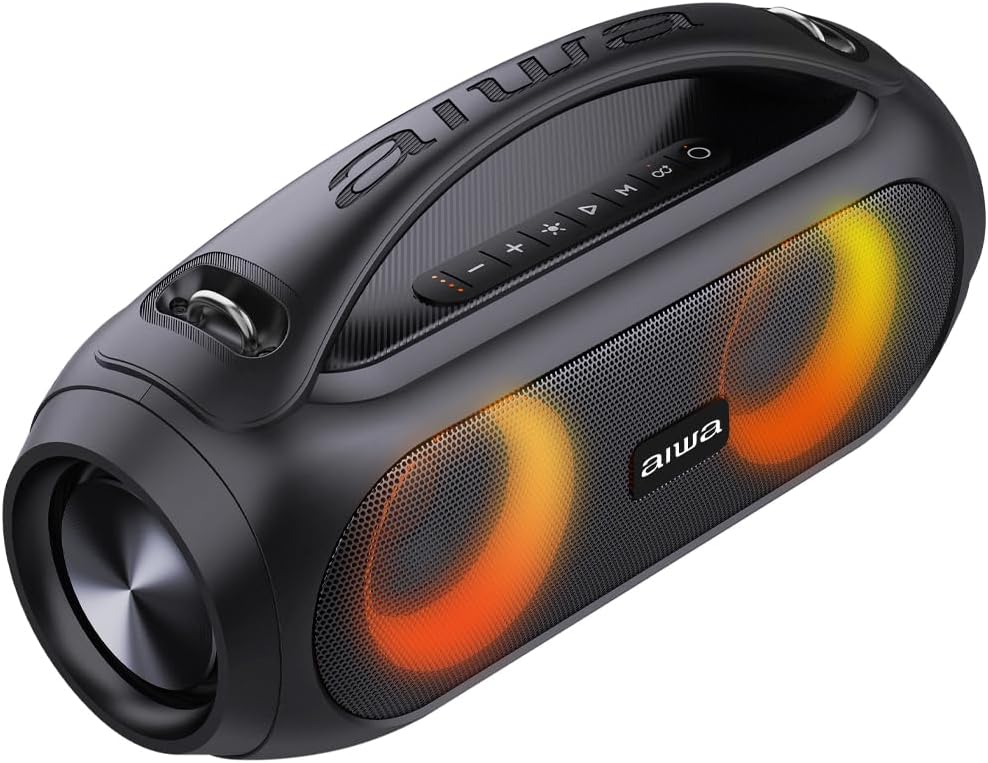
Figure 3: Control panel and handle of the Aiwa AWS500BT speaker.
Familiarize yourself with the control buttons located on the top panel of the speaker:
- Power Button: Press and hold to turn the speaker On/Off.
- Volume Down (-): Press to decrease volume.
- Volume Up (+): Press to increase volume.
- Play/Pause Button (▶︎||): Press to play or pause music.
- Mode Button (M): Press to switch between Bluetooth, USB, and AUX input modes.
- Light Mode Button (☀︎): Press to cycle through different LED light patterns or turn them off.
- Bluetooth Pairing Button (∞): Press to enter Bluetooth pairing mode.
- Previous Track Button (⏮︎): Press to go to the previous track.
- Next Track Button (⏭︎): Press to go to the next track.
Setup
1. Charging the Speaker
Before first use, fully charge the speaker.
- Connect the provided USB charging cable to the speaker's USB port.
- Connect the other end of the USB cable to a compatible USB power adapter (not included) or a computer's USB port.
- The charging indicator light will illuminate. It takes approximately 5 hours for a full charge.
- Once fully charged, the indicator light will change or turn off, depending on the model. Disconnect the charging cable.
Note: The speaker provides up to 4 hours of playback, or 2 hours at maximum volume, on a full charge.
2. Powering On/Off
- To turn On: Press and hold the Power button (O) for a few seconds until the indicator light illuminates and you hear an audible prompt.
- To turn Off: Press and hold the Power button (O) again for a few seconds until the indicator light turns off and you hear an audible prompt.
Operating Instructions
1. Bluetooth Pairing
- Ensure the speaker is powered on and in Bluetooth mode. If not, press the Mode button (M) until you hear the Bluetooth prompt. The Bluetooth indicator light will flash, indicating it's ready for pairing.
- Enable Bluetooth on your smartphone, tablet, or other device.
- Search for available Bluetooth devices and select "AIWA AWS500BT" from the list.
- Once paired, you will hear a confirmation sound, and the Bluetooth indicator light will stop flashing and remain solid.
- You can now play audio from your device through the speaker.
Note: The speaker will automatically attempt to reconnect to the last paired device when powered on.
2. USB Playback
The speaker supports playing MP3 files directly from a USB drive.
- Insert a USB drive containing MP3 audio files into the speaker's USB port.
- Press the Mode button (M) to switch to USB mode. The speaker will automatically begin playing music from the USB drive.
- Use the Play/Pause, Previous Track, and Next Track buttons to control playback.
3. AUX Input
Connect external audio devices using an AUX cable (not included).
- Connect one end of a 3.5mm AUX cable to the speaker's AUX input port.
- Connect the other end to the audio output of your external device.
- Press the Mode button (M) to switch to AUX mode.
- Control playback and volume from your external device.
4. Adjusting Volume and Tracks
- Press the Volume Up (+) button to increase the volume.
- Press the Volume Down (-) button to decrease the volume.
- Press the Next Track (⏭︎) button to skip to the next song.
- Press the Previous Track (⏮︎) button to go back to the beginning of the current song or to the previous song.
5. LED Light Control
- Press the Light Mode button (☀︎) to cycle through various LED light patterns.
- Continue pressing to select your preferred light mode or to turn the lights off.
Maintenance
- Cleaning: Use a soft, dry cloth to clean the speaker. Do not use abrasive cleaners or solvents.
- Storage: Store the speaker in a cool, dry place away from direct sunlight and extreme temperatures.
- Battery Care: To prolong battery life, charge the speaker regularly, even if not in use for extended periods. Avoid fully discharging the battery frequently.
- Water Exposure: This speaker is NOT waterproof. Avoid exposing it to water or excessive moisture.
Troubleshooting
| Problem | Possible Cause | Solution |
|---|---|---|
| Speaker does not turn on. | Low battery or no power. | Charge the speaker fully. Ensure the power button is pressed and held correctly. |
| Cannot pair via Bluetooth. | Speaker not in pairing mode, or device Bluetooth is off. | Ensure speaker is in Bluetooth pairing mode (flashing indicator). Turn off and on Bluetooth on your device. Move devices closer. |
| No sound. | Volume too low, incorrect mode, or device not connected. | Increase speaker and device volume. Check if the correct input mode (Bluetooth, USB, AUX) is selected. Reconnect the device. |
| Poor sound quality. | Low battery, device too far, or interference. | Charge the speaker. Move the connected device closer to the speaker. Avoid obstacles between devices. |
Specifications

Figure 4: Dimensions of the Aiwa AWS500BT speaker.
| Feature | Detail |
|---|---|
| Model | AWS500BT |
| Brand | Aiwa |
| Max Speaker Output Power | 40 Watts (Peak) / 20W RMS |
| Frequency Response | 18 KHz |
| Connectivity Technology | Bluetooth 5.1 |
| Audio Output Mode | Stereo (2.1 Channel) |
| Housing Material | Plastic |
| Speaker Type | Dual Subwoofer (70mm diameter each) |
| Control Type | Push Button |
| Color | Black |
| Battery Capacity | 3000 mAh Lithium Ion |
| Average Battery Life | Up to 4 Hours (2 hours at max volume) |
| Battery Charging Time | Approximately 5 Hours |
| Water Resistance | No (Not waterproof) |
| Bluetooth Range | Up to 10 Meters |
| USB Ports | 1 x USB 2.0 |
| Dimensions (D x W x H) | 39 x 17 x 20 cm |
| Weight | 3 Kilograms |
| Compatible Devices | Laptop, Smartphone, Tablet |
Warranty and Support
The Aiwa AWS500BT Portable Bluetooth Speaker comes with a 12-month manufacturer's limited warranty. This warranty covers defects in materials and workmanship under normal use. It does not cover damage caused by misuse, accidents, unauthorized modifications, or exposure to water.
For warranty claims, technical support, or further inquiries, please contact your local Aiwa customer service or refer to the official Aiwa website for contact information. Please retain your proof of purchase for warranty validation.
Product Videos
Video 1: Unboxing and overview of the Aiwa AWS500BT portable Bluetooth speaker, demonstrating its design, controls, and dynamic lighting features. This video highlights the speaker's portability and ease of use for various settings.


