
Qiterr Qiterrh91yzd327e
Qiterr Crane Hoist Control Push Button Switch User Manual
Model: Qiterrh91yzd327e
1. Introduction
This user manual provides detailed instructions for the safe and effective operation, installation, and maintenance of the Qiterr Crane Hoist Control Push Button Switch. Please read this manual thoroughly before using the product to ensure proper functionality and to prevent damage or injury.

Figure 1: Qiterr Crane Hoist Control Push Button Switch (Model: Qiterrh91yzd327e)
2. Safety Information
Always adhere to local safety regulations and guidelines when installing, operating, or maintaining this device. Failure to do so may result in serious injury or equipment damage.
- Ensure power is disconnected before any installation or maintenance work.
- Only qualified personnel should perform electrical connections.
- Do not operate the switch if it is damaged or shows signs of wear.
- Keep the device dry and away from excessive dust or corrosive environments.
3. Setup and Installation
This section outlines the steps for setting up and installing your Qiterr Crane Hoist Control Push Button Switch.
3.1 Unpacking
Carefully remove the controller from its packaging. Verify that all components are present and undamaged. The package should contain: 1 x Controller.
3.2 Wiring Diagram and Connections
The push button switch is designed for crane and hoist control applications. It features a normally open contact type. Refer to the internal wiring diagram (if available with the physical product) for specific connection points. Ensure the working voltage of 500V and contact rated current of 5A are respected.
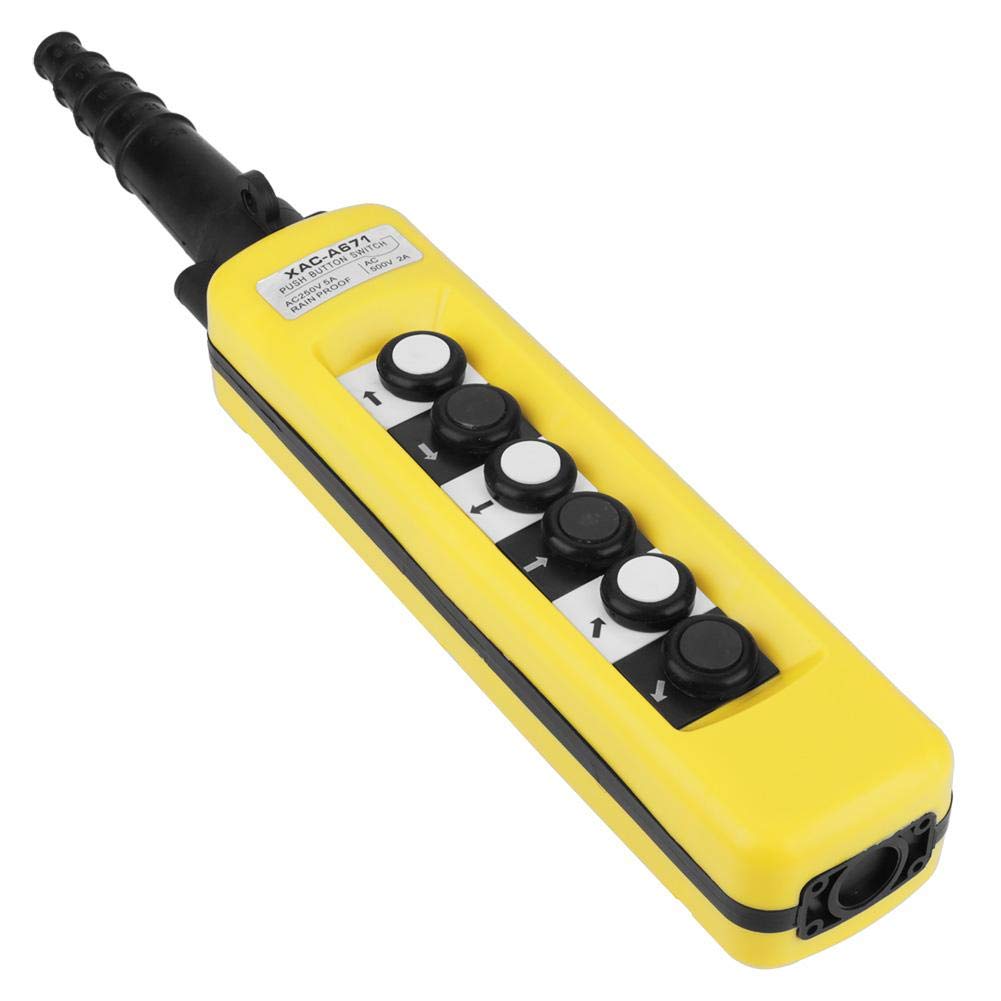
Figure 2: Top-down view of the control unit, highlighting the button layout and cable gland.
3.3 Mounting
The controller is typically suspended from the crane or hoist system via its cable. Ensure the suspension point is secure and can support the weight of the controller (approx. 745g) and any associated cable strain.

Figure 3: Detail of the cable gland, designed for strain relief and protection.
4. Operating Instructions
The Qiterr Crane Hoist Control features six push buttons for intuitive operation. The key colors are black and white, typically indicating different functions (e.g., up/down, left/right, start/stop).
4.1 Button Functions
Each button corresponds to a specific function of the crane or hoist. Common functions include:
- Up/Down: Controls vertical movement of the hoist.
- Left/Right: Controls horizontal movement of the crane trolley.
- Forward/Backward: Controls bridge travel.
- Emergency Stop: (If present) Immediately cuts power to the system.

Figure 4: Detail of the control buttons, showing directional markings.
4.2 Operation
To operate, firmly press the desired button. The switch is designed for comfortable one-hand operation. Release the button to stop the corresponding action. Always ensure the path of movement is clear before initiating any operation.
5. Maintenance
Regular maintenance ensures the longevity and safe operation of your Qiterr push button switch.
5.1 Cleaning
Clean the exterior of the switch periodically with a soft, damp cloth. Do not use abrasive cleaners or solvents. Ensure the device is dry before re-applying power.
5.2 Inspection
Regularly inspect the cable for any signs of wear, fraying, or damage. Check the housing for cracks or deformation. Ensure all buttons operate smoothly and return to their neutral position.

Figure 5: Bottom view of the control unit, showing the durable ABS plastic construction.
6. Troubleshooting
This section provides solutions to common issues you might encounter.
| Problem | Possible Cause | Solution |
|---|---|---|
| Device not responding | No power; Loose connection; Damaged cable. | Check power supply; Verify all connections are secure; Inspect cable for damage and replace if necessary. |
| Button sticking or not engaging | Debris under button; Internal mechanical issue. | Clean around the button; If issue persists, contact qualified technician for inspection. |
| Intermittent operation | Loose internal wiring; Environmental interference. | Have a qualified technician check internal wiring; Ensure operating environment is within specifications. |
7. Specifications
Detailed technical specifications for the Qiterr Crane Hoist Control Push Button Switch.
| Feature | Detail |
|---|---|
| Model | Qiterrh91yzd327e (ASIN: B07X492PJM) |
| Material | ABS Plastic |
| Contact Type | Normally Open |
| Key Colors | Black, White |
| Contact Rated Current | 5 Ampere |
| Working Voltage | 500 Volt |
| IP Protection Class | IP54 |
| Dimensions (L x W) | 47 cm x 7.6 cm (18.5 in x 2.99 in) |
| Product Dimensions (from spec) | 10 x 10 x 10 cm |
| Weight | Approx. 745 g |
| Operating Mode | ON-OFF |
| Control Method | Touch (Push Button) |

Figure 6: Product label with electrical ratings and model information.

Figure 7: Product dimensions overview.
8. Warranty and Support
Specific warranty information is not provided in the product details. For warranty claims or technical support, please contact your retailer or the manufacturer, Qiterr, directly. Retain your proof of purchase for any warranty inquiries.
Manufacturer: Qiterr
First Available Date: July 14, 2020
Ask a question about this manual
Ask about setup, troubleshooting, compatibility, parts, safety, or missing instructions. Manuals+ will review the question and use this page’s manual context to help answer it.