1. Introduction
This manual provides essential information for the safe and efficient installation, operation, and maintenance of your EBM-PAPST A2D250-AH02-01 AC Axial Fan. Please read this manual thoroughly before using the product and retain it for future reference. The EBM-PAPST A2D250-AH02-01 is an AC axial fan designed for various cooling and ventilation applications, offering reliable air movement.
2. Safety Information
Always observe the following safety precautions to prevent injury and damage to the product:
- Electrical Safety: Ensure the power supply matches the fan's voltage and frequency requirements. Disconnect power before installation, maintenance, or troubleshooting. All electrical connections must be performed by a qualified electrician in accordance with local and national electrical codes.
- Handling: Handle the fan with care. Avoid dropping or subjecting it to strong impacts. Do not touch the fan blades while the fan is operating or connected to power.
- Installation Environment: Install the fan in a stable and secure location. Ensure adequate clearance around the fan for proper airflow and to prevent obstruction of moving parts. Avoid installing in environments with excessive moisture, dust, or corrosive gases unless the fan is specifically rated for such conditions.
- Personal Protective Equipment (PPE): Wear appropriate PPE, such as safety glasses and gloves, during installation and maintenance.
3. Package Contents
Upon unpacking, please verify that all components are present and undamaged:
- EBM-PAPST A2D250-AH02-01 AC Axial Fan Unit
- Mounting Hardware (screws, nuts, washers - may vary by supplier)
- This User Manual
If any items are missing or damaged, contact your supplier immediately.
4. Setup and Installation
Follow these steps for proper installation:
- Unpacking: Carefully remove the fan from its packaging. Inspect for any visible damage.
- Mounting: Securely mount the fan to a stable surface using appropriate mounting hardware. Ensure the fan is oriented correctly for the desired airflow direction (typically indicated by an arrow on the fan housing).
- Electrical Connection: Connect the fan to the AC power supply. Refer to the wiring diagram (if provided on the fan label or separate documentation) for correct connections. Ensure proper grounding. The fan operates on AC power, and incorrect wiring can cause damage or pose a safety hazard.
- Airflow Check: Before final power-up, ensure there are no obstructions to the fan blades or airflow path.
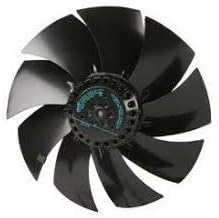
An image of the EBM-PAPST A2D250-AH02-01 AC Axial Fan, showing its multi-bladed design and central motor housing. This fan is designed for efficient air movement in various applications.
5. Operating Instructions
Once installed and connected, operating the EBM-PAPST A2D250-AH02-01 AC Axial Fan is straightforward:
- Power On: Apply power to the fan's electrical connection. The fan should begin to rotate and move air.
- Continuous Operation: The fan is designed for continuous operation within its specified environmental and electrical parameters.
- Monitoring: Periodically check the fan for unusual noises, vibrations, or reduced airflow, which may indicate a problem.
6. Maintenance
Regular maintenance ensures optimal performance and extends the lifespan of your fan:
- Power Disconnection: Always disconnect the fan from the power supply before performing any maintenance.
- Cleaning: Periodically clean the fan blades and housing to remove dust and debris. Use a soft cloth, brush, or compressed air. Avoid using harsh chemicals or abrasive materials.
- Inspection: Regularly inspect the fan for any signs of wear, such as loose connections, damaged wiring, or unusual blade movement. Ensure mounting hardware remains secure.
- Lubrication: This fan typically features sealed bearings that do not require lubrication. Refer to specific product documentation if unsure.
7. Troubleshooting
If you encounter issues with your fan, refer to the following common problems and solutions:
| Problem | Possible Cause | Solution |
|---|---|---|
| Fan does not start | No power supply; Incorrect wiring; Motor fault | Check power connection and circuit breaker; Verify wiring against diagram; Contact support if motor fault is suspected. |
| Fan runs slowly or with reduced airflow | Dust/debris on blades; Obstruction in airflow path; Incorrect voltage | Clean blades and housing; Remove obstructions; Verify correct voltage supply. |
| Excessive noise or vibration | Loose mounting; Damaged blades; Bearing wear | Tighten mounting screws; Inspect blades for damage and replace if necessary; Contact support for bearing issues. |
If the problem persists after attempting these solutions, please contact EBM-PAPST customer support.
8. Specifications
| Feature | Detail |
|---|---|
| Brand | ebm-papst |
| Model Number | A2D250-AH02-01 |
| Fan Type | AC Axial Fan |
| Power Type | AC (Alternating Current) |
| Maximum Rotational Speed | 2500 RPM |
| Item Weight | 6.99 pounds |
| Material (Internal Components) | Copper |
| Compatible Devices (General) | Desktop (as per product listing, typically for industrial/system cooling) |
| UPC | 013415013329 |
9. Warranty and Support
For warranty information, technical support, or service inquiries, please refer to the official EBM-PAPST website or contact your authorized EBM-PAPST distributor. Keep your purchase receipt and product model number (A2D250-AH02-01) readily available when contacting support.


