
1. Introduction
This manual provides essential information for the safe and efficient operation, setup, and maintenance of the Sitel MK3-M8-3-BOX Marking System Controller. Please read this manual thoroughly before operating the device to ensure proper functionality and to prevent damage or injury.
2. Safety Information
Observe the following safety precautions to prevent personal injury and damage to the equipment:
- Ensure the power supply matches the specifications listed on the device's nameplate.
- Do not operate the controller in wet or excessively dusty environments.
- Disconnect power before performing any maintenance or cleaning.
- Only qualified personnel should perform installation and service.
- Avoid blocking ventilation openings to prevent overheating.
3. Product Overview
The Sitel MK3-M8-3-BOX is a robust controller designed for industrial marking systems. It features an integrated display and keyboard for direct input and system monitoring.
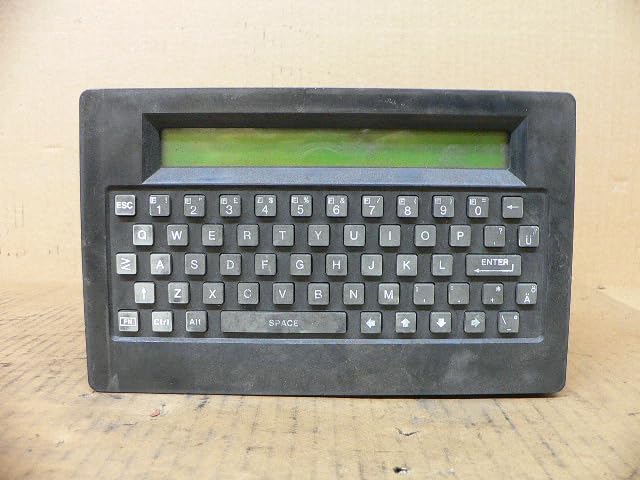
Figure 3.1: Front Panel. This image displays the front of the Sitel MK3-M8-3-BOX controller, featuring a green monochrome display screen at the top and a full QWERTY keyboard below it. The keyboard includes alphanumeric keys, function keys (ESC, ALT, CTRL), arrow keys, and an ENTER key. The casing is dark gray and appears to be made for industrial use.
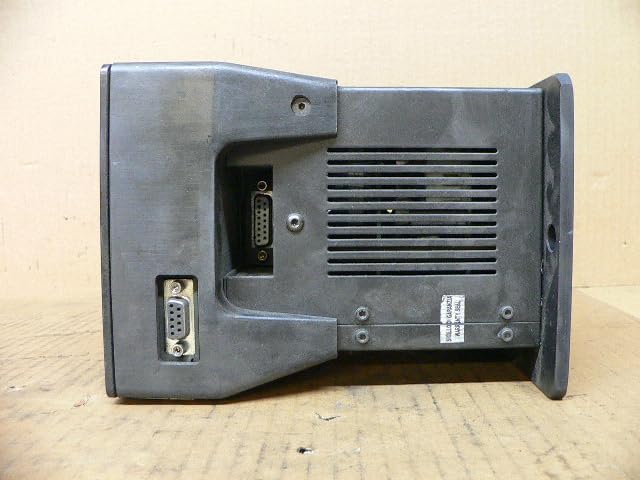
Figure 3.2: Side Panel. This image shows the side of the Sitel MK3-M8-3-BOX controller. Visible features include two D-subminiature connectors (likely serial ports) for external connections, and a series of ventilation grilles to dissipate heat. A small white sticker with text is also visible near the grilles, possibly indicating a warranty or inspection status.
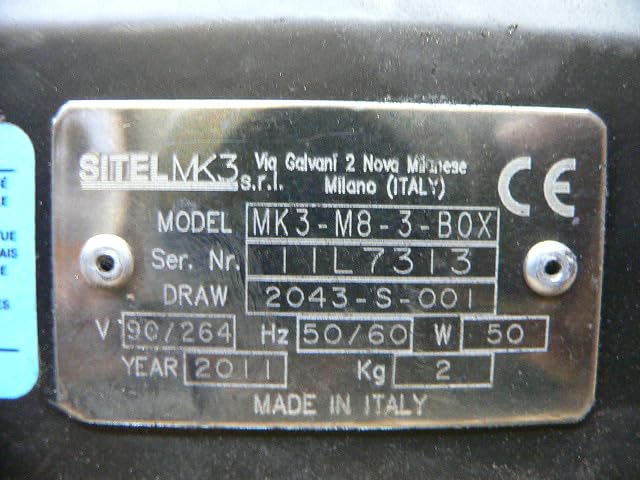
Figure 3.3: Product Nameplate. This close-up image displays the metallic nameplate affixed to the Sitel MK3-M8-3-BOX controller. It clearly shows the brand "SITELMK3", model "MK3-M8-3-BOX", serial number "11L7313", and electrical specifications including voltage (90/264 V), frequency (50/60 Hz), and power (50 W). The plate also indicates "MADE IN ITALY" and the manufacturing year "2011".
4. Setup
- Unpacking: Carefully remove the controller from its packaging. Inspect for any signs of damage during transit.
- Mounting: Secure the controller in a stable, well-ventilated location, away from direct heat sources or excessive vibration.
- Connections:
- Connect the power cable to the appropriate power input on the controller and then to a grounded electrical outlet.
- Connect any peripheral devices (e.g., marking head, external sensors) to the designated ports on the side or rear of the controller using appropriate cables. Refer to the specific marking system's manual for peripheral connection details.
- Initial Power-On: Once all connections are secure, switch on the power. The display should illuminate, and the system should initiate its startup sequence.
5. Operating Instructions
The Sitel MK3-M8-3-BOX controller operates through its integrated keyboard and display. Specific operational procedures will depend on the marking system software installed.
- Navigation: Use the arrow keys to navigate through menus and options on the display.
- Data Entry: Use the QWERTY keyboard to input text, numerical values, and commands.
- Confirmation: Press the ENTER key to confirm selections or inputs.
- Exit/Cancel: Use the ESC key to exit menus or cancel operations.
- Function Keys: Specific functions may be assigned to keys like ALT or CTRL in conjunction with other keys, as defined by the marking system software.
For detailed software-specific operations, refer to the software's dedicated user manual.
6. Maintenance
Regular maintenance ensures the longevity and reliable operation of your controller.
- Cleaning:
- Periodically clean the exterior of the controller with a soft, damp cloth. Do not use abrasive cleaners or solvents.
- Ensure the display and keyboard are free from dust and debris.
- Ventilation: Regularly check that the ventilation grilles are clear of obstructions to maintain proper airflow and prevent overheating.
- Cable Inspection: Periodically inspect all connected cables for wear, damage, or loose connections.
- Software Updates: If applicable, ensure the system software is kept up-to-date according to manufacturer recommendations.
7. Troubleshooting
This section addresses common issues you might encounter. For problems not listed here, contact technical support.
| Problem | Possible Cause | Solution |
|---|---|---|
| Controller does not power on. | No power supply; loose power cable; faulty power outlet. | Check power cable connection; verify power outlet functionality; ensure power switch is ON. |
| Display is blank or unreadable. | Contrast/brightness settings incorrect; system error. | Adjust display settings (if available); restart the controller. |
| Keyboard input not responding. | Keyboard malfunction; system frozen. | Restart the controller. If issue persists, contact support. |
| Peripheral device not recognized. | Loose cable connection; incorrect port; driver issue. | Check cable connections; ensure correct port usage; refer to peripheral manual. |
8. Specifications
- Model: MK3-M8-3-BOX
- Manufacturer: Sitel
- Product Dimensions: 7.09 x 6.3 x 8.27 inches (18 x 16 x 21 cm)
- Weight: 6.17 Pounds (2.8 kg)
- Power Input: 90/264 V AC, 50/60 Hz, 50 W (as per nameplate)
- First Available Date: August 27, 2019
9. Warranty Information
Specific warranty terms for the Sitel MK3-M8-3-BOX Marking System Controller are typically provided at the point of purchase or with the original product documentation. Please refer to your purchase agreement or contact your vendor for detailed warranty coverage and conditions.
10. Technical Support
For technical assistance, service, or spare parts, please contact your authorized Sitel distributor or the vendor from whom you purchased the product. When contacting support, please have your model number (MK3-M8-3-BOX) and serial number (found on the product nameplate) readily available.