
1. Introduction
Thank you for choosing the LogiLink BP0079 TV Stand. This stand is designed to provide a stable and elegant solution for mounting your 49-70 inch LCD, Plasma, or LED television. It features a fixed V-base design, ensuring your television is securely positioned. This manual provides comprehensive instructions for safe installation, operation, and maintenance of your new TV stand.

Figure 1.1: The LogiLink BP0079 TV Stand with a television, showcasing its sleek design in a contemporary environment.
2. Safety Information
Please read all safety warnings and instructions carefully before assembly and use. Failure to do so may result in serious personal injury or property damage.
- Weight Capacity: Do not exceed the maximum load capacity of 40 kg (88 lbs). Ensure your TV's weight is within this limit.
- Screen Size: This stand is designed for televisions between 49 and 70 inches. Using a TV outside this range may compromise stability.
- VESA Compatibility: Ensure your TV's VESA mounting pattern is compatible with 600 x 400 mm.
- Assembly: Assemble the stand strictly according to the instructions. Do not modify the product or use unapproved parts.
- Stability: Place the stand on a flat, stable, and level surface. Avoid placing it on uneven ground or near edges where it could tip over.
- Children and Pets: Keep children and pets away from the assembly area. Do not allow children to climb on or play with the stand or mounted TV.
- Moving the Stand: Always remove the TV from the stand before attempting to move the stand. Moving the stand with a TV mounted can cause instability and damage.
3. Package Contents
Before beginning assembly, verify that all parts are present and undamaged. If any parts are missing or damaged, do not attempt to assemble. Contact your retailer for assistance.

Figure 3.1: Overview of the LogiLink BP0079 TV Stand components, including the main pole, V-base, and VESA mounting brackets.
Parts List:
- Main Support Pole (1)
- V-Base (1)
- VESA Mounting Brackets (2)
- Top Pole Cap (1)
- Cable Management Clips (2)
- Adjustable Feet/Pads (3)
- Hardware Kit (Screws, Washers, Allen Key)
4. Setup and Assembly
Follow these steps carefully to assemble your TV stand. It is recommended to have two people for assembly, especially when mounting the television.
Step 4.1: Attach the V-Base to the Main Support Pole
- Carefully unpack all components and lay them out on a soft, clean surface to prevent scratches.
- Align the V-Base with the bottom of the Main Support Pole.
- Secure the V-Base to the Main Support Pole using the provided screws and the Allen key. Ensure all screws are tightened firmly.

Figure 4.1.1: Detail of the V-base connection to the main pole, showing the secure screw points.
Step 4.2: Attach VESA Mounting Brackets to the Main Support Pole
- Slide the two VESA Mounting Brackets onto the Main Support Pole.
- Position the brackets at the desired height for your television. The stand is fixed, so the height adjustment is done during this step.
- Secure the brackets to the pole using the designated screws. Ensure they are level and tightly fastened.

Figure 4.2.1: The VESA mounting bracket securely fastened to the main support pole, ready for TV attachment.
Step 4.3: Attach VESA Mounting Brackets to Your Television
- Carefully place your television face down on a soft, clean surface.
- Identify the VESA mounting holes on the back of your television.
- Attach the VESA Mounting Brackets (the ones already on the pole) to the back of your TV using the appropriate screws from the hardware kit. Ensure the screws are compatible with your TV's mounting holes and are tightened securely. Do not overtighten.
Step 4.4: Mount the Television onto the Stand
- With assistance, carefully lift the television with the attached VESA brackets.
- Align the VESA brackets on the TV with the corresponding slots on the stand's main pole.
- Gently lower the television, ensuring the brackets slide into place and the TV is securely seated on the stand.
- Double-check all connections and ensure the TV is stable before releasing it.
Step 4.5: Cable Management
- Route your TV's power and video cables neatly along the main support pole.
- Use the provided cable management clips to secure the cables to the pole, keeping them tidy and preventing tangles.
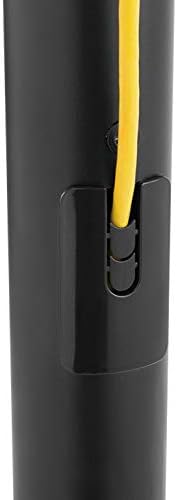
Figure 4.5.1: Integrated cable management clips help keep cables organized and out of sight.
5. Operating
The LogiLink BP0079 TV Stand is a fixed-position stand. Once assembled and the TV is mounted, no further operational adjustments are required for the stand itself.
- Placement: Position the stand in a location that provides optimal viewing angles and is free from obstructions.
- Stability Check: Periodically check that the stand is stable and the TV is securely mounted.
- Cable Routing: Ensure all cables are routed safely and do not pose a tripping hazard.
6. Maintenance
Regular maintenance will help ensure the longevity and safety of your TV stand.
- Cleaning: Wipe the stand with a soft, dry cloth. For stubborn marks, a slightly damp cloth can be used, followed by drying. Avoid abrasive cleaners or solvents.
- Screw Tightness: Every few months, check all screws and bolts to ensure they remain tight. Retighten if necessary, but do not overtighten.
- Damage Inspection: Periodically inspect the stand for any signs of wear, damage, or corrosion. If any damage is found, discontinue use and contact customer support.
7. Troubleshooting
If you encounter any issues with your TV stand, refer to the following common problems and solutions.
| Problem | Possible Cause | Solution |
|---|---|---|
| Stand is wobbly/unstable | Screws are loose; uneven surface; TV too heavy or too large. | Ensure all assembly screws are tightened. Move stand to a flat, level surface. Verify TV weight and size are within specifications. |
| TV does not fit mounting brackets | Incorrect VESA pattern; wrong screws used. | Check your TV's VESA pattern against the stand's 600x400mm compatibility. Ensure you are using the correct screws for your TV. |
| Cables are messy | Cable management clips not used or improperly used. | Utilize the integrated cable management clips on the main pole to route and secure cables neatly. |
8. Specifications
Detailed technical specifications for the LogiLink BP0079 TV Stand.
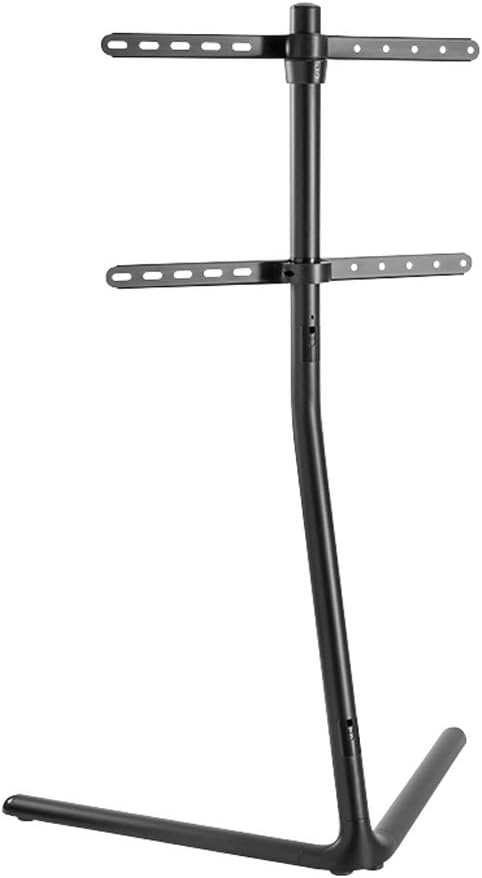
Figure 8.1: Dimensional drawing of the LogiLink BP0079 TV Stand, showing key measurements.
- Brand: LogiLink
- Model Number: BP0079
- Color: Black
- Compatible Devices: Televisions
- Minimum Compatible Screen Size: 49 inches
- Maximum Compatible Screen Size: 70 inches
- Maximum Load Capacity: 40 kg (88 lbs)
- VESA Compatibility: 600 x 400 mm
- Mounting Type: Floor Stand (V-Base)
- Movement Type: Fixed
- Manufacturer: 2direct GmbH
- Country of Origin: China
9. Warranty and Support
For information regarding warranty coverage, technical support, or replacement parts, please refer to the official LogiLink website or contact your local retailer where the product was purchased. Keep your proof of purchase for warranty claims.


