
1. Introduction
Thank you for purchasing the LG Smart TV 43LM6300PSB. This 43-inch Full HD LED TV features LG's ThinQ AI and webOS 4.5 for an intuitive smart TV experience. It includes integrated Wi-Fi, multiple HDMI ports, and advanced picture and sound technologies like Dynamic Color Enhancer and Dolby Audio. This manual will guide you through the setup, operation, and maintenance of your new television.

Figure 1.1: Front view of the LG 43LM6300PSB Smart TV.
2. Setup
2.1 Unboxing and Package Contents
Carefully remove the TV and all components from the packaging. Ensure all items listed below are present:
- 1 x LG Smart TV (43LM6300PSB)
- Base and fixing screws
- Power cable (ABNT Standard)
- Cable organizer
- User Manual (this document)
- Remote control
- AAA batteries (for remote control)
2.2 Attaching the Stand
- Place the TV screen-down on a soft, flat surface to prevent damage.
- Align the stand bases with the corresponding slots on the bottom of the TV.
- Secure the bases with the provided screws. Do not overtighten.

Figure 2.1: Front view of the TV with the stand attached.
2.3 Connecting External Devices
Refer to the back panel of your TV for various input ports. Connect your devices (e.g., cable box, Blu-ray player, gaming console) using HDMI cables. The TV features 3 HDMI ports.
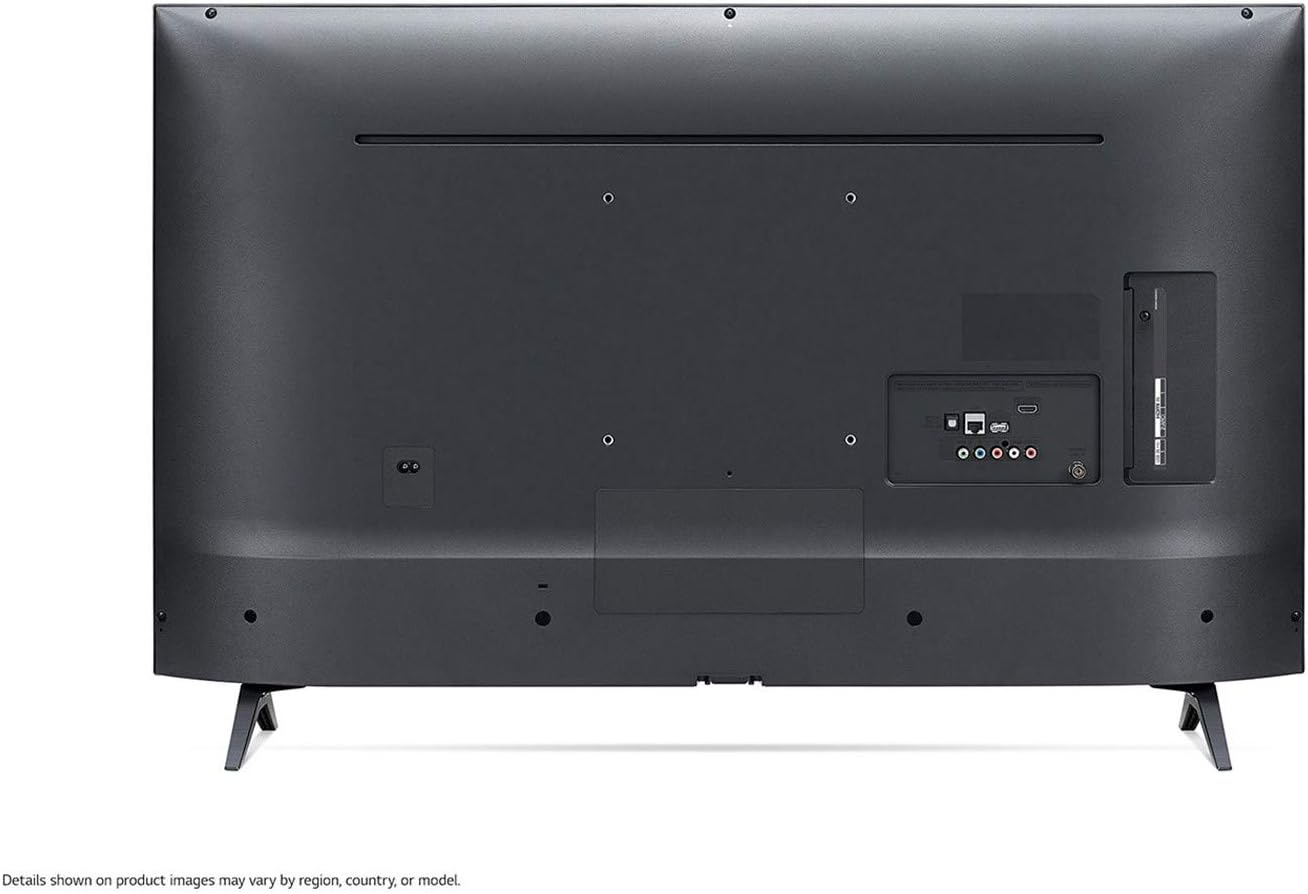
Figure 2.2: Rear view of the TV displaying various input/output ports.
2.4 Power Connection and Initial Setup
- Connect the power cable to the TV and then to a wall outlet. Ensure the voltage matches your region (110V or 220V).
- Press the power button on the remote control or on the TV.
- Follow the on-screen instructions to complete the initial setup, including language selection, time zone, and network connection.
- For network connection, select your Wi-Fi network and enter the password. The TV has integrated Wi-Fi.
3. Operating Instructions
3.1 Basic Controls
Use the provided remote control to navigate the TV's functions. The main buttons include:
- Power: Turns the TV on/off.
- Volume +/-: Adjusts the volume level.
- Channel +/-: Changes TV channels.
- Home: Accesses the webOS Smart TV dashboard.
- Navigation (Arrow) Buttons: Moves cursor/selection.
- OK/Enter: Confirms selection.
- Back: Returns to the previous screen.
- Input: Selects input source (HDMI 1, HDMI 2, etc.).
3.2 Smart TV Features (webOS 4.5)
Your LG Smart TV runs on webOS 4.5, providing easy access to various applications and content. Press the Home button on your remote to access the launcher bar at the bottom of the screen.
- Streaming Services: Easily access pre-installed apps like Netflix and YouTube.
- LG Content Store: Download additional applications and games.
- ThinQ AI: Utilize AI features for personalized recommendations and smart home integration.
3.3 Picture and Sound Settings
Customize your viewing and listening experience through the TV's settings menu.
- Picture Modes: Select from modes like Vivid, Standard, Eco, Cinema, Sports, Game, and isf Expert. The Dynamic Color Enhancer feature automatically adjusts colors for richer, more natural images.
- Color Temperature: Adjust between Warm, Cool, or Medium.
- Sound Modes: Choose from Standard, Music, Cinema, Sports, News, and Game.
- Dolby Audio: Experience clear and immersive sound with Dolby Audio technology.
- Clear Voice III: Enhances dialogue clarity.
3.4 Voice Control
While a Magic Remote is not included, you can utilize voice control features by downloading the official LG TV Plus app on your smartphone. This app allows you to control the TV, including voice commands, directly from your mobile device.
4. Maintenance
4.1 Cleaning the TV
- Always unplug the TV before cleaning.
- Use a soft, dry cloth to wipe the screen and cabinet.
- For stubborn marks, lightly dampen the cloth with water or a mild, non-abrasive screen cleaner. Do not spray liquid directly onto the TV.
- Avoid using harsh chemicals, abrasive pads, or solvents.
4.2 Software Updates
To ensure optimal performance and access to the latest features, regularly check for and install software updates. You can usually find this option in the TV's settings menu under 'General' or 'About This TV'. Ensure your TV is connected to the internet for updates.
5. Troubleshooting
If you encounter issues with your LG Smart TV, refer to the following common problems and solutions:
| Problem | Possible Solution |
|---|---|
| No power | Check if the power cable is securely connected to the TV and the wall outlet. Test the outlet with another device. |
| No picture / Black screen | Ensure the correct input source is selected. Check HDMI cable connections. Try restarting the TV. |
| No sound | Check volume level and mute status. Verify audio settings. If using external speakers, check their connections. |
| Wi-Fi connection issues | Restart your router and modem. Re-enter the Wi-Fi password. Ensure the TV is within range of the Wi-Fi signal. |
| Remote control not working | Replace the batteries. Ensure there are no obstructions between the remote and the TV's IR receiver. |
For more detailed troubleshooting or persistent issues, please visit the official LG support website or contact customer service.
6. Specifications
Below are the key technical specifications for the LG Smart TV 43LM6300PSB:
- Model: 43LM6300PSB
- Screen Size: 43 inches
- Display Technology: LED
- Resolution: Full HD (1920 x 1080)
- Operating System: webOS
- Connectivity: Integrated Wi-Fi, 3 x HDMI ports
- Power Consumption: 50 watts
- Voltage: 110 Volts, 220 Volts (Dual Voltage)
- Dimensions (W x H x D): 97.3 cm x 62.5 cm x 21.8 cm (with stand)
- Weight: 8.1 kg (with stand)
- Compatible Internet Services: Netflix, YouTube

Figure 6.1: Dimensional overview of the LG 43LM6300PSB Smart TV.
7. Warranty and Support
7.1 Manufacturer's Warranty
This LG Smart TV 43LM6300PSB comes with a manufacturer's warranty of 12 months from the date of purchase. Please retain your proof of purchase for warranty claims. The warranty covers manufacturing defects under normal use conditions.
7.2 Customer Support
For technical assistance, service requests, or further information, please visit the official LG website or contact LG customer support in your region. You can find contact details and frequently asked questions on their support pages.
Visit the official LG store on Amazon: LG Official Store