
ELECTROPRIME WMT-248
ELECTROPRIME Cherub WMT-248
Digital Metronome and Tuner Instruction Manual
1. Introduction
Thank you for choosing the ELECTROPRIME Cherub WMT-248 Digital Metronome and Tuner. This versatile device is designed to assist musicians with precise timing and accurate instrument tuning. It combines the functions of a metronome for rhythm practice and a tuner for various instruments, making it an essential tool for students and professionals alike. Please read this manual carefully to ensure proper operation and to maximize the lifespan of your device.
2. Product Overview
Familiarize yourself with the components of your Cherub WMT-248.
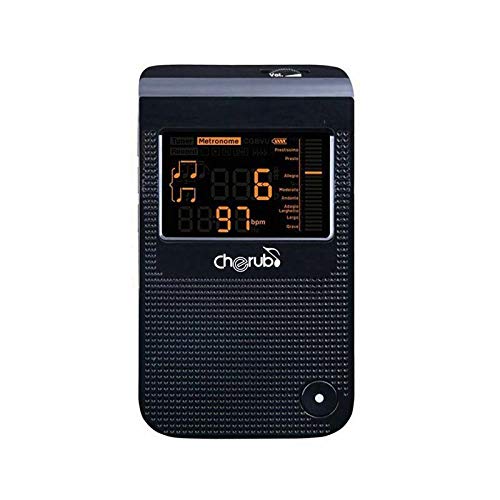
Figure 2.1: Front View. This image displays the front of the Cherub WMT-248, featuring its large digital display which shows tuning and metronome information, along with the 'cherub' brand logo.
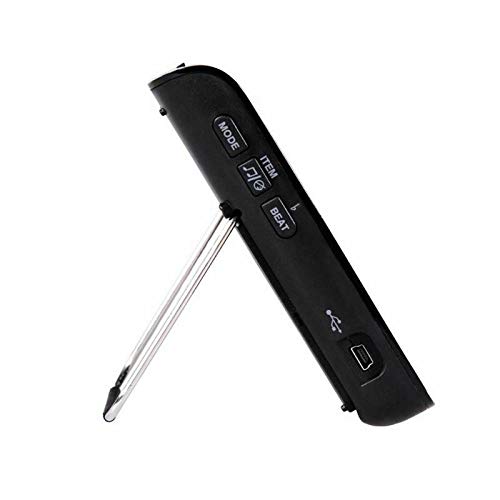
Figure 2.2: Side View. This image highlights the side of the device, showing the control buttons (MODE, ITEM, BEAT) and the USB port for power or connectivity. A retractable kickstand is also visible.
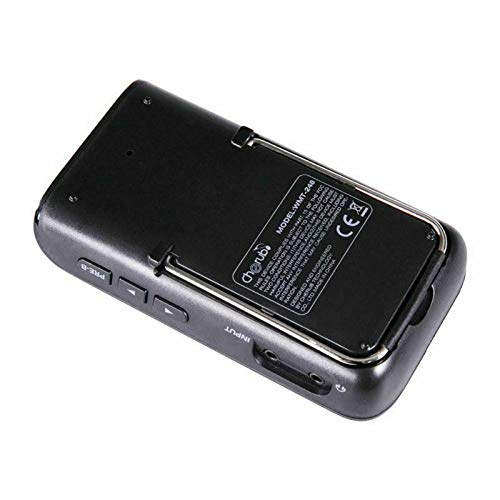
Figure 2.3: Rear View. The back of the Cherub WMT-248 is shown, revealing the battery compartment, the integrated kickstand, and the product label with the model number WMT-248.
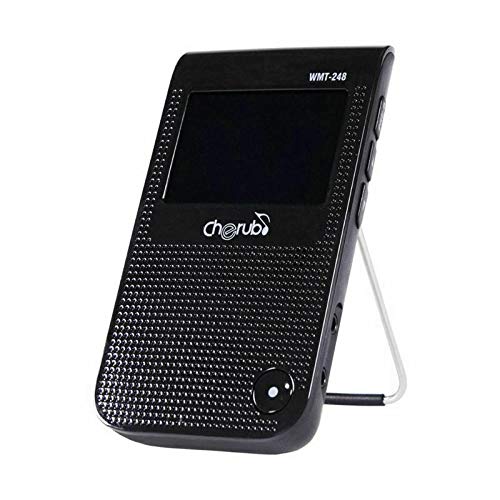
Figure 2.4: Angled View with Stand. This image presents an angled front view of the Cherub WMT-248 with its kickstand extended, demonstrating how the device can be positioned upright for optimal viewing during use.
Controls and Ports:
- Display Screen: Large LCD for displaying tuning notes, metronome tempo, and settings.
- MODE Button: Switches between Metronome and Tuner modes.
- ITEM Button: Navigates through settings or parameters within a mode (e.g., tuning modes, beat patterns).
- BEAT Button: Adjusts the beat subdivision in metronome mode.
- Volume Knob: Controls the output volume of the metronome click.
- USB Port: For power supply or potential data transfer (refer to specific model features).
- Input Jack: (If present) For connecting an instrument directly for tuning.
- Built-in Microphone: For acoustic tuning.
- Kickstand: Retractable stand for upright positioning.
3. Setup
3.1 Battery Installation
- Locate the battery compartment on the back of the device (refer to Figure 2.3).
- Slide open the battery cover.
- Insert two AAA batteries (not included), ensuring correct polarity (+/-) as indicated inside the compartment.
- Close the battery cover securely.
3.2 Powering On/Off
- To power on, press and hold the MODE button for a few seconds until the display illuminates.
- To power off, press and hold the MODE button again until the display turns off. The device may also have an auto-power-off feature to conserve battery life.
3.3 Using the Kickstand
- Gently pull out the kickstand from the back of the unit (refer to Figure 2.4).
- Place the device on a flat surface for stable, upright viewing.
- To retract, push the kickstand back into its slot until it clicks into place.
4. Operating Instructions
4.1 Metronome Mode
The metronome function provides a steady beat to help with rhythm and timing.
- Press the MODE button until 'Metronome' or a similar indicator appears on the display.
- Setting Tempo (BPM): Use the arrow buttons (or similar controls, if present, otherwise assume ITEM button cycles through values) to adjust the Beats Per Minute (BPM). The range is typically from 30 to 250 BPM.
- Setting Beat: Press the BEAT button to cycle through different beat patterns (e.g., 0/4, 1/4, 2/4, 3/4, 4/4, 5/4, 6/8). This determines the number of beats per measure and the accent pattern.
- Setting Rhythm: Use the ITEM button to select different rhythm subdivisions (e.g., quarter notes, eighth notes, sixteenth notes, triplets).
- Start/Stop: Press the central button (often the MODE button again, or a dedicated play/pause button) to start or stop the metronome click.
- Adjust Volume: Rotate the Volume Knob to increase or decrease the metronome click volume.
4.2 Tuner Mode
The tuner function helps you accurately tune your musical instrument.
- Press the MODE button until 'Tuner' or a note indicator appears on the display.
- Select Tuning Mode: Use the ITEM button to cycle through different tuning modes (e.g., Chromatic, Guitar, Bass, Violin, Ukulele).
- Connect Instrument: For electric instruments, connect a 1/4-inch cable from your instrument to the Input Jack (if available). For acoustic instruments, use the built-in microphone by placing the device near the sound source.
- Play a Note: Pluck a single string or play a single note on your instrument.
- Read the Display: The display will show the note name (e.g., A, C#, G) and an indicator (needle or bar) showing if the note is flat, sharp, or in tune. Adjust your instrument until the indicator is centered and the note name is correct.
- A4 Calibration: If available, use the ITEM button to adjust the A4 calibration (e.g., 440Hz).
5. Maintenance
- Cleaning: Wipe the device with a soft, dry cloth. Do not use liquid cleaners or abrasive materials.
- Storage: Store the device in a cool, dry place away from direct sunlight and extreme temperatures.
- Battery Care: Remove batteries if the device will not be used for an extended period to prevent leakage.
- Avoid Drops: Protect the device from drops and impacts, which can damage internal components or the display.
6. Troubleshooting
- Device does not power on: Check battery installation and ensure batteries are fresh. If using USB power, ensure the cable and power source are functional.
- Display is dim or flickering: Replace batteries.
- Metronome click is too low/high: Adjust the Volume Knob.
- Tuner is not detecting notes: Ensure the instrument is connected properly (if using input jack) or that the device's microphone is close to the sound source. Check for excessive background noise.
- Tuner seems inaccurate: Verify the selected tuning mode (e.g., Chromatic, Guitar) and A4 calibration setting.
7. Specifications
| Feature | Detail |
|---|---|
| Model | WMT-248 |
| Manufacturer | ELECTROPRIME |
| Color | Black |
| ASIN | B07WSX2W4L |
| First Available | 21 August 2019 |
| Power Supply | 2 x AAA Batteries (not included) or USB Power |
| Metronome Tempo Range | Typically 30-250 BPM |
| Tuning Modes | Chromatic, Guitar, Bass, Violin, Ukulele (common modes) |
8. Warranty and Support
This product is covered by a standard manufacturer's warranty. For specific warranty terms, technical support, or service inquiries, please contact your retailer or the manufacturer, ELECTROPRIME, directly. Keep your purchase receipt as proof of purchase.
Ask a question about this manual
Ask about setup, troubleshooting, compatibility, parts, safety, or missing instructions. Manuals+ will review the question and use this page’s manual context to help answer it.