
1. Introduction
Thank you for choosing the jerryvon Creative Puzzle 3D Construction Toy. This educational set is designed to foster imagination, logical thinking, practical ability, and color recognition in children aged 3 to 6 years. It includes a variety of geometric shapes, dinosaur pieces, and an electric drill to create numerous 2D and 3D models.

Image: Child engaging with the construction toy, demonstrating its use.
2. Package Contents
Please verify that all components listed below are included in your package:
- 1 x Plastic Pegboard (storage case)
- 1 x Electric Drill (requires 2 x AA batteries, not included)
- 2 x Interchangeable Drill Bits
- 1 x Hand Screwdriver
- 1 x Wrench
- 8 x Dinosaur Puzzle Sets (various designs)
- Colorful Screws (various shapes and colors)
- Geometric Shapes (squares, circles, triangles, strips in various colors)
- Nuts and Connectors
- Instruction Manuals (STEM guides for model building)
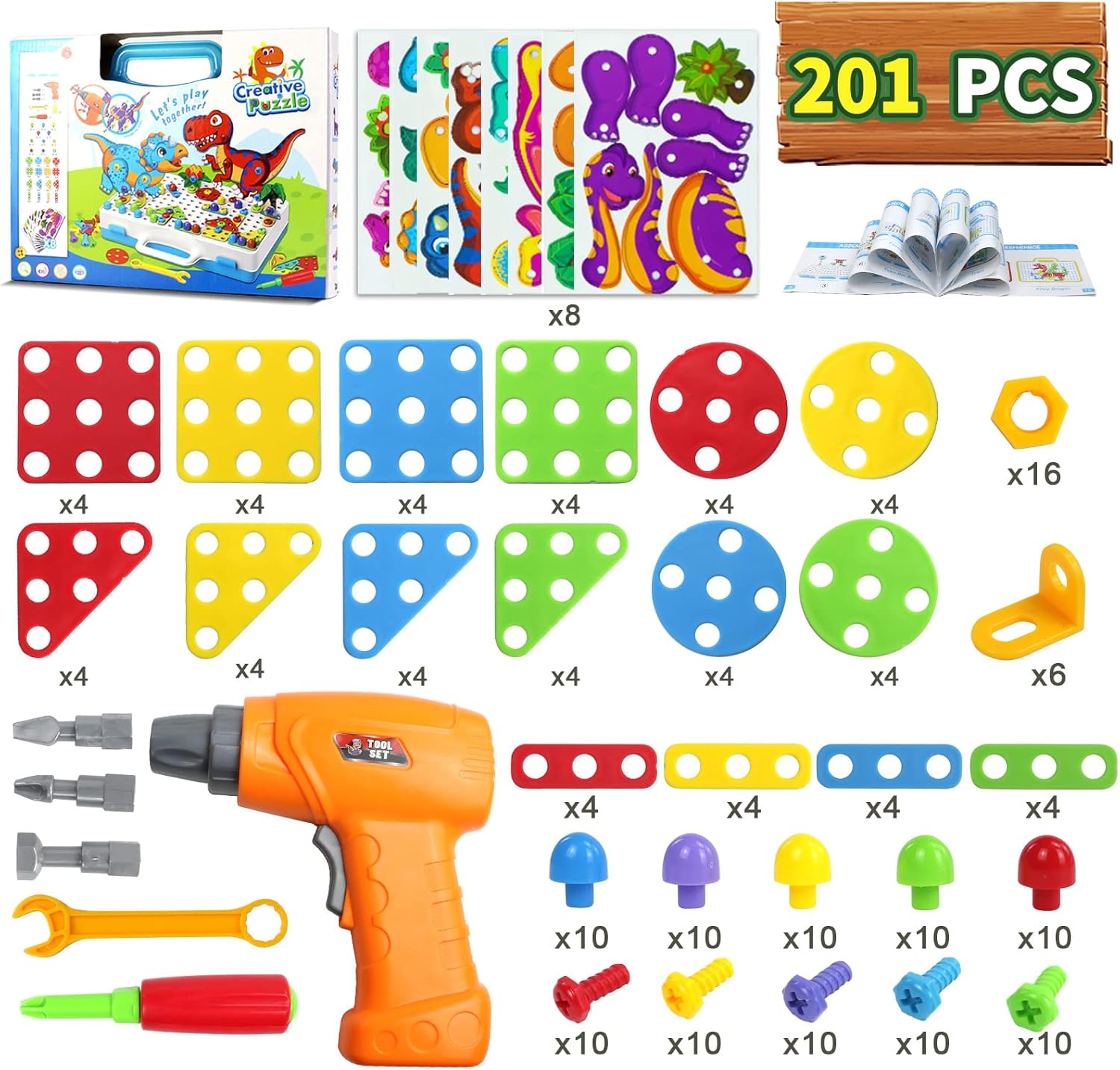
Image: All 201 pieces of the construction toy.
3. Setup
3.1 Battery Installation for Electric Drill
- Locate the battery compartment on the handle of the electric drill.
- Use a small screwdriver (not included) to open the battery compartment cover.
- Insert 2 x AA batteries (not included) into the compartment, ensuring correct polarity (+/-).
- Replace the battery compartment cover and secure it with the screw.
3.2 Preparing the Pegboard
The plastic storage case doubles as the pegboard. Open the case and lay it flat to begin construction. The holes on the surface are designed to accommodate the screws and other building components.

Image: Electric drill battery installation and bit attachment details.
4. Operating Instructions
4.1 Using the Electric Drill
- Attaching Drill Bits: Select the desired drill bit and firmly insert it into the front opening of the electric drill.
- Screwing In: Press the 'DOWN BUTTON' (usually located on the lower part of the handle) to rotate the bit clockwise, driving screws into the pegboard or connecting pieces.
- Screwing Out: Press the 'UP BUTTON' (usually located on the upper part of the handle) to rotate the bit counter-clockwise, removing screws.
4.2 Using Hand Tools
- Hand Screwdriver: Use the hand screwdriver for manual tightening or loosening of screws, especially for smaller adjustments or when the electric drill is not preferred.
- Wrench: The wrench is used to secure nuts onto bolts, providing a stable connection for more complex structures.
4.3 Assembling Models
- Place geometric shapes or dinosaur pieces onto the pegboard.
- Align the holes on the pieces with the holes on the pegboard.
- Use the electric drill or hand screwdriver to insert screws through the pieces and into the pegboard, securing them in place.
- Combine various shapes and colors to create unique 2D patterns or build multi-layered 3D structures.
- Refer to the included STEM manuals for guided construction ideas and challenges.
5. Creative Play Ideas
The jerryvon Creative Puzzle set offers over 60 types of assembly possibilities, encouraging children to explore their creativity. Here are some ideas:
- 2D Designs: Create flat images on the pegboard such as flowers, animals, vehicles, or abstract patterns using the colorful geometric shapes and screws.
- 3D Structures: Utilize the connectors and multiple layers of pieces to build three-dimensional models like robots, trees, trucks, or even complex dinosaur figures.
- Dinosaur Assembly: Use the provided dinosaur puzzle pieces to construct various dinosaur species, then attach them to the pegboard or integrate them into larger scenes.
- Free Play: Encourage children to experiment and create their own unique designs without following specific instructions, fostering independent thinking.

Image: Examples of models that can be built with the toy, including robots, trees, and dinosaurs.

Image: Various dinosaur models that can be constructed.
6. Maintenance
- Cleaning: Wipe all plastic components with a damp cloth and mild soap if necessary. Ensure all parts are completely dry before storage. Do not immerse the electric drill in water.
- Storage: Store all pieces in the provided plastic pegboard case when not in use to prevent loss and keep them organized. Keep the toy in a cool, dry place away from direct sunlight.
- Battery Care: Remove batteries from the electric drill if it will not be used for an extended period to prevent leakage.
7. Troubleshooting
- Electric Drill Not Working:
- Check if batteries are inserted correctly with the correct polarity.
- Replace old batteries with new AA batteries.
- Ensure the drill bit is properly seated.
- Pieces Not Connecting Securely:
- Ensure the screws are fully tightened using either the electric drill or hand tools.
- Verify that the holes on the pieces align correctly with the pegboard or other connecting pieces.
8. Specifications
| Brand | jerryvon |
| Model Name | Mosaique Enfant (RinTalen) |
| Material | Plastics |
| Color | Multicolor |
| Number of Pieces | 201 (including 8 dinosaur puzzles) |
| Educational Objective | Construction Skills, Creative Thinking |
| Special Feature | Electric Drill |
| Recommended Age | 3-6 Years |
| Package Dimensions | 31.7 x 23.8 x 6.4 cm |
| Item Weight | 850 grams |

Image: Product packaging with dimensions.
9. Safety Information
- Adult Supervision: Always ensure adult supervision during play, especially for younger children, to prevent misuse of tools or ingestion of small parts.
- Small Parts Warning: This toy contains small parts which may pose a choking hazard for children under 3 years. Keep out of reach of infants.
- Battery Safety: Do not mix old and new batteries. Do not mix alkaline, standard (carbon-zinc), or rechargeable (nickel-cadmium) batteries. Remove exhausted batteries promptly.
- Material Safety: The toy is made from plastics. Ensure children do not chew on or ingest any parts.
10. Warranty and Support
For any questions, concerns, or support regarding your jerryvon Creative Puzzle 3D Construction Toy, please contact the manufacturer directly through the retailer's platform or the official jerryvon website. Please retain your proof of purchase for any warranty claims.