
Introduction
This manual provides essential instructions for the safe and effective use of your Bizzico Blackhead Remover Pore Vacuum. Please read this manual thoroughly before first use and retain it for future reference. This device is designed to assist in the removal of blackheads, whiteheads, and other impurities from the skin using vacuum suction technology.

Image: The Bizzico Blackhead Remover Pore Vacuum, shown with its retail packaging, multiple interchangeable suction heads, and a USB charging cable. The device is white with rose gold accents.
Safety Precautions
- Do not use on irritated, damaged, or broken skin.
- Avoid using on areas with skin conditions such as eczema, psoriasis, or severe acne.
- Do not hold the device in one spot for more than 3 seconds to prevent bruising or skin discoloration.
- Keep the device dry. Do not immerse in water.
- Keep out of reach of children.
- Consult a dermatologist if you have sensitive skin or pre-existing skin conditions before use.
Package Contents
- Bizzico Blackhead Remover Pore Vacuum Device
- USB Charging Cable
- 6 Interchangeable Suction Heads
- User Manual (this document)
Setup
1. Charging the Device
- Before first use, fully charge the device.
- Connect the USB charging cable to the charging port on the device.
- Plug the other end of the USB cable into a compatible USB power adapter (not included) or a computer USB port.
- The battery indicator on the device will show charging status. Once fully charged, disconnect the cable.
2. Attaching Suction Heads
- Select the desired suction head based on your skin type and target area (refer to the "Operating Instructions" section for guidance on head types).
- Gently twist or push the chosen suction head onto the device's nozzle until it is securely in place.
- Ensure the head is firmly attached to prevent air leakage and maintain optimal suction.
Operating Instructions
1. Skin Preparation
- Cleanse your face thoroughly to remove makeup, oil, and dirt.
- Open your pores by applying a warm towel to your face for 5-10 minutes or by using a facial steamer. This step is crucial for effective and gentle extraction.
- Ensure your skin is slightly damp, but not wet, for better glide and suction.
2. Device Operation
- Press the power button to turn on the device.
- Select the appropriate suction mode (Oily, Neutral, Dry) by pressing the 'M' button. Start with the lowest suction setting (Oily) and gradually increase if needed.
- Choose a suitable suction head based on the area and type of impurity.
- Place the suction head flat against your skin and move it slowly and continuously across the skin. Do not hold it in one place for more than 3 seconds.
- Move the device in one direction, avoiding back-and-forth motions.
- After use, press the power button to turn off the device.

Image: The device display indicating three skin type modes: Oily (low-grade suction), Neutral (high-grade suction for blackheads), and Dry (mid-range suction for stubborn dirt). The power and mode selection buttons are also visible.

Image: The Bizzico Blackhead Remover in operation, demonstrating its application on the nose area to target skin impurities.
3. Understanding the Suction Mechanism

Image: A diagram showing the three stages of the device's operation: Inhalation (chip-controlled negative pressure to the root of the pore), Release (automatic release of negative pressure to prevent skin discoloration), and Collection (mild skin condensation of pores to avoid secondary accumulation).
4. Suction Head Guide
The device comes with six multi-functional replaceable heads, each designed for specific purposes:
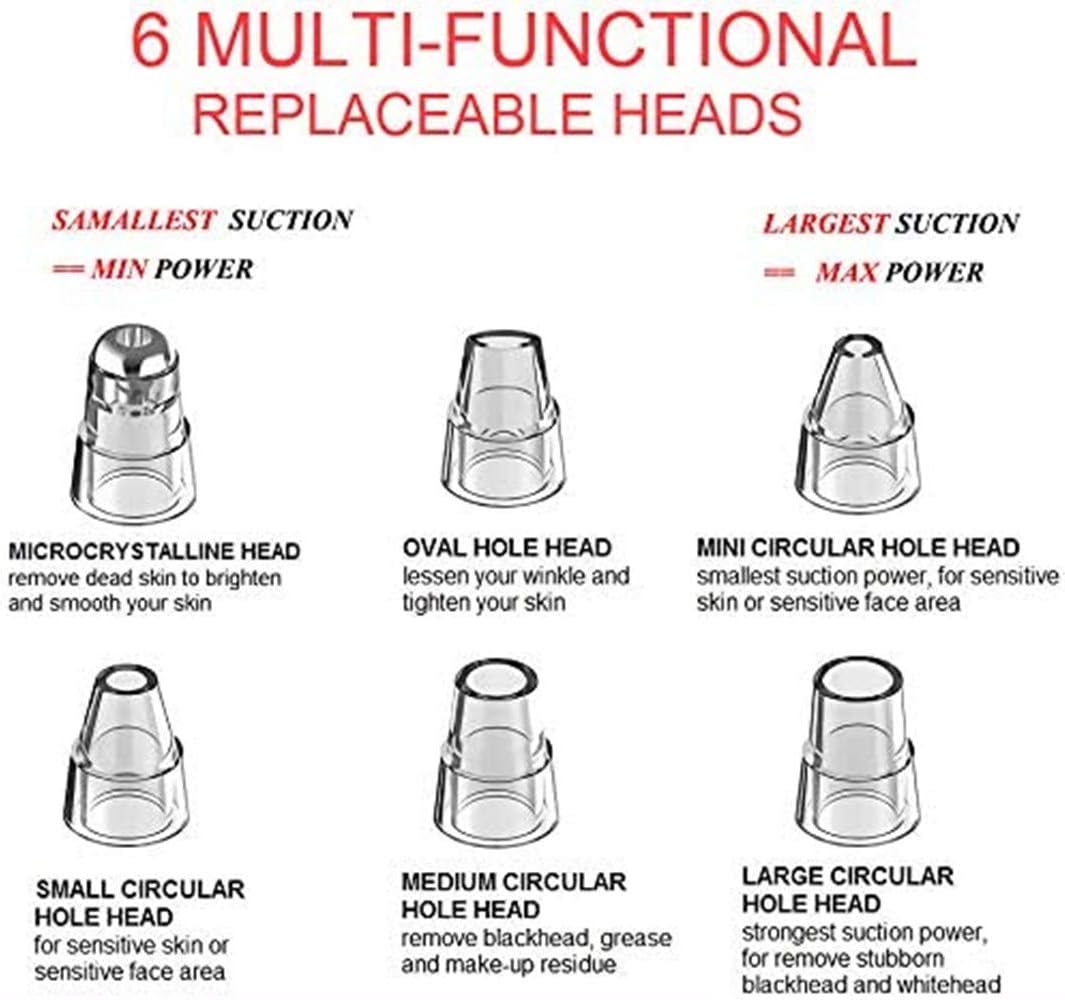
Image: A visual guide to the six interchangeable suction heads. From smallest to largest suction power: Microcrystalline Head (removes dead skin), Oval Hole Head (lessens wrinkles, tightens skin), Mini Circular Hole Head (smallest suction, sensitive skin/face area), Small Circular Hole Head (sensitive skin/face area), Medium Circular Hole Head (removes blackhead, grease, makeup residue), Large Circular Hole Head (strongest suction, stubborn blackhead/whitehead).
- Microcrystalline Head: Designed for exfoliation, removing dead skin cells to brighten and smooth skin texture.
- Oval Hole Head: Suitable for delicate areas, helps to lessen the appearance of fine lines and tighten skin.
- Mini Circular Hole Head: Offers the smallest suction power, ideal for sensitive skin or small, sensitive facial areas.
- Small Circular Hole Head: Similar to the mini, for sensitive skin or precise application on smaller areas.
- Medium Circular Hole Head: Effective for removing blackheads, excess grease, and makeup residue.
- Large Circular Hole Head: Provides the strongest suction, recommended for stubborn blackheads and whiteheads on less sensitive areas.
5. Post-Use Skin Care
- After using the device, apply a cold compress or a soothing toner to help close pores and calm the skin.
- Moisturize your skin to keep it hydrated.
- Avoid direct sun exposure immediately after treatment.
Maintenance
1. Cleaning the Device and Suction Heads
- Turn off the device and detach the suction head.
- Rinse the suction head under running water. Use a small brush or cotton swab to clean any residue inside the head.
- Wipe the main body of the device with a soft, damp cloth. Do not rinse the main body under water.
- Ensure all parts are completely dry before reassembling or storing.
2. Storage
- Store the device and its accessories in a cool, dry place, away from direct sunlight and moisture.
- Keep the device charged periodically if not used for extended periods to maintain battery health.
Troubleshooting
| Problem | Possible Cause | Solution |
|---|---|---|
| Device does not turn on. | Battery is low or depleted. | Charge the device fully using the provided USB cable. |
| No suction or weak suction. |
|
|
| Skin bruising or redness. |
|
|
Specifications
- Model: B07WPJKDDP
- Brand: Bizzico
- Product Dimensions: 8.7 x 4.3 x 2 inches
- Weight: 5.93 ounces
- Battery: 1 Lithium Ion battery (included)
- Material: Acrylonitrile Butadiene Styrene (ABS)
- Charging: USB Rechargeable
Warranty and Support
For warranty information and customer support, please refer to the documentation provided with your purchase or contact the retailer/manufacturer directly. Specific warranty terms may vary.