Introduction
This manual provides essential information for the safe and effective use of your FITHOOD replacement battery. It is designed for compatibility with various HBC Radiomatic devices, including Patrol D, Quadrix, and Vector Pro models. Please read this manual thoroughly before installation and operation to ensure proper handling and to maximize battery life.
Important Safety Information
Failure to follow these safety instructions may result in fire, electric shock, injury, or damage to the battery or device. Keep these instructions for future reference.
- DO NOT attempt to disassemble, open, or service the battery pack.
- Replace only with the battery pack designated for this product.
- DO NOT crush, puncture, short external contacts, or dispose of in fire or water.
- DO NOT store above 60°C (140°F).
- A new battery pack must be fully charged before initial use.
- To reduce the risk of fire or burns, read all instructions in the operating guide before use.
- Keep the battery away from children.
- Dispose of used batteries according to local regulations.
Product Overview
The FITHOOD replacement battery is a high-quality power source designed to meet the specifications of your HBC Radiomatic equipment. It features a durable casing and reliable internal components for consistent performance.
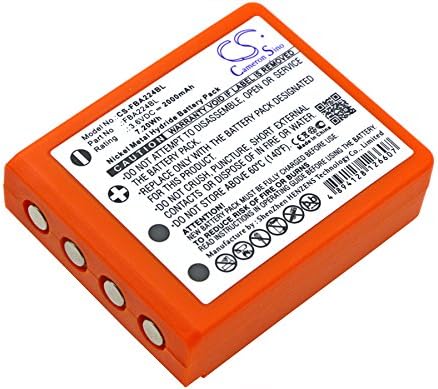
Image: Front view of the FITHOOD replacement battery, displaying its model number, voltage, capacity, and important safety warnings on the label.
Compatibility
This FITHOOD replacement battery is compatible with the following HBC Radiomatic models and battery part numbers:
Compatible Device Models:
- HBC Radiomatic Patrol D
- HBC Radiomatic Quadrix
- HBC Radiomatic Vector Pro
Compatible Battery Part Numbers:
- BA223000
- BA223030
- FUB6
Please verify your device model and existing battery part number to ensure compatibility before use.
What's in the Box
Your package should contain the following item:
- 1 x FITHOOD Replacement Battery (Model: CS-FBA224BL)
Setup & Installation
Follow these general steps to install the replacement battery into your compatible device. Refer to your device's specific user manual for detailed instructions on opening the battery compartment.
- Power Off Device: Ensure your HBC Radiomatic device is completely powered off before proceeding.
- Locate Battery Compartment: Identify and open the battery compartment on your device. This usually involves unlatching a cover or unscrewing a panel.
- Remove Old Battery (if applicable): Carefully remove the old battery, noting its orientation.
- Insert New Battery: Insert the FITHOOD replacement battery into the compartment, ensuring the contact points align correctly with the device's terminals. The battery should fit snugly.
- Secure Compartment: Close and secure the battery compartment cover.
- Initial Charge: It is recommended to fully charge the new battery before its first use. Refer to the 'Operating Instructions' section for charging details.

Image: Angled view of the battery, highlighting the contact points for proper installation.
Operating Instructions
Once installed, the battery powers your device. For optimal performance and longevity, follow these guidelines:
- First Use: Fully charge the battery before its initial use. This helps calibrate the battery and ensures maximum capacity.
- Charging: Use only the charger specified by your device manufacturer. Overcharging or using incompatible chargers can damage the battery.
- Discharging: Avoid completely draining the battery frequently. Partial discharges and more frequent charges are generally better for Ni-MH battery life.
- Temperature: Operate the battery within the recommended temperature range of your device. Extreme temperatures can affect performance and battery life.
Maintenance
Proper maintenance can extend the life of your FITHOOD replacement battery:
- Cleaning: Periodically clean the battery contacts and the device's terminals with a dry, clean cloth to ensure good electrical connection.
- Storage: If storing the battery for an extended period, charge it to about 50% capacity and store it in a cool, dry place away from direct sunlight and extreme temperatures. Recharge every 3-6 months to prevent deep discharge.
- Avoid Physical Damage: Protect the battery from drops, impacts, and crushing, which can lead to internal damage or leakage.
Troubleshooting
If you encounter issues with your battery, consider the following common solutions:
| Problem | Possible Cause | Solution |
|---|---|---|
| Battery not charging | Loose connection, faulty charger, or battery issue. | Ensure battery is properly seated. Check charger and charging cable. Try charging with a different compatible charger if available. |
| Short operating time | Battery not fully charged, aging battery, or high power consumption by device. | Ensure battery is fully charged. Reduce device usage that consumes high power. If battery is old, consider replacement. |
| Device not powering on | Battery not installed correctly, battery discharged, or device fault. | Re-install battery, ensuring proper contact. Charge the battery. Test the device with another known-good battery if possible. |
Technical Specifications
Below are the technical specifications for the FITHOOD Replacement Battery (Model: CS-FBA224BL):
| Feature | Specification |
|---|---|
| Model Number | CS-FBA224BL |
| Battery Type | Ni-MH (Nickel Metal Hydride) |
| Voltage | 3.6V |
| Capacity | 2000mAh |
| Watt-Hours (Wh) | 7.20Wh |
| Product Dimensions | 60.90 x 47.60 x 18.30mm (2.4 x 0.72 x 1.87 inches) |
| Item Weight | 150g (5.3 ounces) |
| Certifications | ISO9001, RoHS, CE |
Warranty and Support
For warranty information or technical support regarding your FITHOOD replacement battery, please refer to the documentation provided with your purchase or contact the seller directly. Ensure you have your purchase details and battery model number available when seeking support.