
1. Introduction
Welcome to the user manual for your new Vivo Y22s smartphone. This guide provides essential information on setting up, operating, maintaining, and troubleshooting your device. The Vivo Y22s is designed to offer a seamless and powerful mobile experience, featuring a high-resolution camera, robust performance, and long-lasting battery life.
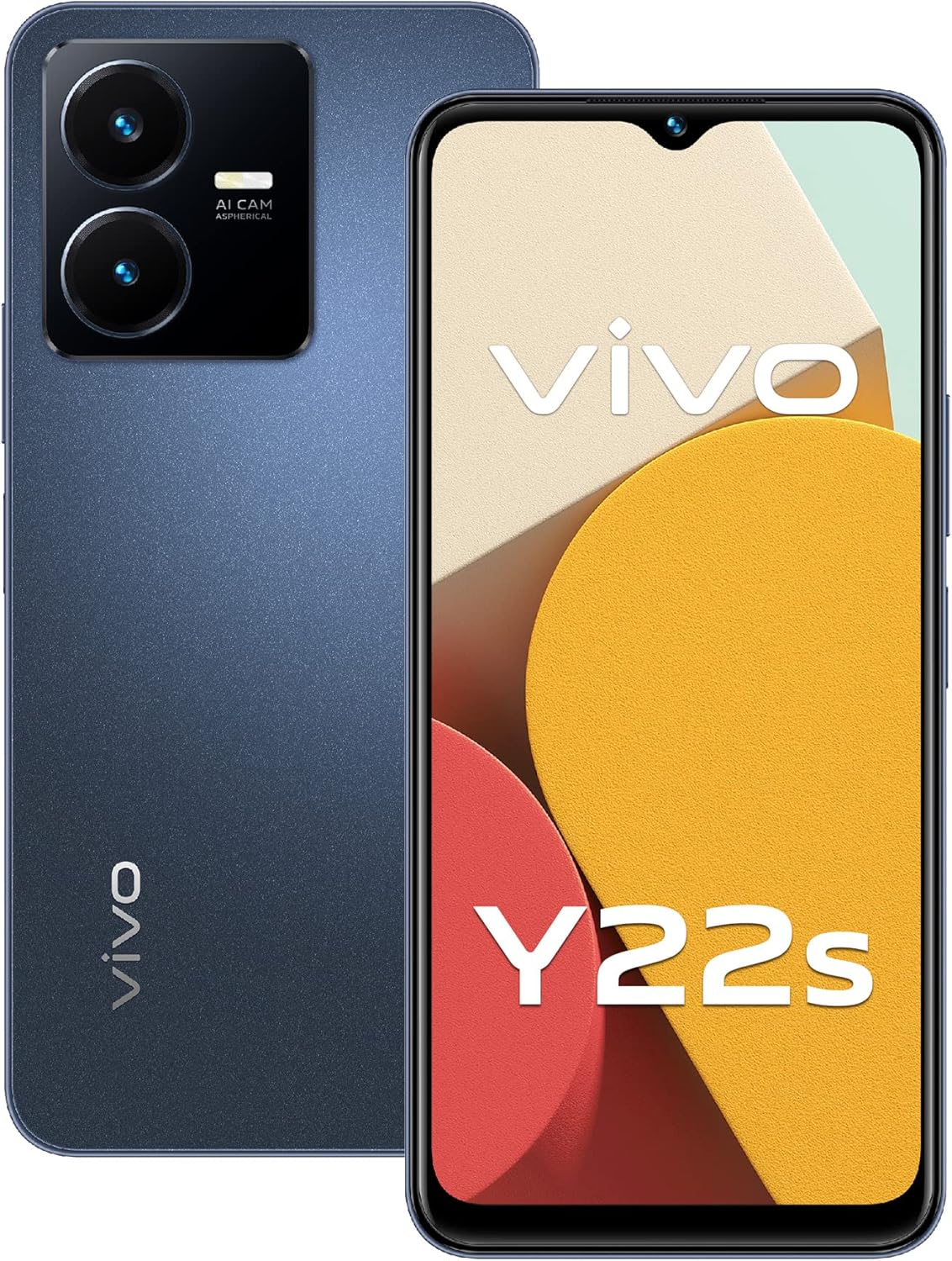
Figure 1: Vivo Y22s Smartphone (Starlight Blue)
This image displays the Vivo Y22s smartphone in Starlight Blue, showcasing its sleek design and dual camera setup on the rear, alongside the vibrant display on the front.
Key features of your Vivo Y22s include:
- Professional Photography: Equipped with a 50MP main rear camera, 2MP macro camera, and an 8MP HD selfie camera, supporting Super Night mode and multi-design portrait photos.
- Powerful Performance: Powered by the Qualcomm Snapdragon 680 6nm octa-core processor with a 90Hz high refresh rate for smooth operation.
- Ample Storage: Comes with 6GB RAM and 128GB internal storage, expandable up to 1TB with an additional memory card.
- Vibrant Display: Features a 6.55-inch HD+ rich color display (1612x720) with eye protection mode.
- Long-lasting Battery: A large 5000mAh battery with 18W fast charging capability.
- Enhanced Security: Includes a side-mounted fingerprint scanner and Face Wake feature for quick and secure unlocking.
- Optimized Gaming: Incorporates Multi-Turbo 5.5 technology and Ultra Game Mode for an enhanced gaming experience.
2. Setup Guide
2.1. Unboxing and Initial Inspection
Carefully unbox your Vivo Y22s and check for all included accessories:
- Vivo Y22s Smartphone
- USB Cable
- Phone Cover
- Power Adapter
- SIM Ejector Tool
2.2. SIM Card and Memory Card Installation
The Vivo Y22s supports dual SIM cards and expandable memory. Follow these steps to install your SIM and memory cards:
- Locate the SIM card tray on the side of your phone.
- Insert the SIM ejector tool into the small hole next to the tray and press gently until the tray pops out.
- Place your Nano-SIM cards into the designated slots on the tray. Ensure the gold contacts face downwards.
- If installing a microSD card, place it in the dedicated memory card slot.
- Carefully push the tray back into the phone until it clicks into place.

Figure 2: SIM Card Tray Location
This image shows the side of the Vivo Y22s, highlighting the location of the SIM card tray for easy access and installation of SIM and memory cards.
2.3. Powering On and Initial Configuration
To power on your device for the first time:
- Press and hold the Power button (located on the side) until the Vivo logo appears.
- Follow the on-screen prompts to select your language, region, and connect to a Wi-Fi network.
- Set up your Google account or create a new one to access Google services and the Play Store.
- Configure your preferred security methods, such as fingerprint unlock or Face Wake.
3. Operating Your Vivo Y22s
Your Vivo Y22s runs on Android 12.0, offering an intuitive and customizable user experience. Here's an overview of its key operational features:

Figure 3: Overview of Vivo Y22s Features
This image visually summarizes the key features of the Vivo Y22s, including its 2.5D trendy design, 6GB RAM + 128GB ROM, 5000mAh battery with 18W fast charge, side fingerprint sensor, 6.55-inch HD color-rich screen, Multi-Turbo 5.5, Face Wake, and Ultra Game Mode.
3.1. Display and Navigation
The 6.55-inch HD+ display provides vibrant colors and sharp visuals. With a 90Hz refresh rate, scrolling and animations are exceptionally smooth. You can navigate the device using touch gestures or traditional navigation buttons, configurable in the settings.
3.2. Camera Features
Capture stunning photos and videos with the versatile camera system:
- 50MP Main Rear Camera: For high-resolution, detailed shots.
- 2MP Macro Camera: Ideal for close-up photography, capturing intricate details.
- 8MP HD Front Camera: Perfect for clear selfies and video calls.
- Super Night Camera: Enhances low-light photography, ensuring bright and clear images even in challenging conditions.
- Multi-design Portrait Photos: Offers various styles and effects for professional-looking portraits.
- Face Beauty for Video: Improves facial features during video recording.

Figure 4: Vivo Y22s Camera Specifications
This image provides a detailed view of the Vivo Y22s camera system, specifying the 50MP rear camera, 2MP macro camera, and 8MP front camera, illustrating their positions on the device.
3.3. Performance and Storage
The Snapdragon 680 processor ensures smooth multitasking and efficient performance. With 6GB of RAM and 128GB of internal storage, you have ample space for apps, photos, and videos. The storage can be expanded up to 1TB using a microSD card, providing even more room for your digital life.
3.4. Battery and Charging
The 5000mAh battery provides extended usage time. When it's time to recharge, the 18W fast charging technology ensures your device is quickly powered up, minimizing downtime.
3.5. Security Features
Your Vivo Y22s offers convenient and secure unlocking options:
- Side Fingerprint Scanner: Integrated into the power button for quick and secure access.
- Face Wake: Unlock your phone simply by picking it up and looking at the screen.
3.6. Gaming Enhancements
For gamers, the Vivo Y22s includes:
- Multi-Turbo 5.5: Intelligently distributes computing power to reduce lag and optimize game performance.
- Ultra Game Mode: Provides features like e-sports mode for maximum intensity, Picture-in-Picture for games, Do Not Disturb mode, and brightness lock for an immersive gaming experience.
4. Maintenance
Proper maintenance ensures the longevity and optimal performance of your Vivo Y22s.
4.1. Battery Care
- Avoid extreme temperatures (hot or cold) as they can degrade battery life.
- Use only the original charger and cable provided with your device.
- Avoid completely draining the battery frequently; try to keep it above 20%.
- If storing the device for a long period, charge it to about 50% before turning it off.
4.2. Software Updates
Regularly check for and install system updates. These updates often include performance improvements, security patches, and new features. To check for updates, go to Settings > System > System update.
4.3. Cleaning Your Device
- Use a soft, lint-free cloth to clean the screen and back of the phone.
- For stubborn smudges, slightly dampen the cloth with water or a screen cleaner.
- Avoid using harsh chemicals, abrasive materials, or excessive moisture.
- Keep ports free of dust and debris. Use a soft brush or compressed air if necessary.
5. Troubleshooting
If you encounter issues with your Vivo Y22s, try these common troubleshooting steps:
5.1. Device Not Responding
- Restart: Press and hold the Power button for about 10 seconds to force a restart.
- Charge: Ensure the device has sufficient battery. Connect it to the charger and wait a few minutes before attempting to power on.
5.2. Apps Crashing or Slow Performance
- Close Background Apps: Close unnecessary apps running in the background.
- Clear Cache: Go to Settings > Apps > [App Name] > Storage > Clear cache for problematic apps.
- Free Up Storage: Delete old files, photos, or uninstall unused apps to free up internal storage.
- System Update: Ensure your device's software is up to date.
5.3. Connectivity Issues (Wi-Fi/Bluetooth)
- Toggle On/Off: Turn Wi-Fi or Bluetooth off and then on again.
- Restart Router/Device: For Wi-Fi issues, restart your Wi-Fi router.
- Forget Network: For persistent Wi-Fi issues, forget the network and reconnect.
5.4. Charging Problems
- Check Cable/Adapter: Ensure the USB cable and power adapter are not damaged and are properly connected.
- Clean Port: Gently clean the charging port on your phone for any debris.
- Try Different Outlet: Test with a different power outlet.
If problems persist, please refer to the official Vivo support website or contact customer service for further assistance.
6. Specifications
Detailed technical specifications for the Vivo Y22s:
| Feature | Specification |
|---|---|
| Model Name | Y22s |
| Item Model Number | 5662397 |
| Operating System | Android 12.0 |
| RAM | 6GB |
| Memory Storage Capacity | 128GB (Expandable up to 1TB) |
| Product Dimensions | 16.43 x 7.61 x 0.84 cm |
| Item Weight | 192 grams |
| Battery Power Rating | 5000 mAh |
| Wireless Communication Technologies | Cellular |
| Connectivity Technologies | Bluetooth, Wi-Fi, USB |
| GPS | GLONASS |
| Special Features | Dual SIM, Expandable Memory |
| Device Interface - Primary | Touchscreen |
| Other Camera Features | Front, Rear |
| Audio Jack | 3.5 mm |
| Form Factor | Bar |
| Color | Blue |
| CPU Model | Snapdragon |
| CPU Speed | 2.4 GHz |
| Screen Size | 6.55 inches |
| Resolution | 1612 x 720 (HD+) |
| Refresh Rate | 90 Hz |
7. Warranty and Support
Your Vivo Y22s comes with a standard manufacturer's warranty. Please refer to the warranty card included in your product packaging for specific terms and conditions, including warranty period and coverage details.
7.1. Customer Support
For technical support, service, or warranty claims, please contact Vivo customer service or visit their official support website. Keep your purchase receipt and product serial number handy for faster service.
You can typically find support information on the official Vivo website: www.vivo.com


