
1. Introduction
The Merkury Innovations Lumense One Projector MI-PRJ01-101 is a compact and portable device designed for displaying various media content. It features an internal 2.5-inch LCD display, 150 ANSI lumens brightness, and supports up to 16.7 million colors. This projector is suitable for displaying movies, video games, presentations, and slide shows from multiple input sources. Its compact and lightweight design makes it convenient for travel.

Figure 1: Front view of the Merkury Innovations Lumense One Projector retail box. This image displays the product name, key features like 150-inch screen display, 16.7 million colors, and its use for videos, gaming, and presentations.
2. What's in the Box
Verify that all components are present in the package:
- Lumense One Projector
- Power Adapter (DC 12V 2A)
- 1-to-3 AV Cable
- Remote Control (requires 2 AAA batteries, not included)

Figure 2: Side panel of the product box, detailing the package contents and technical specifications.
3. Setup
3.1 Power Connection
- Connect the power adapter to the projector's DC 12V input port.
- Plug the power adapter into a standard electrical outlet (90-240V / 50-60Hz).
3.2 Input Source Connection
The projector supports multiple input sources:
- HDMI: Connect an HDMI cable from your source device (e.g., laptop, gaming console) to the projector's HDMI port.
- USB: Insert a USB drive into the USB-A port for media playback.
- VGA: Connect a VGA cable from your computer to the projector's VGA/SVGA D-Sub port.
- AV: Use the provided 1-to-3 AV cable to connect to devices with composite video and stereo audio outputs.
- Micro-SD: Insert a Micro-SD card into the designated slot for media playback.
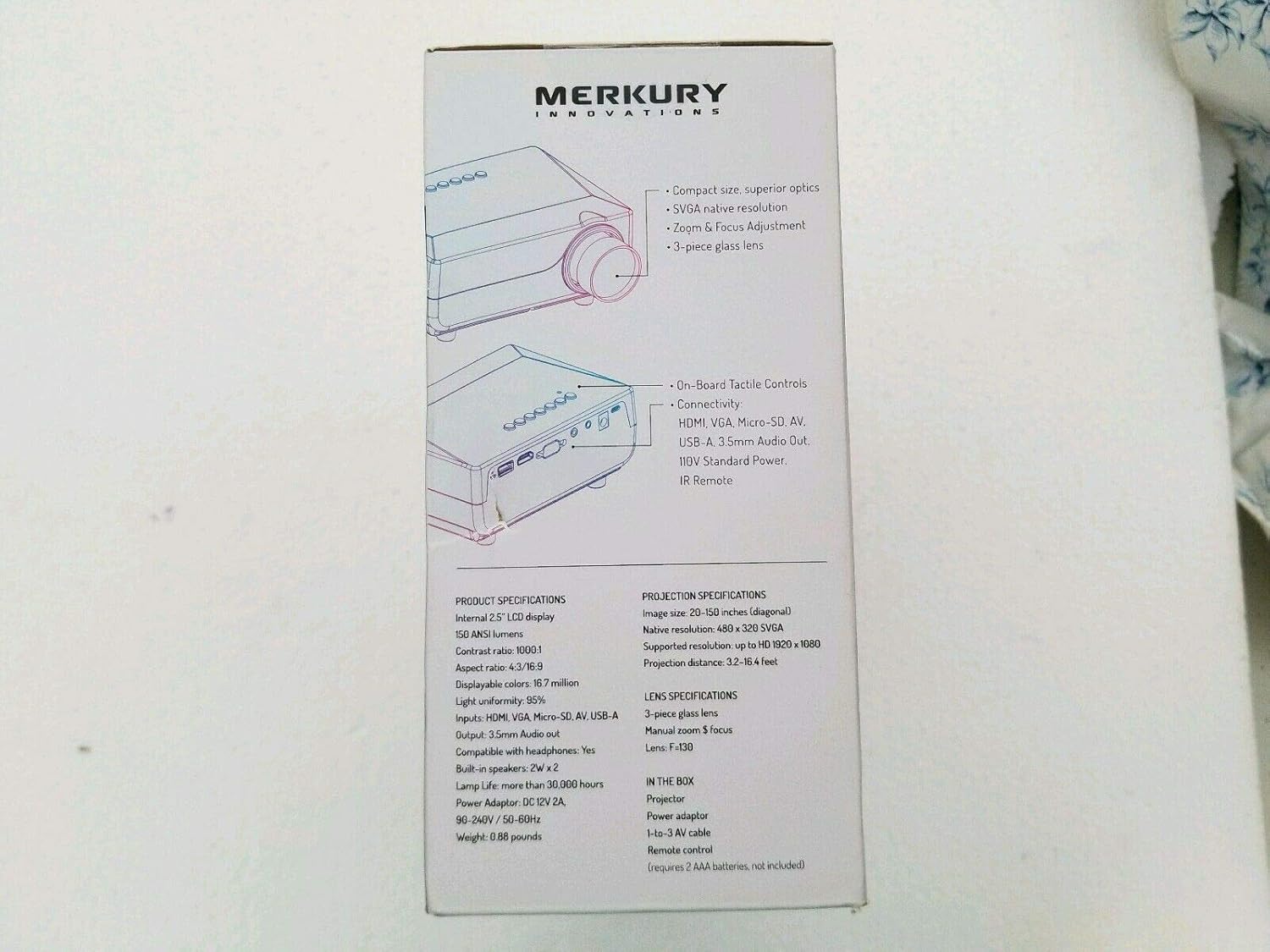
Figure 3: Top-down view of the projector, highlighting the various input and output ports available for connectivity.
3.3 Projector Placement and Focus
- Place the projector on a stable, flat surface (table mount) at a suitable distance from the projection screen or wall. The optimal projection distance ranges from 3.2 to 16.4 feet for an image size of 20 to 150 inches (diagonal).
- Adjust the manual zoom and focus ring on the lens until the projected image is clear and sharp.
4. Operating Instructions
4.1 Power On/Off
Press the power button on the projector or the remote control to turn the unit on or off.
4.2 Selecting Input Source
Use the "Source" button on the remote control or the projector's control panel to cycle through available input sources (HDMI, USB, VGA, AV, Micro-SD) and select the desired one.
4.3 Audio Output
The projector has built-in 2W x 2 speakers. For external audio, connect headphones or external speakers to the 3.5mm audio out port.
5. Maintenance
5.1 Cleaning
- Ensure the projector is powered off and unplugged before cleaning.
- Use a soft, dry cloth to wipe the exterior of the projector.
- For the lens, use a lens cleaning cloth and specialized lens cleaning solution to avoid scratches.
- Do not use abrasive cleaners or solvents.
5.2 Lamp Life
The projector lamp has a life expectancy of more than 30,000 hours under normal operating conditions.
6. Troubleshooting
| Problem | Possible Cause | Solution |
|---|---|---|
| No image displayed |
|
|
| Image is blurry |
|
|
| No sound |
|
|
7. Specifications
| Feature | Detail |
|---|---|
| Model | Lumense One (MI-PRJ01-101) |
| Display Technology | Internal 2.5" LCD display |
| Brightness | 150 ANSI lumens |
| Contrast Ratio | 1000:1 |
| Aspect Ratio | 4:3 / 16:9 |
| Displayable Colors | 16.7 million |
| Light Uniformity | 95% |
| Native Resolution | 480 x 320 SVGA |
| Supported Resolution | Up to HD 1920 x 1080 |
| Image Size (Diagonal) | 20-150 inches |
| Projection Distance | 3.2 - 16.4 feet |
| Lens | 3-piece glass lens, Manual zoom & focus, F=130 |
| Input Ports | HDMI, VGA/SVGA D-Sub, Micro-SD, AV, USB-A |
| Output Port | 3.5mm Audio out (compatible with headphones) |
| Built-in Speakers | 2W x 2 |
| Lamp Life | > 30,000 hours |
| Power Adapter | DC 12V 2A |
| Power Input | 90-240V / 50-60Hz |
| Weight | 0.88 pounds (approx. 399g) |
| Form Factor | Portable |
| Mounting Type | Table Mount |
8. Warranty and Support
For product support, additional information, or to explore the full selection of Merkury Innovations products, please visit the official website:
Specific warranty details are not provided in this manual. Please refer to the product packaging or the official Merkury Innovations website for warranty information.

Figure 4: Bottom panel of the product box, displaying the manufacturer's website and regulatory warnings.
WARNING: This product may contain chemicals known to the State of California to cause cancer and reproductive harm. For more information, visit www.P65Warnings.ca.gov.