
Introduction
This manual provides essential information for the safe and effective use of your FITHOOD Replacement Battery, designed for the Bowers & Wilkins T7 speaker. This battery is a high-quality replacement, compatible with the J271 ICR18650NQ-3S part number.
Please read these instructions carefully before installation and use to ensure proper function and longevity of the battery.
Safety Precautions
Always prioritize safety when handling batteries. Improper handling can lead to fire, explosion, or personal injury.
- Do not attempt to disassemble, open, or service the battery pack.
- Do not crush, puncture, short external contacts, or dispose of in fire or water.
- Do not store above 60°C (140°F).
- Keep out of reach of children.
- Dispose of used batteries according to local regulations.
Setup and Installation
Before proceeding with installation, ensure your Bowers & Wilkins T7 speaker is powered off and disconnected from any power source. It is recommended to consult the original device's service manual or a qualified technician for battery replacement procedures, as this may involve opening the device casing.
- Compatibility Check: Verify that the model number (CS-BWT700SL) and part number (J271 ICR18650NQ-3S) of this replacement battery match your device's requirements. If unsure, compare the physical appearance and connector type with your original battery.
- Prepare the Device: Carefully open the Bowers & Wilkins T7 speaker casing to access the existing battery. Refer to the speaker's service manual for specific instructions on how to safely open the device.
- Disconnect Old Battery: Gently disconnect the old battery from the speaker's circuit board. Note the orientation of the connector to ensure correct installation of the new battery.
- Install New Battery: Connect the FITHOOD replacement battery to the speaker's circuit board, ensuring the connector is securely seated. The battery features a new fully decoded chip designed to work just like the original.
- Secure Battery: Place the new battery securely within the device's battery compartment. Ensure no wires are pinched or obstructing the closure of the casing.
- Reassemble Device: Carefully reassemble the speaker casing, ensuring all screws and clips are properly secured.
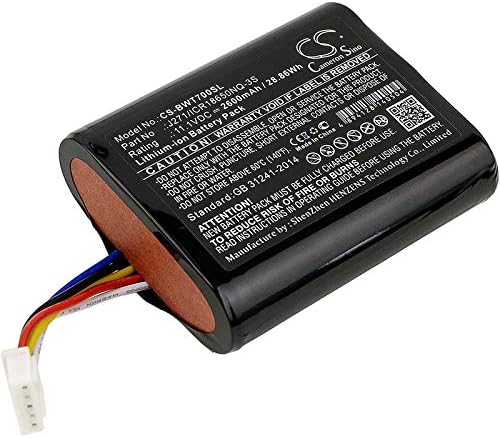
Image: The FITHOOD replacement battery, showing its compact design and wired connector. This image helps in identifying the product.
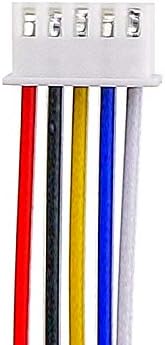
Image: A detailed view of the multi-pin connector, crucial for ensuring compatibility with the device's internal port.
Operating Instructions
Once the battery is installed, follow these guidelines for optimal performance.
Initial Charging
After installation, it is recommended to fully charge the battery before its first use. Connect your Bowers & Wilkins T7 speaker to its original charger and allow it to charge until the charging indicator shows a full charge. This initial charge helps calibrate the battery's charge level indicator.
Normal Use
Use the speaker as you normally would. The battery is designed to provide reliable power for your device. Avoid completely draining the battery frequently, as this can reduce its overall lifespan. For best results, recharge the battery when the device indicates a low power level.
Maintenance and Care
Proper care can extend the life of your FITHOOD replacement battery.
- Temperature: Avoid exposing the battery to extreme temperatures (hot or cold). Optimal operating temperature is typically between 0°C and 35°C (32°F and 95°F).
- Storage: If storing the device for an extended period, ensure the battery is charged to about 50-60% before storage. Store in a cool, dry place.
- Charging Habits: While modern Li-ion batteries do not suffer from "memory effect," it is generally good practice to avoid frequent deep discharges. Occasional full charge cycles can help maintain battery calibration.
- Cleaning: Keep the battery and its contacts clean and dry. Use a soft, dry cloth to wipe away any dust or debris.
Troubleshooting
If you encounter issues with your replacement battery, consider the following common solutions:
Battery Not Charging
- Check Connections: Ensure the battery connector is firmly seated within the device.
- Verify Charger: Confirm that the charging cable and power adapter are functioning correctly and are compatible with your Bowers & Wilkins T7 speaker.
- Device Issue: The issue might be with the speaker's charging port or internal charging circuit, not the battery itself. Test with another known-good battery if possible.
Short Battery Life
- Initial Cycles: New batteries may require a few charge/discharge cycles to reach their full capacity.
- Usage Patterns: High volume audio playback or continuous use of power-intensive features will naturally drain the battery faster.
- Environmental Factors: Operating the device in very cold or very hot environments can temporarily reduce battery performance.
- Battery Age: All rechargeable batteries degrade over time. If the battery has been in use for a significant period, reduced capacity is normal.
If problems persist, please refer to the "Support" section for further assistance.
Specifications
| Feature | Detail |
|---|---|
| Model Number | CS-BWT700SL |
| Compatible Part Number | J271 ICR18650NQ-3S |
| Battery Type | Li-ion (Lithium Ion) |
| Capacity | 2600mAh |
| Watt-Hours (Wh) | 28.86Wh |
| Voltage | 11.1V |
| Dimensions (L x W x H) | 66.90 x 55.46 x 21.55mm (2.63 x 2.18 x 0.85 inches) |
| Weight | 200g / 7.05oz (7.1 ounces) |
| Certifications | ISO9001, RoHS, CE |
Warranty and Support
This FITHOOD replacement battery is manufactured to high-quality standards and is certified with ISO9001, RoHS, and CE for quality assurance. For specific warranty details, including duration and coverage, please refer to the purchase documentation or contact the seller directly.
If you have questions regarding compatibility, installation, or performance, or if you require professional suggestions, please contact the seller or manufacturer with your battery details or pictures. They can provide specialized assistance.
For general inquiries or to confirm compatibility before purchase, you may also refer to the product listing on Amazon or contact the seller through the Amazon platform.