
Introduction
This manual provides instructions for the Calvas Universal Remote Control, designed for use with various Fujitsu air conditioner models, including AR-BB1, AR-BB2, AR-DB4, AR-DB3, AR-DB7, and AR-BB9. This remote control offers direct replacement functionality without requiring complex programming. Each unit is tested for perfect functionality before delivery. The package contains one remote control; batteries are not included. Key features include infrared wireless communication, a single channel, and a 433 MHz frequency.
Setup
1. Battery Installation
The remote control requires two AAA batteries (not included). Follow these steps to install them:
- Open the battery compartment cover on the back of the remote control.
- Insert two AAA batteries, ensuring the positive (+) and negative (-) terminals match the indicators inside the compartment.
- Close the battery compartment cover securely.
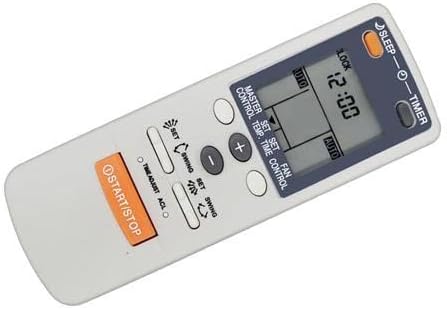
An angled perspective of the remote control, illustrating its compact and user-friendly design. This view provides a good sense of the remote's physical form and where the battery compartment is typically located on the back.
2. Initial Use
Once batteries are installed, the remote is ready for use. Point the remote directly at your Fujitsu air conditioner unit. No programming is typically required for compatible models.
Operating Instructions
Familiarize yourself with the buttons and their functions:
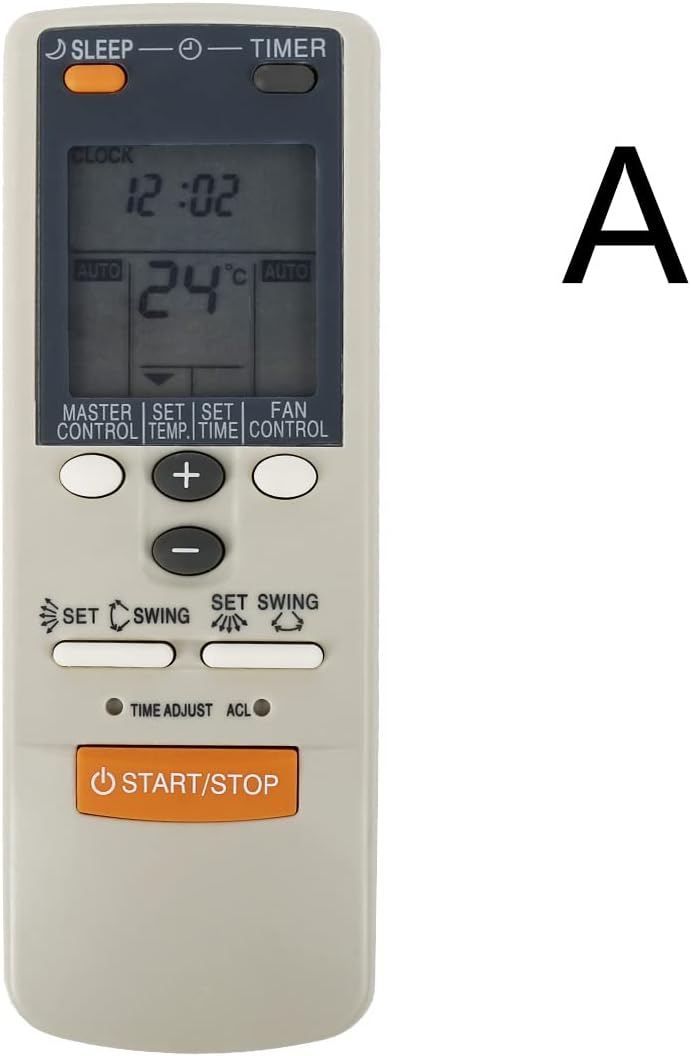
This image displays the front of the remote control, highlighting the LCD screen and the arrangement of its primary function buttons, including START/STOP, temperature controls, mode, fan, and swing settings.
- START/STOP: Press to turn the air conditioner unit ON or OFF.
- Temperature Buttons (+/-): Use these buttons to increase or decrease the desired temperature setting.
- MASTER CONTROL (Mode): Cycles through operating modes such as Auto, Cool, Dry, Fan, and Heat (if supported by your AC unit).
- FAN CONTROL (Fan Speed): Adjusts the fan speed (e.g., Auto, Low, Medium, High).
- SWING (Airflow Direction): Activates or deactivates the automatic swing function for vertical airflow. Some models may have a separate button for horizontal swing.
- TIMER: Used to set the ON/OFF timer for the air conditioner. Refer to your AC unit's manual for specific timer programming details.
- SLEEP: Activates the sleep mode, which typically adjusts temperature and fan speed for comfortable sleep and energy saving.
- LOCK: (If present) Locks the remote control buttons to prevent accidental changes.
- CLOCK: (If present) Used to set the current time on the remote's display.
- SET: (Often used in conjunction with TIMER or CLOCK) Confirms a setting.
- TIME ADJUST: (If present) Adjusts time settings.
- ACL: (If present) A small reset button, often requiring a pointed object to press, used to reset the remote to factory defaults.
Maintenance
Battery Replacement
Replace batteries when the remote's range decreases or the display becomes dim. Always replace both batteries at the same time with new AAA batteries. Do not mix old and new batteries, or different types of batteries.
Cleaning
Wipe the remote control with a soft, dry cloth. Do not use liquid cleaners, abrasive pads, or chemical solvents, as these can damage the remote's surface or internal components.
Storage
If the remote control will not be used for an extended period, remove the batteries to prevent leakage and potential damage. Store the remote in a cool, dry place away from direct sunlight and extreme temperatures.
Troubleshooting
- Remote not responding:
- Check if the batteries are correctly installed and have sufficient charge. Replace if necessary.
- Ensure there are no obstructions between the remote control and the air conditioner's receiver.
- Point the remote directly at the air conditioner unit.
- Limited operating range:
- Replace the batteries with new ones.
- Ensure no strong light sources (e.g., direct sunlight, fluorescent lights) are interfering with the infrared signal.
- Air conditioner not performing desired function:
- Verify that your air conditioner model is listed as compatible with this remote control.
- Consult your air conditioner's original manual for specific functions and settings.
Specifications
| Brand | Calvas |
| Compatible Models | Fujitsu AR-BB1, AR-BB2, AR-DB4, AR-DB3, AR-DB7, AR-BB9 |
| Wireless Communication | Infrared (IR) |
| Frequency | 433 MHz |
| Channel | 1 |
| Maximum Range | 10 Meters |
| Number of Buttons | 9 (primary functions) |
| Power Source | 2 x AAA Batteries (not included) |
Warranty
This Calvas remote control comes with a 3-month warranty from the date of purchase. This warranty covers manufacturing defects under normal use. It does not cover damage resulting from misuse, accident, unauthorized modification, or battery leakage. Please retain your proof of purchase for warranty claims. Batteries are not covered under warranty.
Support
For technical assistance, troubleshooting beyond this manual, or warranty inquiries, please contact your product retailer. You may also visit the official Calvas support website for additional resources, if available. When contacting support, please have your product model information and proof of purchase ready.