
1. Product Overview
This manual provides instructions for the YKR-P/002E remote control, designed for use with AUX Air Conditioner units. This remote control serves as a replacement for original or broken remote controls, offering compatibility with most essential functions.
Key Features:
- Model: YKR-P/002E
- Designed for Air Conditioning AC units.
- Temperature display in Celsius only.
- Compatible with most functions of the original remote control.
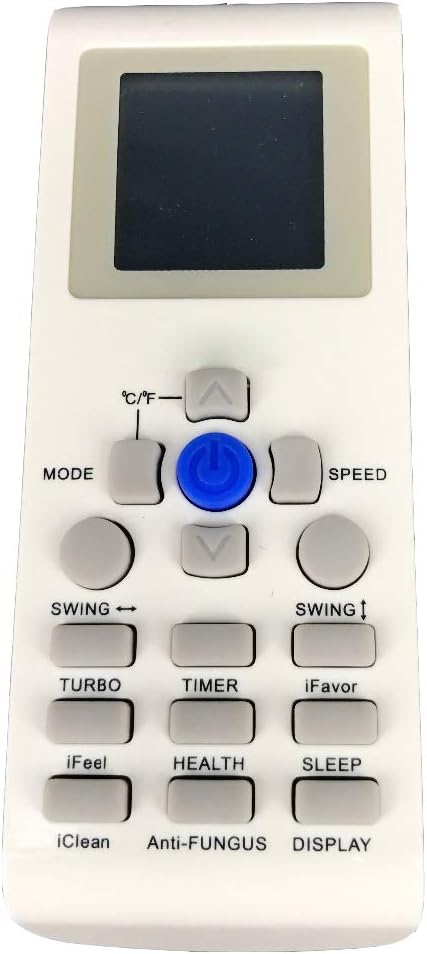
Figure 1: Front view of the YKR-P/002E remote control, showing the display screen and various function buttons such as MODE, SPEED, SWING, TURBO, TIMER, HEALTH, SLEEP, and others.

Figure 2: Back view of the YKR-P/002E remote control, showing the battery compartment cover and the model number label "YKR-P/002E".
2. Setup
2.1 Battery Installation
The remote control requires batteries for operation. Batteries are not included with the remote control and must be purchased separately. Typically, two AAA batteries are required.
- Locate the battery compartment on the back of the remote control.
- Slide the battery compartment cover downwards or in the direction indicated by an arrow to open it.
- Insert two new AAA batteries, ensuring the positive (+) and negative (-) terminals align correctly with the markings inside the compartment.
- Slide the battery compartment cover back into place until it clicks securely.
Note: Remove batteries if the remote control will not be used for an extended period to prevent leakage.
3. Operating Instructions
Point the remote control directly at the air conditioner's receiver when operating. Ensure there are no obstructions between the remote and the unit.
3.1 Button Functions
| Button | Function |
|---|---|
| Power (Blue Button) | Turns the air conditioner ON or OFF. |
| MODE | Cycles through operating modes (e.g., Cool, Heat, Fan, Dry, Auto). |
| ↑ / ↓ (Up/Down Arrows) | Adjusts temperature settings or navigates menu options. |
| ℃/℉ | Switches temperature display between Celsius and Fahrenheit. Note: The remote's display is in Celsius only. |
| SPEED | Adjusts fan speed (e.g., Low, Medium, High, Auto). |
| SWING ↔ | Controls horizontal louver swing. |
| SWING ↕ | Controls vertical louver swing. |
| TURBO | Activates rapid cooling or heating for quick temperature changes. |
| TIMER | Sets the timer for automatic ON/OFF operation. |
| iFavor | Activates a pre-set preferred operating mode. |
| iFeel | Enables the remote to sense the ambient temperature at its location and adjust the air conditioner accordingly. |
| HEALTH | Activates health-related functions, such as air purification or ionizer. |
| SLEEP | Adjusts settings for comfortable sleep, often by gradually increasing temperature and reducing fan speed. |
| iClean | Initiates a self-cleaning function for the indoor unit. |
| Anti-FUNGUS | Activates a function to prevent mold and mildew growth within the air conditioner. |
| DISPLAY | Controls the display on the air conditioner unit, often turning it on or off. |
4. Maintenance
4.1 Cleaning the Remote Control
To maintain the remote control's appearance and functionality:
- Wipe the surface with a soft, dry cloth.
- Do not use liquid cleaners, sprays, or abrasive materials, as these can damage the remote.
4.2 Battery Replacement
Replace batteries when the remote control's range decreases or the display becomes dim. Refer to Section 2.1 for battery installation instructions.
5. Troubleshooting
| Problem | Possible Cause | Solution |
|---|---|---|
| Remote control not working. | Dead or incorrectly installed batteries. | Replace batteries, ensuring correct polarity. |
| Obstruction between remote and AC unit. | Ensure a clear line of sight to the air conditioner's receiver. | |
| Remote control is too far from the AC unit. | Move closer to the air conditioner. | |
| AC unit does not respond to commands. | Incompatibility with the specific AC model. | Verify that your air conditioner model is compatible with the YKR-P/002E remote. This remote is designed for AUX Air Conditioners. |
6. Specifications
- Model: YKR-P/002E
- Usage: Air Conditioning AC Remote Control
- Compatible Devices: Air Conditioner (specifically AUX models)
- Connectivity Technology: Infrared (IR)
- Display: Celsius only
- Power Source: Batteries (not included)
7. Warranty and Support
Specific warranty information for this replacement remote control is not provided in the product details. For any warranty claims or technical support, please contact the seller or the manufacturer, xingzhihua, directly.
It is recommended to retain your purchase receipt as proof of purchase.