
GODOX 8ed3aa76-aebe-4555-bf4c-8c0ab942e5fa
Godox Xpro-C TTL Wireless Studio Flash Trigger Transmitter Instruction Manual
Model: 8ed3aa76-aebe-4555-bf4c-8c0ab942e5fa
1. Introduction
The Godox Xpro-C TTL Wireless Studio Flash Trigger Transmitter is designed for Canon cameras, offering advanced wireless control over your flash system. This manual provides comprehensive instructions for setup, operation, and maintenance to ensure optimal performance and longevity of your device.
Key features include 2.4G X System wireless communication, 1/8000s High-Speed Sync (HSS), TTL Autoflash, Multi-flash, Manual Flash, Flash Exposure Compensation (FEC), and a unique TCM (TTL-Convert-Manual) function.

Figure 1: Godox Xpro-C TTL Wireless Studio Flash Trigger Transmitter.
2. Safety Information
Please read and understand all safety precautions before using the Godox Xpro-C. Improper use can lead to electric shock, fire, or other hazards.
- Do not disassemble or modify the device.
- Keep the device dry. Do not expose to water or high humidity.
- Avoid extreme temperatures. Do not operate in direct sunlight or near heat sources.
- Use only specified batteries (2*AA batteries).
- Keep out of reach of children.
- Disconnect from power source before cleaning or maintenance.
3. Product Overview and Names of Parts
Familiarize yourself with the components of your Xpro-C transmitter.

Figure 2: Detailed diagram of the Godox Xpro-C components.
Key Components:
- LCD Panel: Displays settings and information.
- Group Buttons (A-E): Used to select and adjust individual flash groups.
- Function Buttons (1-4): Context-sensitive buttons for various functions.
- MODE/LOCK Mode Selection/Locking Button: Changes flash mode or locks controls.
- TEST/Shutter Button: Triggers a test flash or acts as a remote shutter release.
- Select Dial: Navigates menus and adjusts values.
- MENU Button: Accesses the main menu.
- Magnification/TCM Button: Toggles magnification view or converts TTL to Manual power.
- Status Indicator Lamp: Indicates device status.
- 2.5mm Sync Cord Jack: For wired triggering of flashes without the Godox X system.
- Type-C USB Port: For firmware updates.
- Hot Shoe Connection: Mounts the trigger to your camera's hot shoe.
- AF Assist Beam Switch: Controls the autofocus assist light.
- Power Switch: Turns the device ON/OFF.
4. Setup
4.1. Battery Installation
The Xpro-C uses two AA batteries. Ensure correct polarity when inserting.
Figure 3: Location of the battery compartment.
4.2. Mounting to Camera
Slide the Xpro-C onto your camera's hot shoe until it clicks into place. Secure it by tightening the locking ring.

Figure 4: Xpro-C mounted on a DSLR camera.
5. Operating Instructions
5.1. Power On/Off
Use the Power Switch on the side of the unit to turn it ON or OFF.
5.2. Basic Operation
The Xpro-C features an extra-large LCD panel and intuitive controls for easy operation.

Figure 5: Close-up of the LCD display and control buttons.
5.3. Flash Modes and Functions
- TTL Autoflash: Automatically adjusts flash output for correct exposure.
- 1/8000s High-Speed Sync (HSS): Allows for flash synchronization at shutter speeds faster than the camera's native sync speed.
- Multi-flash (Stroboscopic Flash): Fires a series of rapid flashes to capture multiple movements in one image.
- Manual Flash (M): Manually set the flash power output.
- Flash Exposure Compensation (FEC): Adjusts the flash output to fine-tune exposure.
- TCM Transform Function: Long press the TCM button to convert the flash value in TTL mode into the power output value in Manual mode. Short press TCM to switch between one-group and multi-group mode.
- Magnification Function: Allows for a magnified view of settings on the LCD.
- One-Shoot & Multi-Shoot Setting: Configures the trigger for single or continuous shooting.
- Group Modeling Lamp Control: Control the modeling lamps of compatible flashes.
- Group Zooming: Adjust the zoom of compatible flash heads.
- Adjusting All Groups' Output Value Simultaneously: Quickly change power for all active groups.
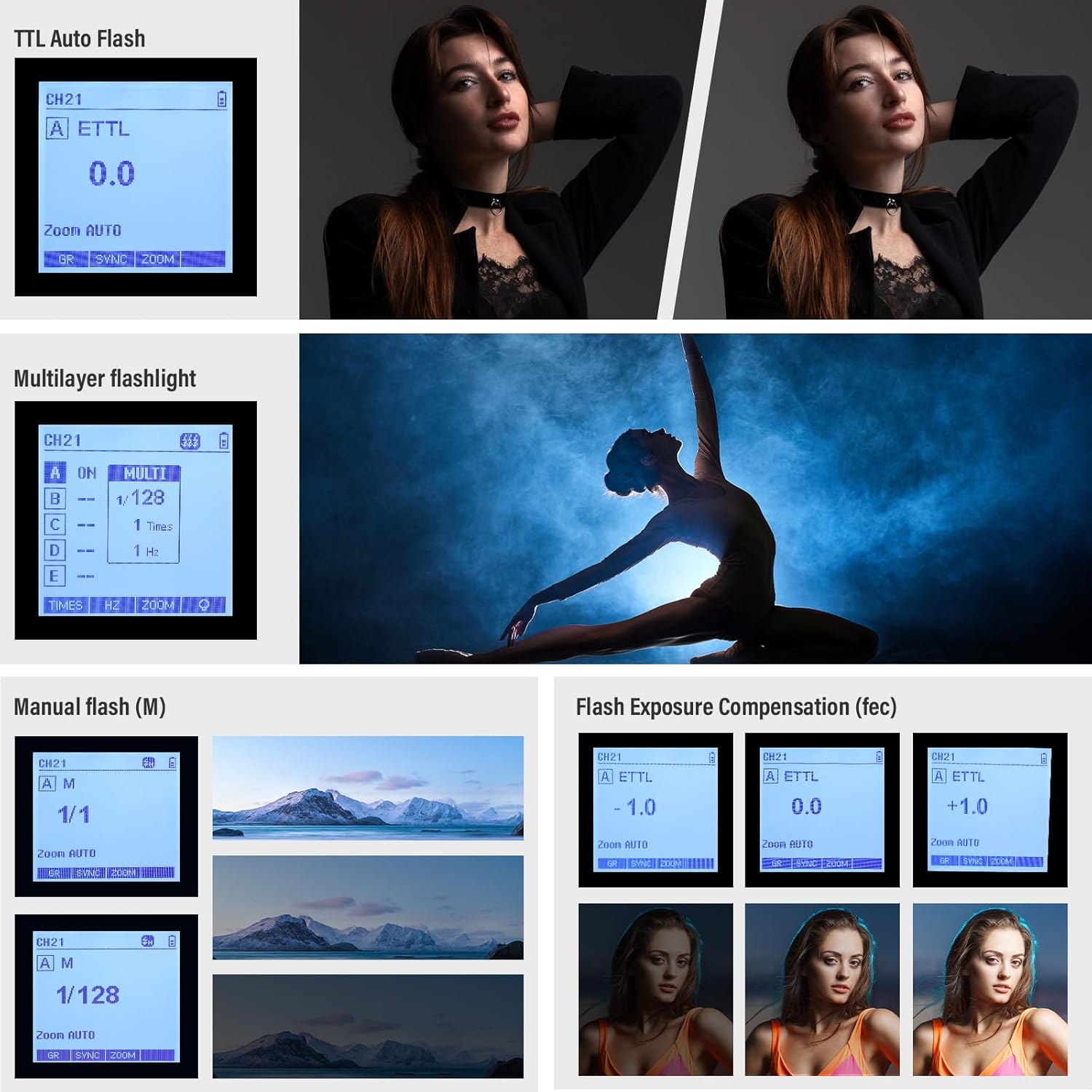
Figure 6: Examples of various flash mode displays on the Xpro-C.
5.4. Wireless X System and ID Settings
The built-in 2.4G Wireless X System allows for reliable triggering up to 100 meters. To avoid signal interference, ensure the channels and wireless IDs of the master (Xpro-C) and slave units (flashes) are set to the same value (01-99).

Figure 7: Versatile applications of the Godox 2.4G Wireless X System.
The Xpro-C can function as:
- A wireless Godox Trigger for camera flash, outdoor flash, and studio flash.
- A wireless trigger compatible with Canon Speedlites.
- A wireless shutter release trigger.
- A flash trigger (without Godox X system) using the 2.5mm Sync Cord Jack.

Figure 8: Remote control and triggering via 2.4G wireless system.
5.5. Official Product Video
Video 1: Godox Xpro TTL Wireless Studio Flash Trigger for Camera. This video demonstrates the key features and functionality of the Godox Xpro-C, including its 2.4G wireless system, TTL autoflash, HSS, and multi-flash capabilities. It also shows the physical aspects like the hot shoe connection and battery installation.
6. Compatibility
The Godox Xpro-C is compatible with a wide range of Godox flashes and Canon EOS camera models. Refer to the table below for detailed compatibility information.

Figure 9: Compatible Flash and Camera Models.
Note: While many camera flashes are compatible with Canon speedlites, specific testing for all models is not conducted. The Xpro-C supports flashes with Godox wireless USB ports.
7. Maintenance
- Clean the device regularly with a soft, dry cloth.
- Avoid using harsh chemicals or abrasive cleaners.
- Store the device in a cool, dry place when not in use.
- Remove batteries if the device will not be used for an extended period to prevent leakage.
8. Troubleshooting
| Problem | Possible Cause | Solution |
|---|---|---|
| Flash not firing. | Incorrect channel/ID settings; low battery; flash not powered on; trigger not securely mounted. | Ensure channels and IDs match. Replace batteries. Power on flash. Securely mount trigger. |
| Inconsistent flash output. | Interference; distance too far; low battery. | Change wireless ID. Reduce distance. Replace batteries. |
| LCD display not working. | Low battery; device malfunction. | Replace batteries. Contact customer support if issue persists. |
For further assistance, please refer to the official Godox support resources or contact their customer service.
9. Specifications
| Feature | Detail |
|---|---|
| Brand | GODOX |
| Model | 8ed3aa76-aebe-4555-bf4c-8c0ab942e5fa |
| Package Dimensions | 4.92 x 4.8 x 2.44 inches |
| Item Weight | 5.9 ounces |
| Compatible Mountings | Canon EOS |
| Flash Sync Speed | 1/8000s |
| Included Components | Two AA Batteries, 2.5mm Sync Port Cable |
| Wireless System | Built-in 2.4G Wireless X System |
| Groups & Channels | 16 Groups, 32 Channels (as per video) |
| Wireless ID | 01-99 |
10. Warranty and Support
For warranty information and customer support, please refer to the documentation included with your product or visit the official GODOX website. Keep your purchase receipt for warranty claims.
Online resources and FAQs may also be available on the manufacturer's website to assist with common queries and technical support.
Related Documents - 8ed3aa76-aebe-4555-bf4c-8c0ab942e5fa
 |
Godox XPROII C TTL Wireless Flash Trigger User Manual This comprehensive user manual provides detailed instructions for the Godox XPROII C TTL Wireless Flash Trigger. It covers setup, operation, features, settings, specifications, troubleshooting, and maintenance for photographers using Canon cameras and Godox flashes. |
 |
Godox X3 C TTL 无线引闪器使用手册 - 摄影师的无线闪光灯解决方案 探索 Godox X3 C TTL 无线引闪器,专为佳能 EOS 相机设计,提供 E-TTL II、高速同步和强大的 2.4GHz 无线控制,提升您的摄影创作体验。 |
 |
Godox XPro II S TTL Wireless Flash Trigger User Manual User manual for the Godox XPro II S TTL Wireless Flash Trigger, covering setup, operation, and features for Canon cameras. Includes instructions for wireless flash triggering, power management, and channel settings. |
 |
Godox XProC TTL Wireless Flash Trigger Instruction Manual Comprehensive instruction manual for the Godox XProC TTL Wireless Flash Trigger, detailing its features, operation, settings, and troubleshooting for Canon EOS cameras. |
 |
Godox XProC TTL Wireless Flash Trigger Instruction Manual This comprehensive instruction manual details the Godox XProC TTL Wireless Flash Trigger for Canon EOS cameras. It covers setup, operation, features like E-TTL II and high-speed sync, compatibility, technical specifications, troubleshooting, and maintenance. |
 |
Godox XPROII C TTL Wireless Flash Trigger - Instruction Manual Comprehensive user guide and instructions for the Godox XPROII C TTL Wireless Flash Trigger, covering setup, operation, features, and troubleshooting for photographers. This manual details how to use the trigger with various Godox flashes and Canon cameras. |
Ask a question about this manual
Ask about setup, troubleshooting, compatibility, parts, safety, or missing instructions. Manuals+ will review the question and use this page’s manual context to help answer it.