
Introduction
This manual provides detailed instructions for the safe and efficient operation, setup, and maintenance of your ABLAZE 3 CFM Single Stage Vacuum Pump. Please read this manual thoroughly before operating the pump to ensure proper use and to prevent damage or injury.
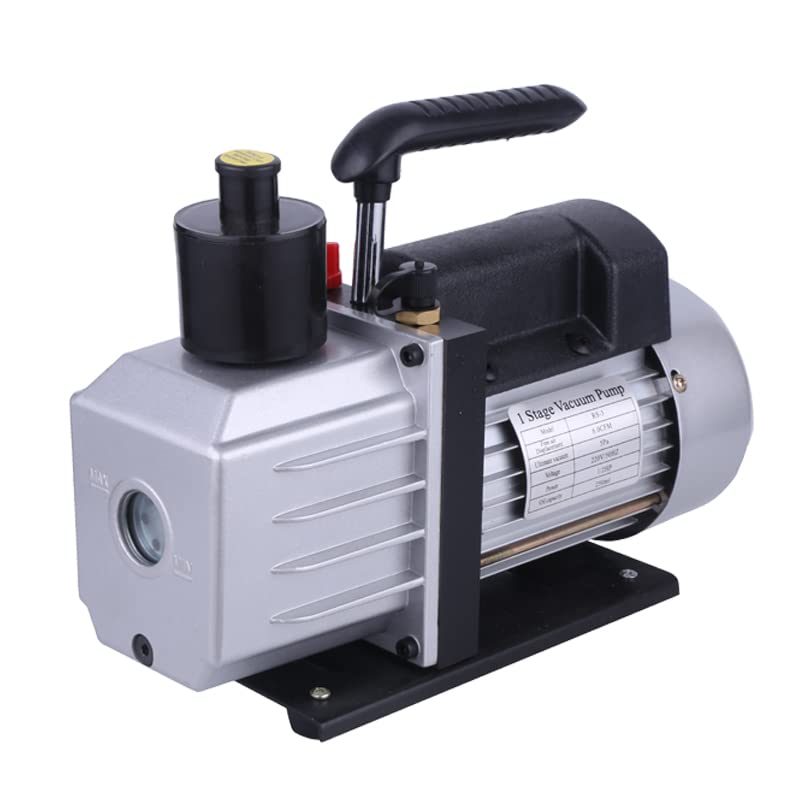
An image showing the ABLAZE 3 CFM Single Stage Vacuum Pump. The pump is silver and black, with a handle on top and a visible oil sight glass on the front. A label on the side indicates '1 Stage Vacuum Pump' and lists specifications like '3 CFM'.
Important Safety Instructions
Always follow these safety precautions to reduce the risk of fire, electric shock, or injury.
- Electrical Safety: Ensure the pump is connected to a properly grounded outlet with the correct voltage (220V/50Hz as indicated on the pump label). Do not operate with damaged cords or plugs.
- Ventilation: Operate the pump in a well-ventilated area to prevent heat buildup and ensure proper air circulation.
- Oil Handling: Vacuum pump oil can be irritating. Avoid skin and eye contact. Use appropriate personal protective equipment (PPE) such as gloves and safety glasses when handling oil. Dispose of used oil responsibly according
to local regulations. - Hot Surfaces: The pump may become hot during operation. Avoid touching hot surfaces. Allow the pump to cool before handling or performing maintenance.
- Stable Surface: Always place the pump on a stable, level surface to prevent tipping.
- Intended Use: Use the pump only for its intended purpose of creating a vacuum. Do not use it for pumping flammable or corrosive gases.
- Children and Pets: Keep the pump out of reach of children and pets.
Product Components
Familiarize yourself with the main components of your vacuum pump:
- Vacuum Pump Body: The main housing containing the motor and pump mechanism.
- Oil Sight Glass: A clear window on the front of the pump to check the oil level.
- Oil Fill Cap: Used to add vacuum pump oil.
- Exhaust Port: Where air is expelled from the pump.
- Inlet Port: Where the vacuum hose connects to the pump.
- Power Switch: To turn the pump on and off.
- Handle: For easy transport of the pump.
Setup and First Use
Follow these steps to prepare your vacuum pump for its first use:
- Unpack: Carefully remove the vacuum pump from its packaging. Inspect for any shipping damage.
- Add Oil: Locate the oil fill cap. Unscrew it and slowly pour high-quality vacuum pump oil into the reservoir until the oil level is between the MIN and MAX marks on the oil sight glass. Do not overfill.
- Secure Placement: Place the pump on a firm, level, and stable surface in a well-ventilated area.
- Connect Power: Ensure the power switch is in the OFF position. Plug the power cord into a grounded electrical outlet with the correct voltage.
- Initial Run (Optional): For first use, you may run the pump for a few minutes with the inlet port open to circulate the oil. Then, turn it off and check the oil level again, adding more if necessary.
Operating the Vacuum Pump
Once set up, follow these steps for operation:
- Connect Vacuum Chamber: Attach the vacuum hose from your vacuum chamber (e.g., Ablaze Vacuum Chamber) securely to the inlet port of the vacuum pump. Ensure all connections are tight to prevent leaks.
- Close Chamber Valve: Ensure the vacuum chamber's valve is closed before starting the pump.
- Start Pump: Flip the power switch to the ON position. The pump will begin to operate.
- Open Chamber Valve: Slowly open the vacuum chamber's valve to begin drawing a vacuum. Monitor the pressure gauge on your chamber.
- Monitor Operation: Allow the pump to run until the desired vacuum level is achieved.
- Close Chamber Valve: Once the desired vacuum is reached, close the vacuum chamber's valve first.
- Turn Off Pump: Flip the power switch to the OFF position to shut down the pump.
- Disconnect: After the pump has cooled, you may disconnect the vacuum hose.
Maintenance
Regular maintenance ensures the longevity and optimal performance of your vacuum pump.
- Oil Level Check: Check the oil level before each use. The oil should be clear and between the MIN and MAX marks on the sight glass.
- Oil Change: Change the vacuum pump oil regularly, typically after every 20-50 hours of operation, or if the oil appears cloudy, discolored, or contaminated. Refer to the oil drain plug location for draining.
- Cleaning: Keep the exterior of the pump clean and free of dust and debris. Use a dry cloth. Do not use solvents that could damage the finish.
- Storage: When not in use for extended periods, store the pump in a dry, clean environment. Ensure the inlet and exhaust ports are capped to prevent contaminants from entering.
Troubleshooting Guide
This section addresses common issues you might encounter.
| Problem | Possible Cause | Solution |
|---|---|---|
| Pump does not start | No power; Faulty power cord/plug; Overheating protection activated. | Check power connection and outlet; Inspect cord/plug; Allow pump to cool down. |
| Pump runs but no vacuum is pulled | Loose connections; Leaks in vacuum system; Insufficient oil; Contaminated oil. | Tighten all connections; Check chamber/hose for leaks; Add oil to proper level; Change oil. |
| Pump is noisy | Low oil level; Contaminated oil; Worn components. | Check and add oil; Change oil; If noise persists, contact customer support. |
| Oil appears milky or cloudy | Water vapor contamination. | Change oil immediately. Ensure proper ventilation during operation. |
Technical Specifications
- Model: 3 CFM Single Stage
- Flow Rate: 3 CFM (Cubic Feet per Minute)
- Ultimate Vacuum: Approximately 250 microns (as indicated on pump label)
- Voltage: 220V / 50Hz (as indicated on pump label)
- Material: Stainless Steel, Glass (for sight glass)
- Item Package Dimensions (L x W x H): 14.21 x 10.47 x 6.22 inches
- Package Weight: 5.43 Kilograms
- Part Number: Gallon (as listed in product specifications)
Warranty and Customer Support
For warranty information, technical assistance, or to purchase replacement parts, please contact Ablaze customer support through the retailer where you purchased the product or visit the official Ablaze website. Please have your product model and purchase date available when contacting support.
Online Resources: For additional support and resources, please refer to the product page on Amazon.com: ABLAZE Vacuum Pump on Amazon