
Calvas DB93-14195B
Calvas Remote Control User Manual
For Samsung Air Conditioner Models DB93-14195B, DB93-1115U/R/V/M, KFR-35GW/URE
Introduction
This manual provides essential information for the proper setup, operation, and maintenance of your Calvas replacement remote control for Samsung air conditioners. Please read this manual thoroughly before using the remote control.
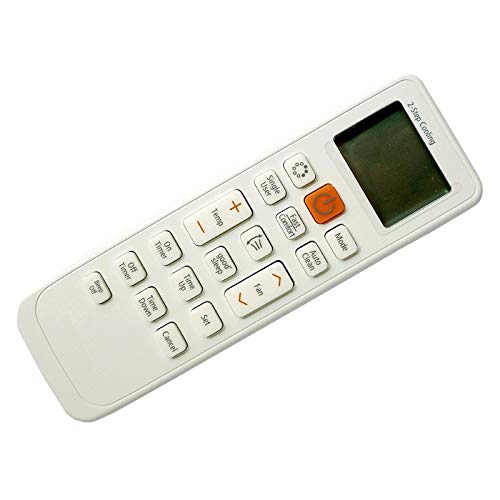
Figure 1: Front view of the Calvas remote control, showing the display and various function buttons.
Package Contents
- 1 x Calvas Remote Control (Model DB93-14195B)
- Protective packaging (bubble film and plastic bags)
Note: AAA batteries are not included and must be purchased separately.
Setup
Battery Installation
- Locate the battery compartment on the back of the remote control.
- Slide the battery compartment cover downwards or press the latch and lift to open.
- Insert two (2) AAA alkaline batteries, ensuring the positive (+) and negative (-) terminals align correctly with the markings inside the compartment.
- Replace the battery compartment cover by sliding it back into place until it clicks securely.

Figure 2: Back view of the remote control with the battery compartment, indicating where to insert AAA batteries.
Important: Use only new AAA alkaline batteries. Do not mix old and new batteries, or different types of batteries. Remove batteries if the remote control will not be used for an extended period.
Operating Instructions
This remote control uses infrared (IR) technology to communicate with your Samsung air conditioner. Ensure there is a clear line of sight between the remote control and the air conditioner's IR receiver.
Basic Functions
- Power On/Off: Press the POWER button to turn the air conditioner on or off.
- Temperature Adjustment: Use the TEMP UP (▲) and TEMP DOWN (▼) buttons to set your desired temperature. The digital display on the remote will show the current setting.
- Mode Selection: Press the MODE button to cycle through available operating modes (e.g., Cool, Heat, Fan, Dry, Auto).
- Fan Speed: Use the FAN button to adjust the fan speed (e.g., Low, Medium, High, Auto).
- Swing Function: If your air conditioner supports it, press the SWING button to activate or deactivate the louver swing function.
Refer to your Samsung air conditioner's original manual for specific functions and button layouts if they differ from standard operations.
Maintenance
- Cleaning: Wipe the remote control with a soft, dry cloth. Do not use liquid cleaners or abrasive materials.
- Battery Replacement: Replace batteries when the remote control's range decreases or if the display becomes dim. Always replace both batteries simultaneously.
- Storage: Store the remote control in a cool, dry place away from direct sunlight and extreme temperatures.
Troubleshooting
| Problem | Possible Cause | Solution |
|---|---|---|
| Remote control not working. | Dead or incorrectly inserted batteries. | Replace batteries with new AAA alkaline batteries, ensuring correct polarity. |
| Remote control has short range. | Weak batteries or obstruction. | Replace batteries. Ensure no objects block the signal path between the remote and the air conditioner. |
| Air conditioner does not respond to commands. | Remote control not compatible or air conditioner receiver issue. | Verify compatibility with your specific Samsung air conditioner model. Check if the air conditioner's IR receiver is clean and unobstructed. |
Specifications
| Brand | Calvas |
| Model Number | DB93-14195B |
| Compatible Devices | Samsung Air Conditioners (Models: DB93-14195B, DB93-1115U/R/V/M, KFR-35GW/URE, DB93-14195G) |
| Connectivity Technology | Infrared (IR) |
| Maximum Range | 9 Meters |
| Special Feature | Digital Display |
| Batteries Required | 2 x AAA Alkaline (not included) |
| Item Weight | 90 Grams |
| Manufacturer Reference | GMX-7F1BD7DBF0A29F5E6A223FB9EC44D434 |
Warranty and Support
Information regarding specific warranty terms and customer support for this product is not available in the provided details. For any issues or inquiries, please refer to the retailer or vendor from whom the product was purchased.
For general information about Calvas products, you may visit their official website if available, or contact your point of purchase for assistance.
Ask a question about this manual
Ask about setup, troubleshooting, compatibility, parts, safety, or missing instructions. Manuals+ will review the question and use this page’s manual context to help answer it.