
Important Safety Information
Please read this manual thoroughly before using the IMDK Blood Pressure Monitor. Keep it for future reference. This device is intended for non-invasive measurement and monitoring of arterial blood pressure in adults. It is not intended for self-diagnosis or treatment. Always consult a healthcare professional for diagnosis and treatment of any medical condition.
Statements regarding dietary supplements have not been evaluated by the FDA and are not intended to diagnose, treat, cure, or prevent any disease or health condition. This device is not a medical diagnostic tool. Always consult your doctor if you experience symptoms of arrhythmia, even if the monitor does not detect it.
Product Overview
The IMDK Blood Pressure Monitor UK-B02-1 is designed for accurate and convenient home use. It features advanced sensors for precise readings, an adjustable cuff for comfort, and smart app connectivity for long-term health management.
Included Components:
- 1 Blood Pressure Monitor
- 1 Cuff (8.7-16.5 inches / 22-42 cm)
- 1 Travel Bag
- 1 USB-C Cable
- 1 User Manual
- 1 Smart App (download required)
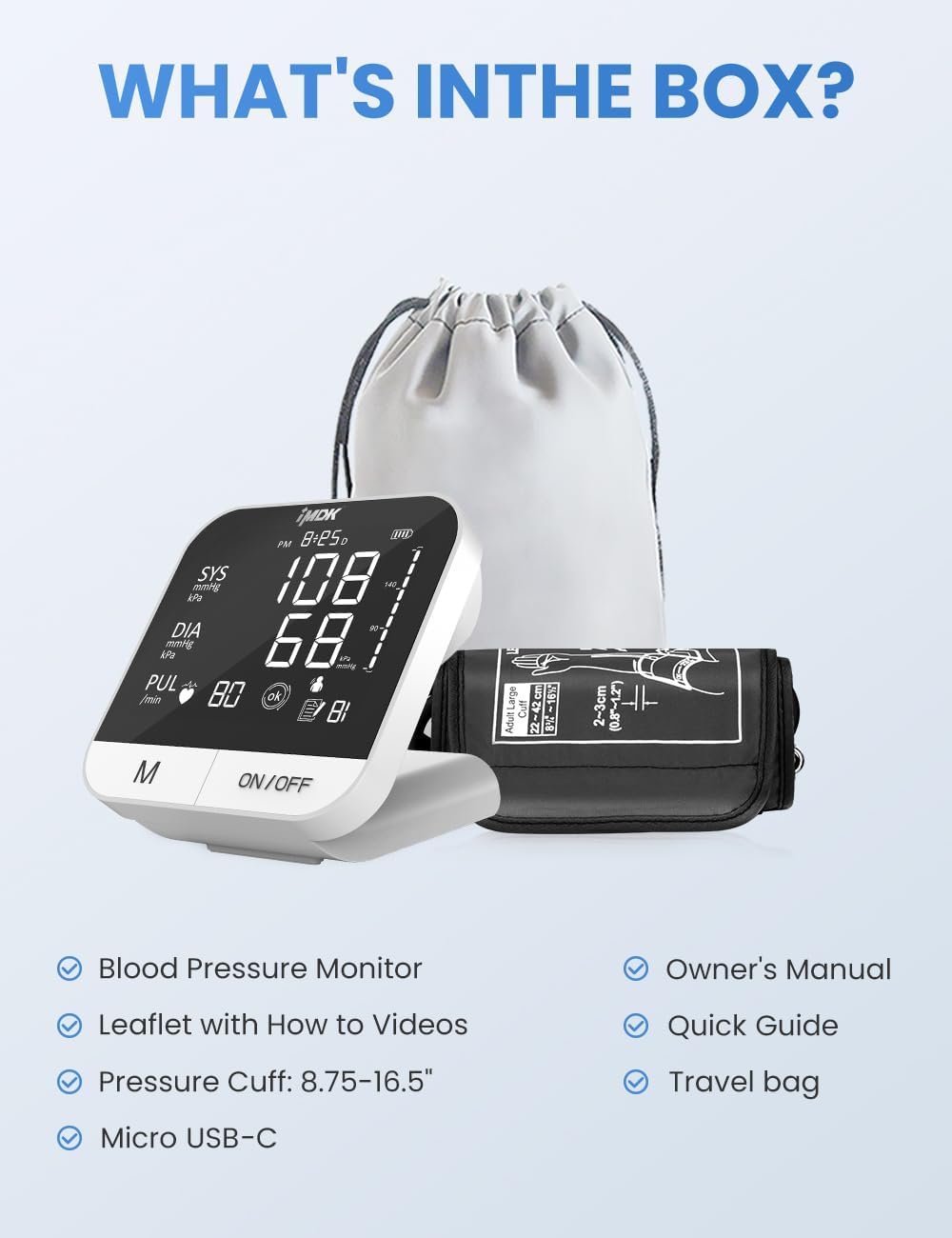
Figure 1: Contents of the IMDK Blood Pressure Monitor package.

Figure 2: Key features of the IMDK Smart Blood Pressure Monitor.
Setup Guide
Powering the Device
The monitor can be powered by 4 AAA batteries (not included) or via the included USB-C adapter. Insert batteries into the battery compartment, ensuring correct polarity. Alternatively, connect the USB-C cable to the monitor and a power source.
Video 1: IMDK Blood Pressure Monitor Initial Setup Guide. This video demonstrates how to insert batteries and connect the cuff.
Attaching the Arm Cuff
Ensure the cuff is placed on your upper arm, at least 1 centimeter above the elbow joint. The cuff should be snug but not too tight. Refer to the cuff's markings for correct placement, aligning the artery mark with your brachial artery. The adjustable cuff fits arm circumferences from 8.7 to 16.5 inches (22 to 42 cm).

Figure 3: Proper application of the intelligent pressurization cuff.

Figure 4: Guide for ensuring the correct cuff fit for accurate readings.
Initial Settings (Date, Time, Volume, Unit)
To set the date, time, and volume, press the 'M' button and the 'ON/OFF' button simultaneously to enter settings. Use the 'M' button to select values and 'ON/OFF' to confirm and move to the next setting. Adjust the year, month, day, time, and measurement unit (mmHg or kPa) as needed. You can also adjust the voice broadcast volume or turn it off.
Video 2: IMDK Blood Pressure Monitor Setup Guide. This video demonstrates how to set the date, time, and other initial settings.
App Installation and Bluetooth Connection
Scan the QR code provided on the product packaging or in the user manual to download the MedM Health application. Follow the on-screen prompts to install and register an account. Turn on the blood pressure monitor and enable Bluetooth on your smartphone. In the app, search for compatible devices and pair with your IMDK monitor. Ensure Bluetooth is enabled on both devices and the app has necessary permissions for successful pairing and data synchronization.

Figure 5: The monitor's smart features for hypertension management.

Figure 6: Integrated smartphone app for data management.
Video 3: IMDK Blood Pressure Monitor Bluetooth Connection Guide. This video demonstrates how to connect the monitor to the app via Bluetooth.
Operating Instructions
Taking a Measurement
Before measurement, rest for at least 5 minutes. Avoid caffeine, smoking, exercise, and alcohol for 30 minutes prior. Sit calmly with your back supported, feet flat on the floor, and arm resting comfortably at heart level. Press the 'ON/OFF' button to start the measurement. The monitor will automatically inflate the cuff and display your systolic, diastolic, and pulse readings. The device also features voice broadcast for convenience.

Figure 7: The IMDK Blood Pressure Monitor provides precise measurements.

Figure 8: Factors that can influence blood pressure readings.
Understanding Results
The large backlit display shows Systolic (SYS), Diastolic (DIA), and Pulse (PUL) readings. The monitor also features an intelligent indicator for blood pressure levels (Normal, Prehypertension, High BP 1, High BP 2, Hypertensive Crisis) and can detect irregular heartbeats. Consult a healthcare professional for interpretation of results.

Figure 9: Intelligent indicator for understanding blood pressure levels.

Figure 10: WHO Blood Pressure Indicator for classification of readings.

Figure 11: Irregular Heartbeat Detection feature.
Using the App for Tracking
Once connected via Bluetooth, the MedM Health app automatically tracks and analyzes your long-term blood pressure levels. You can add notes to each reading, view trends, and easily export or share records with your doctor for informed consultations. The app offers unlimited storage for your readings.

Figure 12: Health monitoring made simple with the companion app.

Figure 13: Smart tracking features for long-term health management.

Figure 14: Easily share your health data with healthcare providers.
Maintenance and Care
Clean the monitor and cuff with a soft, dry cloth. Do not use abrasive cleaners or immerse the device in water. Store the device in the provided travel bag in a cool, dry place, away from direct sunlight and extreme temperatures. The cuff is engineered for durability, with a lifespan of over 15,000 cycles and a service life of 5+ years.
Troubleshooting
- Inconsistent or Inaccurate Readings: Ensure the cuff is correctly placed and snug. Verify that pre-measurement conditions (resting, no caffeine/smoking) are followed. Refer to Figure 4 for correct cuff fit.
- Device Does Not Power On: Check if batteries are inserted correctly and have sufficient charge. If using USB-C, ensure the cable is properly connected to a working power source.
- App Connectivity Issues: Confirm Bluetooth is enabled on both the monitor and your smartphone. Check that the MedM Health app has all necessary permissions granted in your phone's settings. Try restarting both the monitor and the app.
- Error Messages: The monitor may display error codes for various issues. Consult the full user manual for a detailed explanation of error codes and their corresponding solutions.
Product Specifications
| Model Number | UK-B02-1 (BPM-A7VL) |
| Manufacturer | FoviFlxy |
| Product Dimensions | 6.6 x 5.3 x 4 inches; 1.21 Pounds |
| Power Source | 4 AAA batteries (not included) or USB-C adapter (included) |
| Display Type | Large, High-Def Backlit Display (4.7 inch) |
| Accuracy | ±3 mmHg |
| Cuff Size | 8.7-16.5 inches (22-42 cm) |
| Memory Storage | 99 readings (on monitor), Unlimited (on app) |
| Special Features | Movement Indicator, Voice Broadcast, Irregular Heartbeat Detection, App Connectivity |
| Certifications | 510 K, CE, ESH, AAMI, FSA/HSA Eligible |
Warranty and Support
The IMDK Blood Pressure Monitor UK-B02-1 is manufactured by FoviFlxy and meets high standards for accuracy and quality, holding certifications such as 510 K, CE, ESH, AAMI, and being FSA/HSA Eligible.
For specific warranty details, technical support, or customer service inquiries, please refer to the official IMDK or FoviFlxy website or contact their customer support channels directly.