
Buyers Products Company 5626432
User Manual
Buyers Products 5626432 6 Inch Oval LED Multi-Mount Combination Stop/Turn/Tail, Backup & Strobe Light
1. Introduction
This manual provides detailed instructions for the installation, operation, and maintenance of the Buyers Products 5626432 6 Inch Oval LED Multi-Mount Combination Stop/Turn/Tail, Backup & Strobe Light. Please read this manual thoroughly before installation and use to ensure proper function and safety.
The Buyers Products 5626432 is a versatile lighting solution designed for vehicles, combining multiple essential functions into a single, durable unit. It integrates a DOT-compliant stop/turn/tail light, a DOT-compliant backup light, and an amber warning strobe light with multiple flash patterns.
2. Safety Information
Always observe the following safety precautions to prevent injury or damage to the product and vehicle:
- Disconnect the vehicle's battery before performing any electrical work.
- Ensure all wiring connections are secure and properly insulated to prevent short circuits.
- Mount the light securely to prevent vibration and detachment during vehicle operation.
- Verify that the light's functions (stop, turn, tail, backup, strobe) operate correctly after installation.
- Do not look directly into the LED light when it is illuminated, as it can cause eye strain or damage.
- Refer to local and national regulations regarding vehicle lighting and warning light usage.
This product is rated IP69K for extreme dust resistance and waterproofing, but proper installation is crucial for maintaining this rating.
3. Product Overview
The Buyers Products 5626432 is an oval-shaped LED light designed for multi-functional use on vehicles. Its robust construction and versatile features make it suitable for various applications requiring reliable lighting and warning signals.
Key Features:
- Integrated Stop/Turn/Tail, Backup, and Strobe Light functions.
- DOT compliant for stop/turn/tail and backup functions (FMVSS/CMVSS 108).
- Amber strobe with 19 selectable flash patterns.
- SAE Class 1 J595 Class 1 rated strobe.
- CA13 certified.
- IP69K rated for extreme dust and water resistance.
- Synchronous and alternating capabilities for strobe function when paired.
Components:
- 6 Inch Oval LED Light Unit
- Grommet for recessed mounting
- Mounting Hardware (screws, nuts, washers)
- 7-3/4 inch leads with blunt cut ends for wiring

Figure 3.1: Front view of the 6-inch oval LED light, displaying its red outer ring for stop/turn/tail functions and the central white LEDs for backup lighting. This image highlights the primary illumination capabilities of the unit.
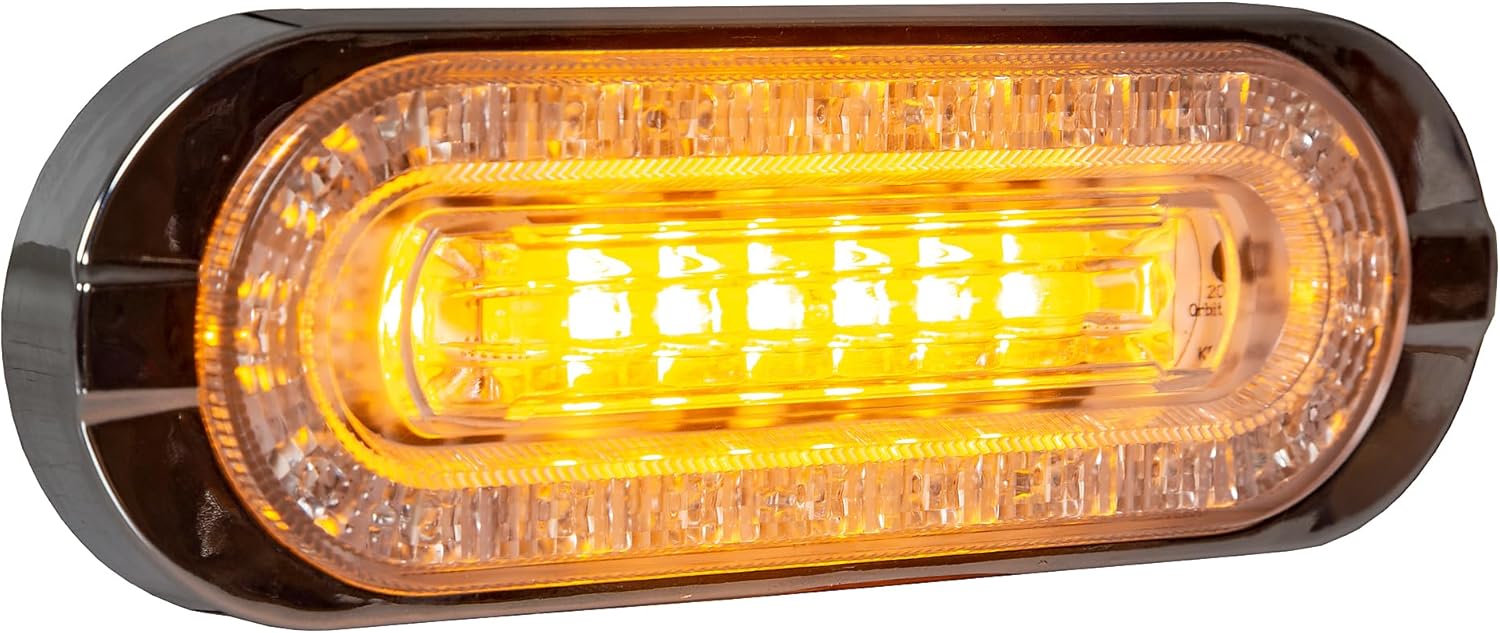
Figure 3.2: Front view of the 6-inch oval LED light with the amber strobe function active. The central LEDs and portions of the outer ring illuminate in amber, demonstrating the warning light capability.

Figure 3.3: The 6-inch oval LED light unit shown with its black rubber grommet, designed for recessed mounting applications. This view illustrates how the light fits into the grommet for a flush installation.

Figure 3.4: Rear view of the LED light, revealing the mounting holes and the exit point for the wiring harness. This perspective is important for understanding the physical installation points and cable management.

Figure 3.5: Top-down view of the LED light, clearly showing the multi-colored wiring leads extending from the unit. These leads are used for connecting the light to the vehicle's electrical system.
4. Specifications
| Attribute | Value |
|---|---|
| Model Number | 5626432 |
| Dimensions (L x W x H) | 8.3 x 3.9 x 1.4 inches |
| Weight | 8.5 ounces |
| Wattage | 16 watts |
| Amperage | 1.1 Amps |
| Lens Color | Red |
| Lens Material | Polycarbonate |
| Light Type | LED |
| Vehicle Service Type | Truck (Universal Fit) |
| Water/Dust Resistance | IP69K Rated |
| Strobe Flash Patterns | 19 |
| Certifications | DOT (FMVSS/CMVSS 108), SAE Class 1 J595 Class 1, CA13 |
| UPC | 724920174169 |
5. Setup and Installation
5.1 Pre-Installation Checklist:
- Verify all components are present: LED light unit, grommet, mounting hardware.
- Ensure the installation location on the vehicle is clean, dry, and provides sufficient space.
- Gather necessary tools: wire strippers, crimpers, electrical tape, drill, appropriate drill bits, screwdriver, multimeter.
- Disconnect the vehicle's negative battery terminal before beginning any electrical work.
5.2 Mounting Options:
The 5626432 light supports both recessed and surface mounting.
Recessed Mounting (with Grommet):
- Cut an oval opening in the mounting surface according to the dimensions of the grommet. Ensure the opening is slightly smaller than the grommet's outer edge for a snug fit.
- Insert the grommet into the cut opening.
- Carefully push the LED light unit into the grommet until it is fully seated and flush with the mounting surface.
Surface Mounting (with Mounting Hardware):
- Position the light on the desired mounting surface.
- Mark the locations for the mounting holes using the light's pre-drilled holes as a template.
- Drill pilot holes at the marked locations.
- Secure the light to the surface using the provided mounting hardware (screws, nuts, washers). Ensure the light is firmly attached.
5.3 Wiring Diagram:
The light comes with 7-3/4 inch leads with blunt cut ends. Refer to the following color code for proper connection:
| Wire Color | Function |
|---|---|
| White | Ground (-) |
| Red | Stop/Turn/Tail (+) |
| Black | Backup Light (+) |
| Yellow | Strobe Power (+) |
| Green | Strobe Pattern Select / Sync |
Wiring Steps:
- Connect the White wire to a reliable vehicle chassis ground.
- Connect the Red wire to the vehicle's stop/turn/tail light circuit.
- Connect the Black wire to the vehicle's backup light circuit.
- Connect the Yellow wire to a switched 12V power source for the strobe function. This can be a dedicated switch or an existing circuit.
- The Green wire is used for selecting strobe patterns and for synchronizing multiple strobe lights. See Section 6.2 for details.
- Ensure all connections are crimped securely and insulated with heat shrink tubing or electrical tape to protect against moisture and corrosion.
6. Operating Instructions
6.1 Basic Light Functions:
- Stop/Turn/Tail: These functions activate automatically when the corresponding vehicle signals (brake, turn signal, headlights/parking lights) are engaged and the Red wire is properly connected.
- Backup Light: The white backup LEDs illuminate when the vehicle is shifted into reverse and the Black wire is properly connected.
6.2 Strobe Function and Pattern Selection:
The amber strobe light features 19 distinct flash patterns. To cycle through the patterns, momentarily apply power to the Green wire (e.g., touch it to the Yellow wire's power source for less than 1 second, or use a momentary switch). Each brief power pulse will advance to the next pattern.
To reset the strobe to its default pattern (Pattern 1), disconnect power from the Yellow wire for more than 5 seconds, then reapply power.
6.3 Strobe Synchronization:
For applications requiring multiple strobe lights to flash in unison (synchronous) or alternating patterns, connect the Green wires of all lights together. Ensure all Yellow wires are connected to the same power source. The lights will then synchronize their flash patterns. To change the pattern for all synchronized lights, momentarily apply power to the shared Green wire connection.
7. Maintenance
The Buyers Products 5626432 LED light is designed for minimal maintenance due to its durable construction and LED technology. However, regular checks can ensure optimal performance and longevity.
- Cleaning: Periodically clean the lens with a soft cloth and mild soap and water. Avoid abrasive cleaners or solvents that could damage the polycarbonate lens.
- Inspection: Regularly inspect the light for any physical damage, such as cracks in the lens or housing. Check wiring connections for corrosion, fraying, or loose terminals.
- Mounting Security: Verify that the light remains securely mounted to the vehicle. Tighten any loose mounting hardware as needed.
- Functionality Test: Periodically test all light functions (stop, turn, tail, backup, strobe) to ensure they are operating correctly.
8. Troubleshooting
If you experience issues with your Buyers Products 5626432 LED light, refer to the following troubleshooting guide:
| Problem | Possible Cause | Solution |
|---|---|---|
| Light does not illuminate. | No power to the light; faulty ground connection; damaged wiring; blown fuse. | Check power supply to the relevant wire (Red, Black, or Yellow) using a multimeter. Verify ground connection (White wire). Inspect wiring for damage. Check vehicle's fuse box for blown fuses. |
| Strobe function not working. | No power to Yellow wire; Green wire not properly pulsed; internal fault. | Ensure constant 12V power to the Yellow wire. Momentarily apply power to the Green wire to cycle patterns. If still not working, contact support. |
| Incorrect flash pattern for strobe. | Pattern was changed. | Momentarily apply power to the Green wire to cycle to the desired pattern. Disconnect power from Yellow wire for 5+ seconds to reset to Pattern 1. |
| Lights not synchronizing. | Green wires not connected together; power supply issues. | Ensure all Green wires are securely connected to each other. Verify all Yellow wires receive power from the same source. |
| Moisture inside the lens. | Improper installation; seal compromised. | While the light is IP69K rated, severe pressure washing or improper sealing during installation can cause issues. Inspect mounting area and seals. If persistent, contact support. |
If the problem persists after attempting these solutions, please contact Buyers Products Company customer support.
9. Warranty and Support
9.1 Warranty Information:
Buyers Products Company stands behind the quality of its products. For specific warranty terms and conditions, please refer to the warranty documentation included with your purchase or visit the official Buyers Products Company website. Keep your proof of purchase for warranty claims.
Note: Warranty may be voided by improper installation, modification, or misuse of the product.
9.2 Customer Support:
For technical assistance, replacement parts, or any questions regarding your Buyers Products 5626432 light, please contact Buyers Products Company customer support:
- Website: www.buyersproducts.com
- Phone: Refer to the website for current contact numbers.
- Email: Refer to the website for current contact email.
When contacting support, please have your product model number (5626432) and purchase date available.
Ask a question about this manual
Ask about setup, troubleshooting, compatibility, parts, safety, or missing instructions. Manuals+ will review the question and use this page’s manual context to help answer it.