
1. Introduction
Thank you for choosing the Brennenstuhl Eco-Line 3-Socket Power Strip, Model 1157504130. This power strip is designed to provide reliable power distribution for your electronic devices. Please read this manual carefully before use to ensure safe operation and optimal performance. Keep this manual for future reference.
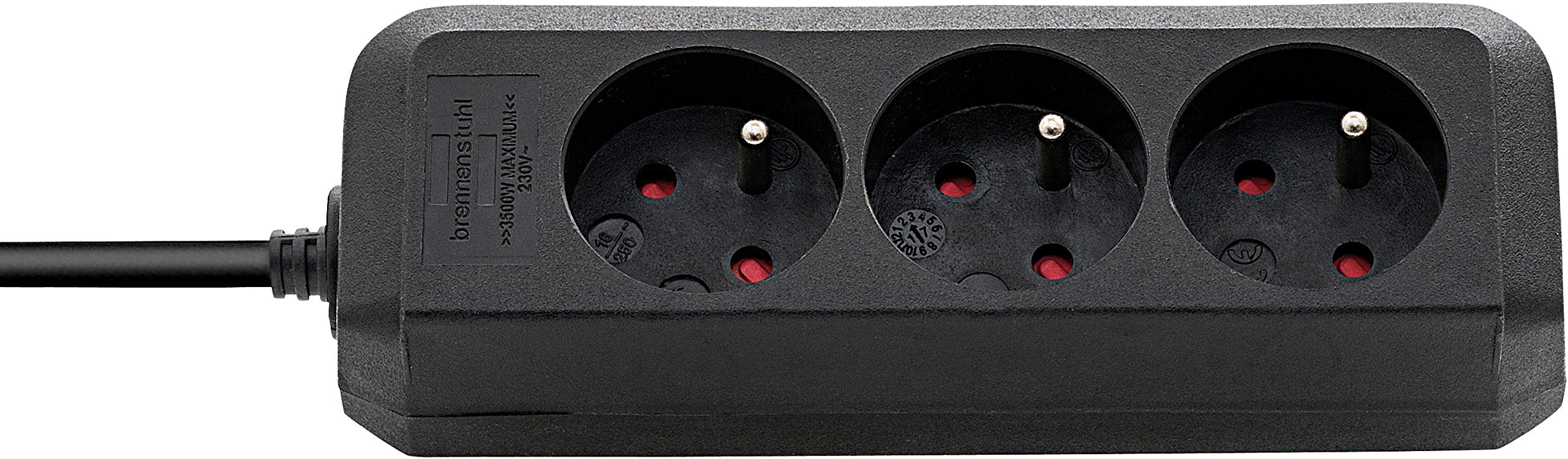
Figure 1: Brennenstuhl Eco-Line 3-Socket Power Strip (Model 1157504130). This image shows the black power strip with three Type F (Schuko) sockets and an integrated 3-meter power cable.
2. Important Safety Instructions
Always follow these safety precautions to reduce the risk of fire, electric shock, and injury.
- Do not exceed the maximum load capacity specified in the technical specifications. Overloading can cause overheating and fire.
- This power strip is designed for indoor use only. Do not expose it to moisture, rain, or extreme temperatures.
- Do not connect multiple power strips in series. This can lead to overloading and fire hazards.
- Ensure that the power plug is fully inserted into the wall socket. A loose connection can cause overheating.
- Do not use the power strip if the cable or housing is damaged. Contact qualified personnel for repair or replacement.
- Keep out of reach of children.
- Do not cover the power strip during operation to allow for proper heat dissipation.
- Always unplug the power strip from the wall socket before cleaning or when not in use for extended periods.
- Do not disassemble the power strip. There are no user-serviceable parts inside.
3. Setup
Follow these steps to set up your Brennenstuhl Eco-Line power strip:
- Unpack: Carefully remove the power strip from its packaging. Inspect it for any signs of damage.
- Placement: Choose a dry, indoor location away from direct sunlight, heat sources, and moisture. Ensure there is adequate ventilation around the power strip.
- Connect to Wall Socket: Plug the power strip's main plug into a properly grounded wall socket. Ensure the connection is firm.
- Connect Devices: Plug your electronic devices into the available sockets on the power strip. Ensure that the total power consumption of all connected devices does not exceed the maximum load capacity of the power strip (refer to Specifications).
4. Operating Instructions
The Brennenstuhl Eco-Line power strip is designed for simple operation.
- Powering On/Off: This model does not feature an individual on/off switch. Power is supplied to all connected devices when the power strip is plugged into a live wall socket. To disconnect power, unplug the power strip from the wall socket.
- Connecting Devices: Insert the plugs of your electronic devices firmly into the sockets of the power strip.
- Disconnecting Devices: To remove a device, pull its plug directly from the socket. Do not pull by the cable.
5. Maintenance and Care
Proper maintenance ensures the longevity and safe operation of your power strip.
- Cleaning: Always unplug the power strip from the wall socket before cleaning. Use a soft, dry cloth to wipe the surface. Do not use liquid cleaners, sprays, or abrasive materials.
- Inspection: Periodically inspect the power strip, cable, and plug for any signs of damage, such as cuts, fraying, or discoloration. If damage is found, discontinue use immediately and replace the unit.
- Storage: When not in use for extended periods, store the power strip in a dry, clean place, away from extreme temperatures.
6. Troubleshooting
If you encounter issues with your power strip, refer to the following common problems and solutions:
| Problem | Possible Cause | Solution |
|---|---|---|
| No power to connected devices. |
|
|
| Power strip feels warm. |
|
|
If the problem persists after attempting these solutions, contact customer support.
7. Technical Specifications
| Feature | Specification |
|---|---|
| Model Number | 1157504130 |
| Brand | Brennenstuhl |
| Number of Sockets | 3 |
| Socket Type | Type F (Schuko) |
| Cable Length | 3 meters |
| Nominal Voltage | 230 Volts AC |
| Max. Current | 16 A |
| Max. Power Load | 3680 W |
| Color | Black |
| Indoor/Outdoor Use | Indoor Use Only |
8. Warranty Information
Brennenstuhl products are manufactured to high-quality standards. This product comes with a manufacturer's warranty against defects in materials and workmanship. The specific warranty period and terms may vary by region and retailer. Please retain your proof of purchase for warranty claims.
The warranty does not cover damage caused by:
- Improper use or installation.
- Unauthorized repairs or modifications.
- Accidents, abuse, or neglect.
- Exceeding the maximum load capacity.
For detailed warranty information, please refer to the documentation provided with your purchase or visit the official Brennenstuhl website.
9. Customer Support
If you have any questions, require technical assistance, or need to report a problem with your Brennenstuhl Eco-Line power strip, please contact Brennenstuhl customer support.
You can typically find contact information on the official Brennenstuhl website or on the product packaging. When contacting support, please have your product model number (1157504130) and proof of purchase ready.
Brennenstuhl Official Website: www.brennenstuhl.com


