
1. Introduction
Thank you for choosing the MOUNTDOG Portable Webcam Stand & Mini Tripod. This versatile accessory is designed to provide stable support for your smartphone, webcam, camera, or other compatible devices, whether you're recording, streaming, or simply viewing content. Its compact and extendable design makes it ideal for tabletop use and portability. This manual provides detailed instructions for setup, operation, maintenance, and troubleshooting to ensure optimal performance and longevity of your tripod.
2. Product Overview
2.1 Key Features
- Portable & Compact: Lightweight and foldable design for easy transport and storage.
- Extendable Height: Adjustable rod allows for varied height settings.
- 360° Rotation: Ball head and phone chuck offer full rotational flexibility for optimal viewing angles.
- Wide Compatibility: Equipped with a standard 1/4-inch screw and a removable phone clip, suitable for smartphones, webcams, digital cameras, and stabilizers.
- Stable & Durable: Constructed from aluminum alloy with anti-skid rubber feet for enhanced stability.
2.2 Components
Familiarize yourself with the main components of your MOUNTDOG tripod:
- Tripod Base: The three-legged base provides stability.
- Extendable Rod: The central shaft that adjusts the height.
- 1/4-inch Universal Screw: Located at the top of the extendable rod, used for attaching cameras, webcams, or the phone clip.
- Phone Clip (Removable): Designed to securely hold smartphones, featuring a 360° rotary chuck.
- Anti-skid Rubber Feet: Located on the tripod legs for enhanced grip and stability on surfaces.

Figure 2.1: Overview of the MOUNTDOG Portable Webcam Stand & Mini Tripod, showcasing its use with a smartphone, a traditional camera, a gimbal, and its compact folded form.

Figure 2.2: Demonstrates the wide compatibility of the tripod, showing it supporting a mobile phone, a camera, a monitor, and a stabilizer, all connecting via the universal 1/4-inch screw.
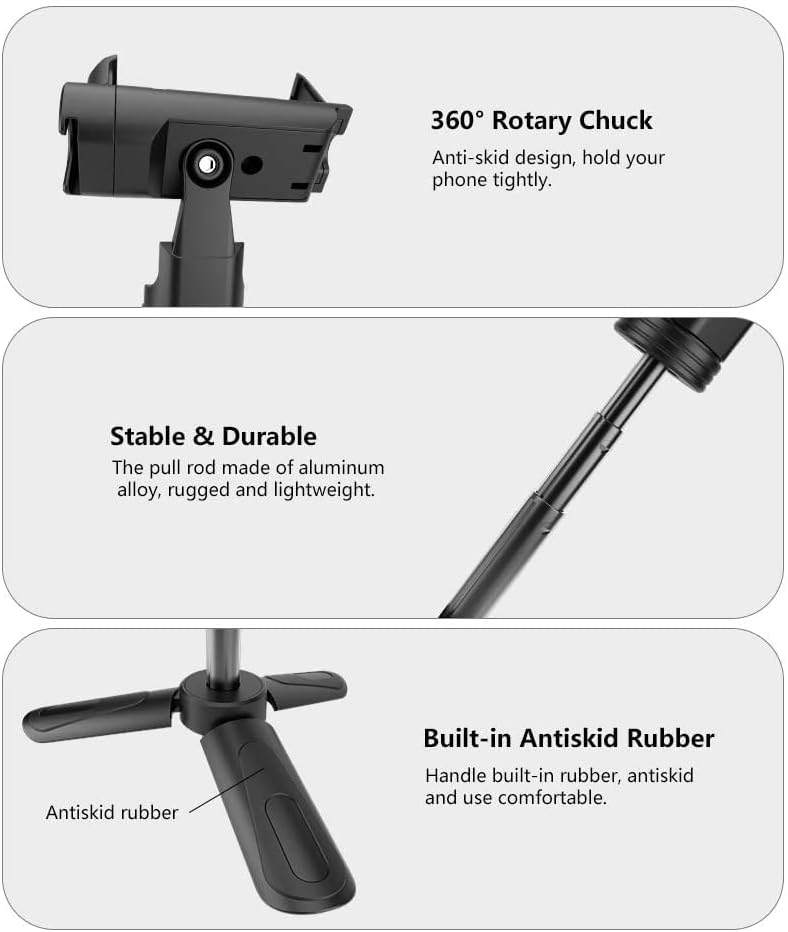
Figure 2.3: Close-up views of key features: the 360° rotary chuck for secure device holding, the robust aluminum alloy extendable rod, and the anti-skid rubber integrated into the tripod handle for comfortable and stable use.
3. Setup
3.1 Unfolding the Tripod
- Hold the main body of the tripod.
- Gently pull the three legs outwards until they lock into place, forming a stable base.
3.2 Attaching the Phone Clip
- Locate the 1/4-inch universal screw at the top of the extendable rod.
- Align the threaded hole on the bottom of the phone clip with the 1/4-inch screw.
- Rotate the phone clip clockwise until it is securely fastened to the tripod. Do not overtighten.

Figure 3.1: Illustration of the 1/4-inch universal nut on the phone clip and the 1/4-inch universal screw on the tripod, demonstrating the connection point for wide compatibility.
3.3 Attaching a Camera or Webcam
If using a camera or webcam directly, ensure the phone clip is removed.
- Locate the 1/4-inch universal screw at the top of the extendable rod.
- Align the tripod mount hole on your camera or webcam with the 1/4-inch screw.
- Rotate your device clockwise until it is securely fastened to the tripod. Do not overtighten.
4. Operating Instructions
4.1 Adjusting Height
- With the tripod base stable, gently pull the extendable rod upwards to increase the height.
- Push the extendable rod downwards to decrease the height. The rod will hold its position once released.

Figure 4.1: Illustrates the retractable feature of the tripod for height adjustment and the 360° rotation capability of the phone clip.
4.2 Rotating Your Device (360° Rotation)
- If using the phone clip, the chuck allows for 360° rotation. Simply rotate your phone within the clip to achieve portrait or landscape orientation, or any angle in between.
- If a camera or webcam is directly attached, the ball head mechanism (if present on your device) or the tripod's own rotation capability allows for angle adjustments.
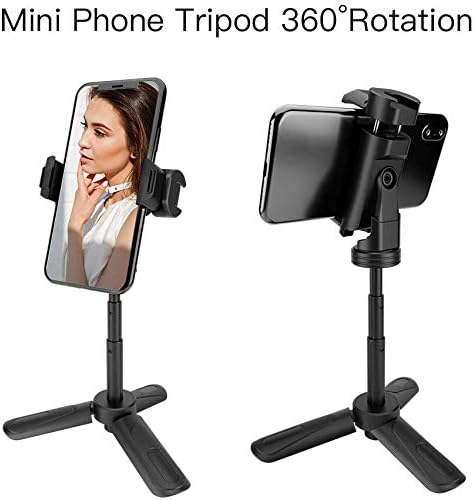
Figure 4.2: Shows the MOUNTDOG mini tripod supporting a smartphone, illustrating its ability to rotate 360 degrees for both portrait and landscape viewing.
4.3 Multi-Angle Adjustment
The design allows for various tilt and pan adjustments to achieve the perfect angle for your content creation or viewing needs.
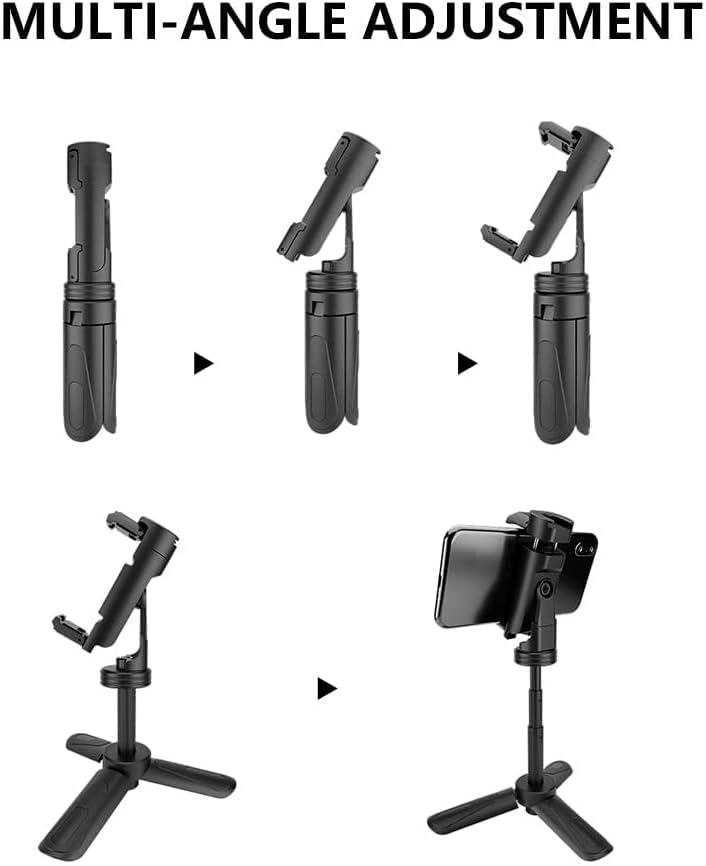
Figure 4.3: A visual guide demonstrating the multi-angle adjustment capabilities of the tripod, showing how it can be positioned for different shooting or viewing perspectives.
5. Maintenance
5.1 Cleaning
- Wipe the tripod with a soft, dry cloth to remove dust and dirt.
- For stubborn marks, use a slightly damp cloth with mild soap, then wipe dry immediately.
- Avoid using abrasive cleaners or solvents, as these can damage the finish and materials.
5.2 Storage
- Store the tripod in a cool, dry place away from direct sunlight and extreme temperatures.
- Ensure the tripod is fully retracted and folded before storage to maintain its compact form and prevent damage.
6. Troubleshooting
6.1 Device Not Stable on Tripod
- Check Connection: Ensure your device (phone, camera, webcam) is securely screwed onto the 1/4-inch universal screw or firmly gripped by the phone clip.
- Balance: For heavier devices, ensure the tripod legs are fully extended and placed on a flat, stable surface.
- Weight Limit: Verify your device's weight does not exceed the tripod's maximum weight limit (0.4 Ounces / 100 Grams).
6.2 Difficulty Adjusting Height or Rotation
- Obstruction: Check for any debris or foreign objects that might be hindering the movement of the extendable rod or the phone clip's rotation mechanism.
- Gentle Force: The mechanisms are designed for smooth operation. Do not apply excessive force. If stiff, ensure no parts are misaligned.
7. Specifications
| Feature | Detail |
|---|---|
| Model Name | Mini Portable Phone Tripod |
| Model Number | 10013-new |
| Product Dimensions | 4.8 x 4.8 x 4.8 inches (folded) |
| Maximum Height | 5.8 Inches |
| Item Weight | 3.53 ounces (100 Grams) |
| Weight Limit | 0.4 Ounces |
| Material | Metal, Plastic, Rubber |
| Color | Black |
| Compatible Devices | Smartphones (iPhone, Samsung Galaxy S7/S8/S9, etc.), Cameras, Webcams, Stabilizers |
| Special Features | Foldable, Lightweight, Portable, 360° Rotation |
Note: The listed weight limit of 0.4 ounces may be a misprint in the source data. Please exercise caution and ensure your device is securely supported.
8. Warranty and Support
MOUNTDOG products are manufactured with quality and durability in mind. For any questions regarding your Portable Webcam Stand & Mini Tripod, including warranty information, technical support, or assistance with operation, please contact MOUNTDOG customer service through the retailer's platform or the official MOUNTDOG website. Please have your model number (10013-new) and purchase details ready when contacting support.
For the most up-to-date support information, please visit the MOUNTDOG Store on Amazon.