Introduction
Thank you for purchasing the Aowasi 7 Inch Digital Picture Frame. This versatile device allows you to display your cherished photos, play videos and music, and utilize calendar, time, and alarm functions. Its user-friendly design ensures a seamless experience for sharing your memories.
Package Contents
Please check the box for the following items:
- 1 x Aowasi 7 Inch Digital Photo Frame
- 1 x Remote Control
- 1 x AC Power Cord
- 1 x User Manual (this document)

Image: The package contents, showing the digital photo frame, remote control, AC power adapter, and the user manual.
Product Overview
The Aowasi 7 Inch Digital Picture Frame is designed for ease of use and versatility. It features a high-definition IPS display for clear viewing from various angles.
Key Features:
- 7-inch HD IPS Display: Provides a clear and vibrant viewing experience with a resolution of 1024x600 pixels.
- Multi-functional: Beyond photos, it supports video and music playback, calendar, time, and alarm clock functions.
- Plug and Play: No software installation required. Simply insert a USB flash drive or SD card to display media instantly.
- Multiple Display Styles: Enjoy slideshows with background music, display 1 to 4 pictures simultaneously, and choose from various transition effects.
- Remote Control: Conveniently navigate menus and control playback from a distance.
- Flexible Placement: Can be placed on a table using the integrated stand or mounted on a wall.
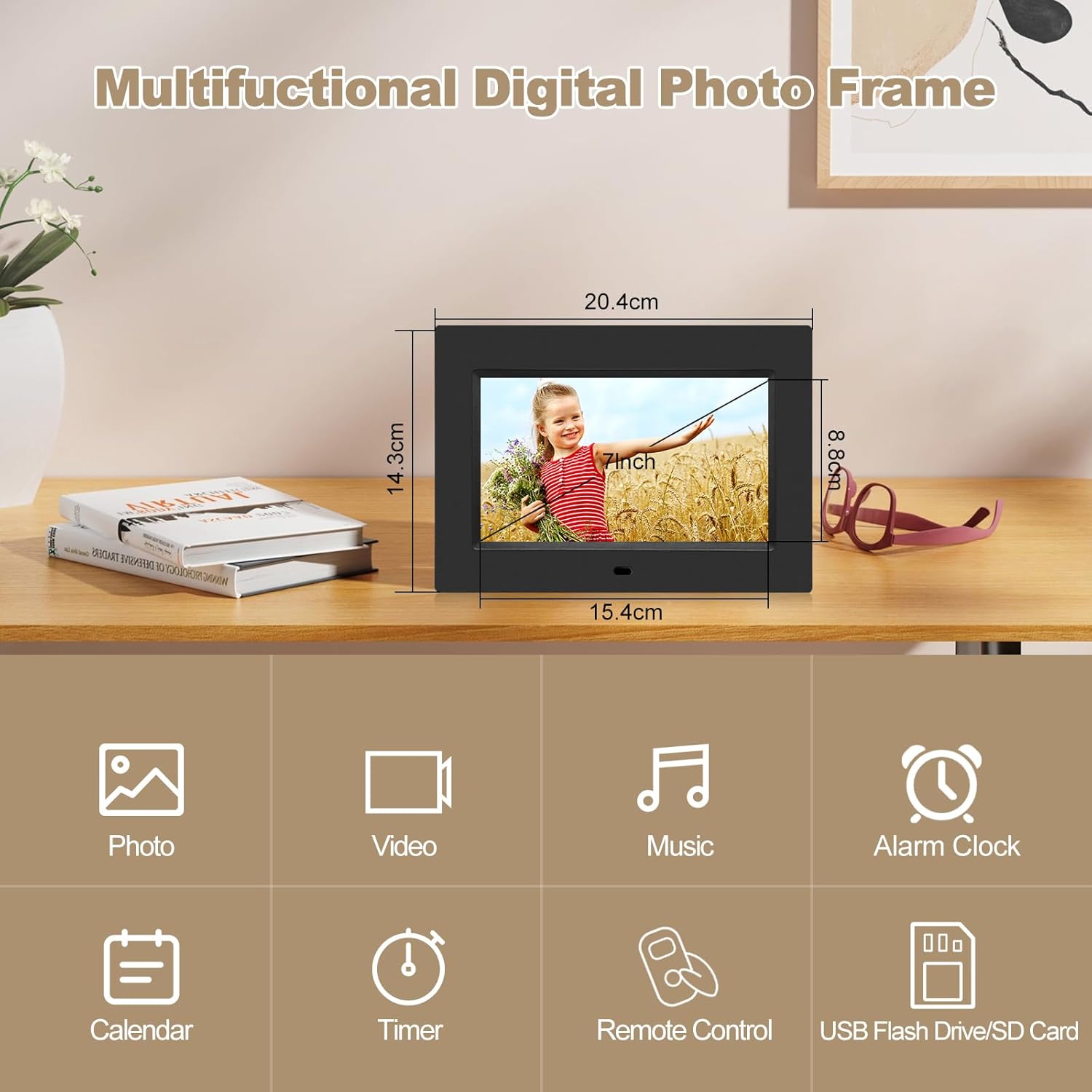
Image: Overview of the digital photo frame's multiple functions, including photo, video, music, alarm clock, calendar, timer, remote control, and USB/SD card compatibility.

Image: Close-up of the 7-inch HD IPS display, emphasizing its resolution and display technology.
Setup
Setting up your Aowasi Digital Picture Frame is quick and easy.
- Power Connection: Connect the supplied AC power cord to the DC IN port on the back of the frame and plug the adapter into a wall outlet. The frame will typically power on automatically.
- Insert Storage Device: Insert a compatible SD/MMC card or USB flash drive into the corresponding slot on the side or back of the frame. Ensure it is inserted correctly.
- Placement: Place the frame on a flat surface using its built-in stand, or mount it on a wall using the wall-mounted hole.

Image: The digital picture frame connected to power and placed on a table, demonstrating its plug-and-play setup and wall-mounting capability.

Image: Rear view of the digital picture frame, highlighting the various ports and control buttons for media input and navigation.
Operating Instructions
Navigate and control your digital picture frame using the included remote control or the buttons on the back of the frame.
Remote Control Functions:
The remote control provides full access to the frame's features:
- Power Button: Turns the frame on or off.
- Navigation Buttons (Up, Down, Left, Right): Used to move through menus and select options.
- OK/Enter Button: Confirms selections.
- Menu Button: Accesses the main menu.
- Exit Button: Returns to the previous screen or exits a function.
- Volume Buttons: Adjusts audio volume for videos and music.
- Playback Controls (Play/Pause, Next, Previous): Controls media playback.
- Mode Buttons (Photo, Video, Music, Calendar, Alarm): Directly switches to different functions.

Image: A user operating the digital picture frame with the remote control, demonstrating ease of setup and control.
Displaying Photos:
Once a storage device is inserted, the frame will automatically begin a slideshow of photos. You can customize the display settings:
- Slideshow Mode: Photos will transition automatically. You can adjust the interval and transition effects in the settings menu.
- Multi-Picture Display: Some modes allow displaying 1 to 4 pictures on the same screen simultaneously.
- Background Music: Play music files in the background while viewing photos.
Playing Videos and Music:
Navigate to the Video or Music section using the remote control. Select the desired file to begin playback. Use the playback controls on the remote to pause, skip, or adjust volume.
Calendar, Time, and Alarm Functions:
Access these functions from the main menu. You can set the current time and date, and configure alarms as needed.
Maintenance
To ensure the longevity and optimal performance of your digital picture frame, follow these maintenance guidelines:
- Cleaning the Screen: Use a soft, lint-free cloth to gently wipe the screen. For stubborn smudges, slightly dampen the cloth with water or a screen-cleaning solution. Avoid harsh chemicals or abrasive materials.
- Cleaning the Frame Body: Wipe the frame body with a dry, soft cloth.
- Storage: When not in use for extended periods, store the frame in a cool, dry place away from direct sunlight and extreme temperatures.
- Avoid Liquids: Keep the device away from water and other liquids to prevent damage to internal components.
- Power Off: Always power off the device before cleaning or disconnecting power.
Troubleshooting
If you encounter any issues with your Aowasi Digital Picture Frame, please refer to the following common problems and solutions:
| Problem | Possible Cause | Solution |
|---|---|---|
| Frame does not power on. | Power cord not connected properly; Power outlet not working. | Ensure the AC power cord is securely connected to the frame and the wall outlet. Test the outlet with another device. |
| No pictures or videos displayed. | No SD card/USB drive inserted; Incompatible file format; Corrupted files. | Insert a compatible SD card or USB drive. Ensure media files are in supported formats (e.g., JPEG for photos, MP4 for video). Try different files or reformat the storage device. |
| Remote control not working. | Batteries are dead or incorrectly inserted; Obstruction between remote and frame. | Replace the remote control batteries. Ensure there is a clear line of sight between the remote and the frame's IR receiver. |
| Poor image quality. | Low resolution images; Dirty screen. | Use higher resolution images for best display. Clean the screen as per maintenance instructions. |
Specifications
Detailed technical specifications for the Aowasi 7 Inch Digital Picture Frame:
| Brand | Aowasi |
| Model Number | 7010 |
| Screen Size | 7 Inches |
| Resolution | 1024x600p |
| Display Type | IPS Display |
| Color | Black |
| Product Dimensions | 8.03 x 5.63 x 0.99 inches |
| Item Weight | 1.06 pounds |
| Batteries | 1 Lithium Ion battery required (included for remote) |
| Compatible Devices | Personal Computer (for file transfer) |
Warranty and Support
Aowasi is committed to providing high-quality products and excellent customer service. If you have any questions or encounter issues with your digital picture frame, please do not hesitate to contact us.
We offer after-sales service and are prepared to provide a replacement or issue a refund if necessary. Please refer to your purchase documentation for specific warranty terms and contact information.
For further assistance, you may visit the official Aowasi store on Amazon: Aowasi Store


