
KOQICALL K-999+K-302 1+2
KOQICALL Queue Calling System User Manual
Model: K-999+K-302 1+2
1. Introduction
This manual provides detailed instructions for the KOQICALL Queue Calling System, Model K-999+K-302 1+2. This system is designed to efficiently manage waiting lines in various environments such as restaurants, hospitals, banks, and barbershops. It includes a keypad for calling numbers and two display units for showing the current number being served.
The system operates wirelessly, offering a convenient and clear method for customer notification. It is a plug-and-play solution, pre-paired for immediate use upon powering on.

Figure 1: Main components of the KOQICALL Queue Calling System.
2. Setup
The KOQICALL Queue Calling System is designed for ease of use with a plug-and-play setup. The keypad and display units are pre-paired at the factory. No internet connection is required for operation.
2.1 Initial Power-On
- Connect the power adapters to the keypad and both display units.
- Plug the power adapters into a standard electrical outlet.
- The units will power on automatically and display numbers.
2.2 Placement Considerations
- The display receiver can be mounted on a wall or placed on a desktop. Metal hanging loops are provided at the top for hanging.
- For optimal signal coverage, ensure the keypad and display units are within the effective range. The system has a signal coverage of approximately 1,000 feet in an open field. Indoors, with obstacles, the signal coverage can reach about 100-150 feet, suitable for small to medium-sized 1-3 storey buildings.
- Avoid prolonged exposure of the display units to direct sunlight, as this can shorten their lifespan. The units are not waterproof.
3. Operation
3.1 Calling a Number
The keypad allows for easy calling of queue numbers. The first orange digit indicates the zone number, and the last three red digits indicate the customer number (001-999).
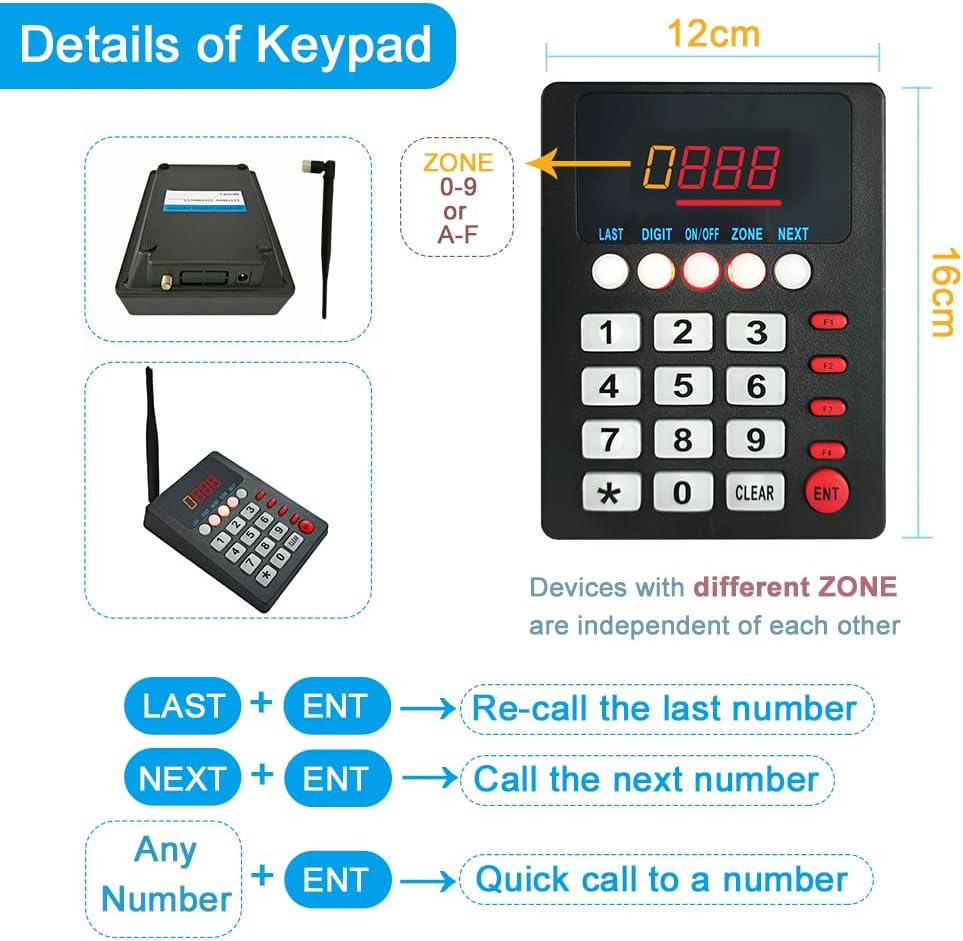
Figure 2: Keypad layout and functions.
- To call a specific number: Enter the desired number (e.g., 123) using the numeric keys, then press the ENT key.
- To re-call the last number: Press the LAST key, then press ENT.
- To call the next number in sequence: Press the NEXT key, then press ENT.
When a number is called, both display units will show the number and provide voice prompts simultaneously, ensuring clear notification in waiting areas.

Figure 3: Basic workflow of the queue calling system.
3.2 Adjusting Voice Mode and Volume
The display units offer adjustable voice modes, volume, and number of prompts. The default voice is "Dingdong + Number XXX". You can choose a simple ding-dong sound or other options.

Figure 4: Available alert tones and voice modes.
Use the remote control to adjust volume and other settings. Aim the remote control at the infrared detection area at the top right of the display screen to easily turn the screen on or off (within a 5-meter radius).
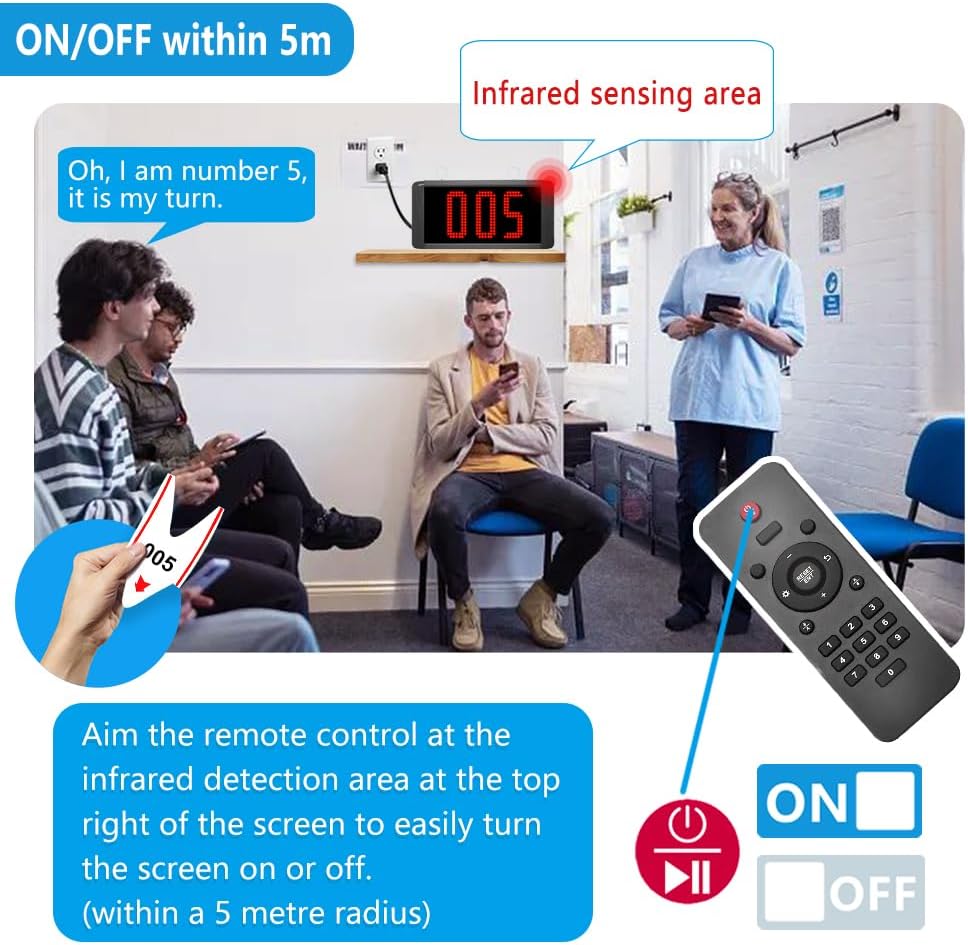
Figure 5: Using the remote control for display power.
4. Maintenance
- Keep the keypad and display units clean by wiping them with a soft, dry cloth.
- Do not use abrasive cleaners or solvents.
- The display units are not waterproof. Avoid exposure to liquids and high humidity.
- Avoid prolonged exposure to direct sunlight, as this can degrade the display and shorten its operational life.
5. Troubleshooting
| Problem | Possible Cause | Solution |
|---|---|---|
| Display not showing numbers or responding. | Out of range, power issue, or interference. | Ensure units are powered on. Move display closer to the keypad. Check for strong interference sources. |
| Voice prompt is unclear or not heard. | Volume too low or incorrect voice mode. | Adjust volume using the remote control. Check voice mode settings (refer to Section 3.2). |
| Numbers on display are dim or hard to see. | Excessive ambient light or display degradation. | Relocate the display to an area with less direct sunlight or bright lighting. Ensure the display is clean. |
| Keypad not responding. | Power issue or internal malfunction. | Ensure keypad is properly powered. If issues persist, contact customer support. |
6. Specifications
- Brand: KOQICALL
- Model Number: K-999+K-302 1+2
- Item Weight: 3.56 pounds (1.62 Kilograms)
- Product Dimensions: 8.66 x 4.88 x 0.01 inches
- Material: Acrylonitrile Butadiene Styrene (ABS)
- Color: Black 1+2
- Power Source: Corded Electric
- Dialer Type: Manual Dialer
- Answering System Type: Digital
- Wireless Range: Up to 1,000 feet (open field), 100-150 feet (indoors with obstacles)
7. Warranty and Support
For warranty information and technical support, please refer to the documentation included with your product or visit the official KOQICALL website. If you require additional quantities or have specific customization needs, please contact the manufacturer directly.
Manufacturer: quanzhou koqi electronic co., ltd