
Introduction
Thank you for choosing the Orient MBSSC064 Men's Chronograph Watch. This manual provides essential information for the proper setup, operation, and maintenance of your timepiece. Please read these instructions carefully to ensure optimal performance and longevity of your watch.
Product Overview
The Orient MBSSC064 is a sophisticated men's chronograph watch featuring a stainless steel case and bracelet, a black dial, and a mineral crystal. It is designed for durability and precision.
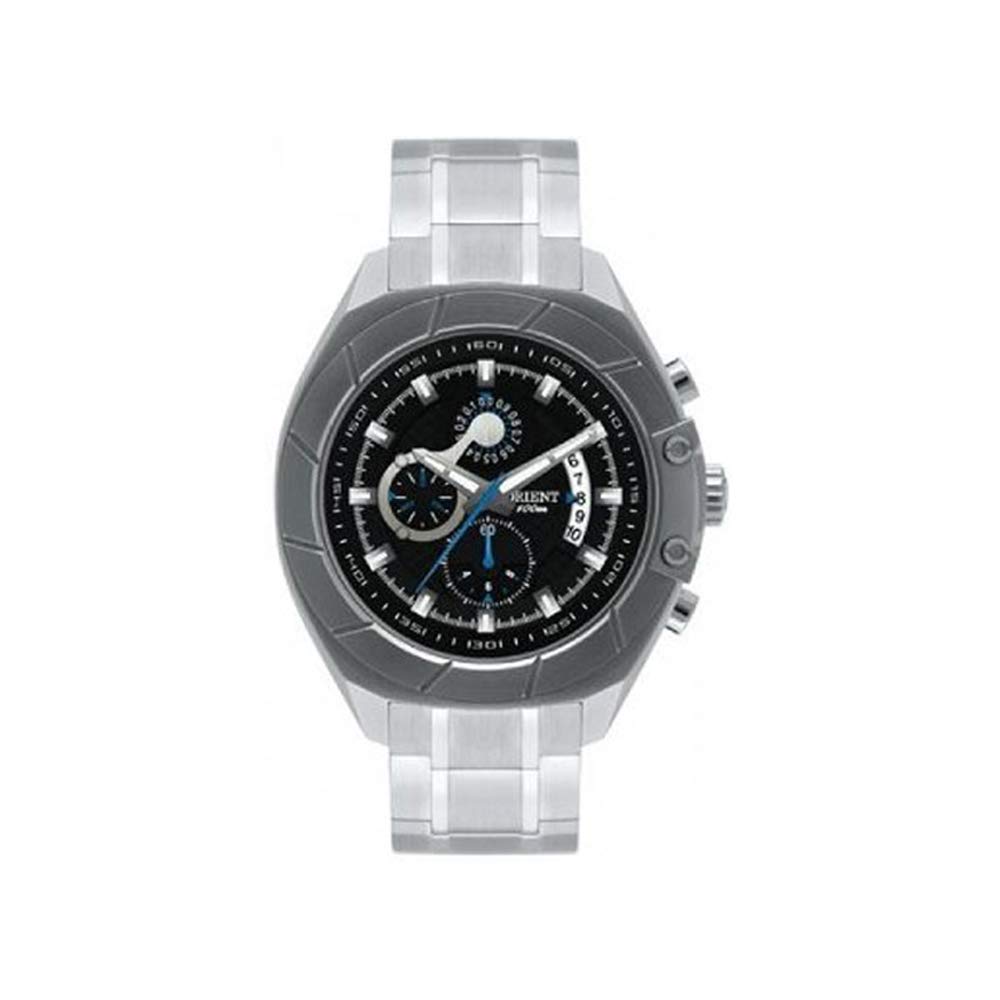
Image: Orient MBSSC064 Men's Chronograph Watch, front view. This image displays the watch's black dial, silver-tone stainless steel case and bracelet, and chronograph sub-dials.
Components:
- Crown: Used for setting time and date.
- Pushers (A & B): Used to operate the chronograph functions.
- Main Dial: Displays hours, minutes, and seconds.
- Sub-dials: Typically for chronograph minutes, seconds, and 24-hour display (specific functions may vary).
- Date Window: Displays the current date.
- Stainless Steel Bracelet: Durable and adjustable for wrist comfort.
Setup
Setting the Time:
- Pull the crown out to the second click position. The second hand will stop.
- Rotate the crown to set the hour and minute hands. Ensure the AM/PM is correctly set if your watch has a 24-hour indicator or date changes at midnight.
- Push the crown back into the normal position. The second hand will resume movement.
Setting the Date:
- Pull the crown out to the first click position.
- Rotate the crown to set the date. Avoid setting the date between 9 PM and 3 AM, as this can damage the movement.
- Push the crown back into the normal position.
Operating the Chronograph
The chronograph function allows you to measure elapsed time independently of the main time display.
- Start: Press pusher A (top pusher) to start the chronograph. The chronograph second hand will begin to move.
- Stop: Press pusher A again to stop the chronograph. The elapsed time will be indicated by the chronograph hands.
- Reset: After stopping, press pusher B (bottom pusher) to reset the chronograph hands to their zero positions.
- Split Time (if applicable): Some chronographs allow for split time measurement. Refer to specific movement instructions if this feature is present.
Note: Do not operate the pushers while the watch is wet or submerged in water, as this can compromise water resistance.
Maintenance
Cleaning:
Wipe the watch case and bracelet regularly with a soft, dry cloth to remove dirt and perspiration. For stainless steel, a slightly damp cloth can be used, followed by a dry cloth. Avoid using chemical cleaners or abrasive materials.
Water Resistance (100 Meters / 10 ATM):
Your Orient MBSSC064 watch is water-resistant up to 100 meters (10 ATM). This means it is suitable for swimming, snorkeling, and showering. However, it is not suitable for high-impact water sports, diving, or prolonged submersion at depths beyond its rating.
- Ensure the crown is fully pushed in before any contact with water.
- Do not operate the crown or pushers while the watch is wet or submerged.
- Avoid exposing the watch to extreme temperature changes (e.g., hot shower immediately followed by cold water), as this can affect seals.
- Have the water resistance seals checked periodically (e.g., every 2-3 years) by an authorized service center.
Battery Replacement:
When the battery needs replacement, the second hand may start moving in two-second intervals (End-of-Life indicator). Battery replacement should only be performed by an authorized Orient service center or a qualified watchmaker to maintain water resistance and prevent damage to the movement.
Troubleshooting
- Watch Not Running: Check if the crown is fully pushed in. If it's a new watch, ensure any plastic battery stopper has been removed. If the watch has stopped, the battery may need replacement.
- Incorrect Time/Date: Refer to the "Setting the Time" and "Setting the Date" sections. Ensure the crown is fully pushed in after setting.
- Chronograph Not Resetting to Zero: This may require a chronograph hand reset procedure. Consult an authorized service center if the issue persists after following basic operating instructions.
- Condensation Inside Crystal: If you notice condensation under the crystal, this indicates a loss of water resistance. Immediately take the watch to an authorized service center to prevent further damage.
Specifications
| Brand: | Orient |
| Model: | MBSSC064 |
| Gender: | Men's |
| Case Material: | Stainless Steel |
| Bracelet Material: | Stainless Steel |
| Dial Color: | Black |
| Crystal Type: | Mineral Glass |
| Water Resistance: | 100 Meters (10 ATM) |
| Movement Type: | Quartz Chronograph |
| Display Type: | Chronograph |
Warranty and Support
Your Orient MBSSC064 watch comes with a 12-month warranty from the date of purchase, covering manufacturing defects. This warranty does not cover normal wear and tear, accidental damage, or damage resulting from improper use or unauthorized repairs.
For warranty claims, service, or technical support, please contact your authorized Orient dealer or an official Orient service center. Attempting to repair the watch yourself will void the warranty.


