
1. Introduction
This manual provides detailed instructions for the installation and use of the ASC Audio Premium Car Stereo Installation Kit. This kit is designed to facilitate the integration of an aftermarket radio into specific Nissan Frontier, Nissan Xterra, and Suzuki Equator vehicles. Please read all instructions carefully before beginning the installation process.
2. Product Contents
The ASC Audio Car Stereo Installation Kit includes the following components:
- Radio Dash Kit: A black finish dash kit compatible with both single and double DIN aftermarket radios.
- Radio Wire Harness: Designed to plug directly into your vehicle's existing wiring for seamless power and speaker connections.
- Antenna Adapter: Ensures proper connection and signal reception for your new aftermarket radio.
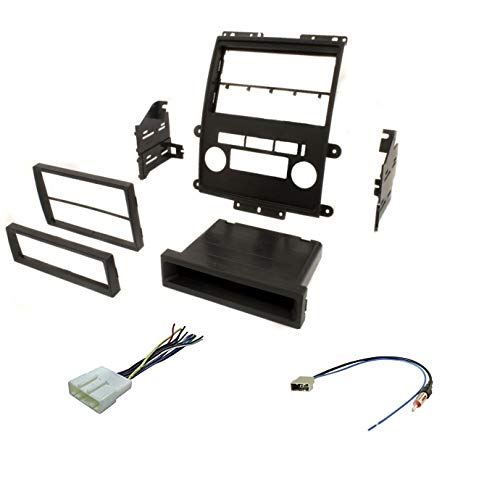
This image displays the complete ASC Audio Car Stereo Installation Kit. It includes the black finish radio dash kit, the necessary wire harness for connecting to the vehicle's electrical system, and an antenna adapter to ensure proper radio signal reception with an aftermarket unit.
3. Compatible Vehicles
This installation kit is compatible with the following vehicle models and years:
- 2009-2011 Nissan Frontier: (Excludes S, SE with 4-cylinder, and XE models)
- 2012 Nissan Frontier: (Excludes S trim models)
- 2009-2012 Nissan Xterra: (Excludes X model)
- 2009-2011 Suzuki Equator Crew Cab: (Excludes extended cab models)
Important Note: This kit will not retain certain factory features such as steering wheel audio controls without additional, separately purchased adapters.
4. Setup and Installation
The installation of an aftermarket radio requires careful attention to detail. If you are not comfortable performing this installation, it is recommended to seek professional assistance.
4.1. Preparation
- Disconnect Battery: Before starting any electrical work, disconnect the negative terminal of your vehicle's battery to prevent electrical shorts.
- Gather Tools: Ensure you have the necessary tools, which typically include screwdrivers, trim removal tools, wire strippers, crimpers, and electrical tape or heat shrink tubing.
- Review Aftermarket Radio Manual: Familiarize yourself with the wiring diagram and installation instructions provided with your new aftermarket radio.
4.2. Removal of Factory Radio
Carefully remove the factory radio and associated trim panels. Refer to your vehicle's service manual or an online resource for specific instructions on how to safely remove these components without causing damage.
4.3. Wiring Connections
- Connect Wire Harness: Match the wires from the ASC Audio wire harness to the corresponding wires on your aftermarket radio's harness. Typically, colors are standardized (e.g., yellow for constant power, red for accessory power, black for ground, etc.). Secure connections using crimp connectors or solder and heat shrink.
- Connect Antenna Adapter: Plug the ASC Audio antenna adapter into the vehicle's factory antenna cable, and then connect the other end to the antenna input on your aftermarket radio.
4.4. Dash Kit Assembly and Radio Installation
- Assemble Dash Kit: Follow the instructions provided with the dash kit to assemble it around your aftermarket radio. Ensure the radio is securely mounted within the dash kit.
- Connect to Vehicle: Plug the ASC Audio wire harness into the vehicle's factory radio harness.
- Test Connections: Before fully reassembling the dash, reconnect the vehicle's battery and briefly test the aftermarket radio's functionality (power, audio, balance, fader, antenna reception).
- Secure Radio: Once tested, carefully slide the assembled dash kit and radio into the vehicle's dashboard opening, securing it with any factory screws or clips.
- Reinstall Trim: Reinstall all removed trim panels in reverse order of removal.
5. Operating
The ASC Audio Car Stereo Installation Kit is a passive component designed to integrate your aftermarket radio. Once installed, the operation of your car stereo will be governed by the features and controls of the aftermarket radio itself. Refer to the user manual provided with your aftermarket radio for detailed operating instructions.
6. Maintenance
The components of the ASC Audio Car Stereo Installation Kit require minimal maintenance. Ensure that all connections remain secure and free from corrosion. Periodically, you may wish to gently clean the visible surfaces of the dash kit with a soft, damp cloth to remove dust or smudges. Avoid using harsh chemicals or abrasive cleaners.
7. Troubleshooting
If you encounter issues after installing your aftermarket radio with this kit, consider the following troubleshooting steps:
- No Power to Radio:
- Check all wire harness connections for proper seating and continuity.
- Verify the vehicle's fuse for the radio circuit is intact.
- Ensure the aftermarket radio's internal fuse is not blown.
- No Sound:
- Confirm speaker wire connections are correct and secure.
- Check the aftermarket radio's settings (e.g., mute, fader, balance).
- Poor Radio Reception:
- Ensure the antenna adapter is fully connected at both ends.
- Verify the antenna cable itself is not damaged.
- Dash Kit Does Not Fit:
- Double-check the compatibility list in Section 3 to ensure your vehicle model and year are supported.
- Ensure all factory mounting brackets and screws have been removed or are correctly positioned.
For persistent issues, consult a professional car audio installer or contact ASC Audio customer support.
8. Specifications
| Feature | Specification |
|---|---|
| Brand | ASC Audio |
| Color | Black |
| Dash Kit Compatibility | Single DIN, Double DIN |
| Antenna Type | Radio |
| Manufacturer | Other |
9. Warranty Information
Specific warranty details for the ASC Audio Car Stereo Installation Kit are not provided in this manual. For information regarding product warranty, please refer to the packaging or contact ASC Audio directly through their official website or customer service channels. Keep your proof of purchase for any warranty claims.
10. Support
For technical assistance, installation questions, or further product information, please contact ASC Audio customer support. You can typically find contact details on the product packaging or the official ASC Audio website.
Online Resources: Search for installation guides specific to your vehicle model and aftermarket radio on reputable car audio forums or YouTube channels for visual aids.