
Introduction
Thank you for choosing the Eureka Forbes Aeroguard AP 500 Air Purifier. This manual provides essential information for the safe and efficient operation, maintenance, and troubleshooting of your new air purifier. Please read it thoroughly before using the appliance and retain it for future reference.
Important Safety Instructions
- Read all instructions before using the appliance.
- Do not operate any appliance with a damaged cord or plug. If the cord or plug is damaged, contact authorized service personnel.
- Do not use the appliance outdoors or on wet surfaces.
- Keep the power cord away from heated surfaces.
- Do not block air openings or place the appliance on a soft surface where openings may be blocked.
- Do not insert any objects into openings.
- This appliance is for household use only.
- Always unplug the air purifier before moving, cleaning, or replacing filters.
- Ensure the voltage rating on the product matches your local power supply.
Product Overview
The Eureka Forbes Aeroguard AP 500 is designed to provide clean and healthy air in your home. It features a multi-stage filtration system to effectively remove various airborne pollutants.

Image: The Eureka Forbes Aeroguard AP 500 Air Purifier, a white rectangular unit with a dark top panel and perforated air intake on the front.
Key Features
- HEPA Filter: High-Efficiency Particulate Air filter capable of removing up to 99.99% of micro-particles such as PM 2.5, dust, pollen, and mold spores.
- 3-Stage Air Purification: Utilizes a Pre-filter, HEPA filter, and Activated Carbon filter for comprehensive air cleaning.
- Air Quality Indicator: Provides real-time feedback on the surrounding air quality.
- Ozone-Free: Designed to purify air without producing harmful ozone.
- Filtermaxx Technology: Advanced filtration system for superior air purification.

Image: Diagram illustrating key features: HEPA Filter icon, 3-stage Air Purification icon, and Air Quality Indicator icon next to the air purifier unit.
Setup and Filter Installation
Before operating your air purifier, ensure all filters are correctly installed. The unit comes with filters included, but they may need to be unwrapped or seated properly.
- Unpack the Unit: Carefully remove the air purifier from its packaging.
- Access Filter Compartment: Locate and open the filter access panel, usually on the back or side of the unit.
- Remove and Unwrap Filters: Take out all filters. If they are sealed in plastic bags, remove the packaging.
- Install Filters: Insert the filters in the correct order. Typically, the Pre-filter goes in first, followed by the HEPA filter, and then the Activated Carbon filter. Refer to the internal labels or diagrams for precise placement.
- Close Panel: Securely close the filter access panel.
- Position the Unit: Place the air purifier on a flat, stable surface, ensuring adequate space around it for optimal airflow.
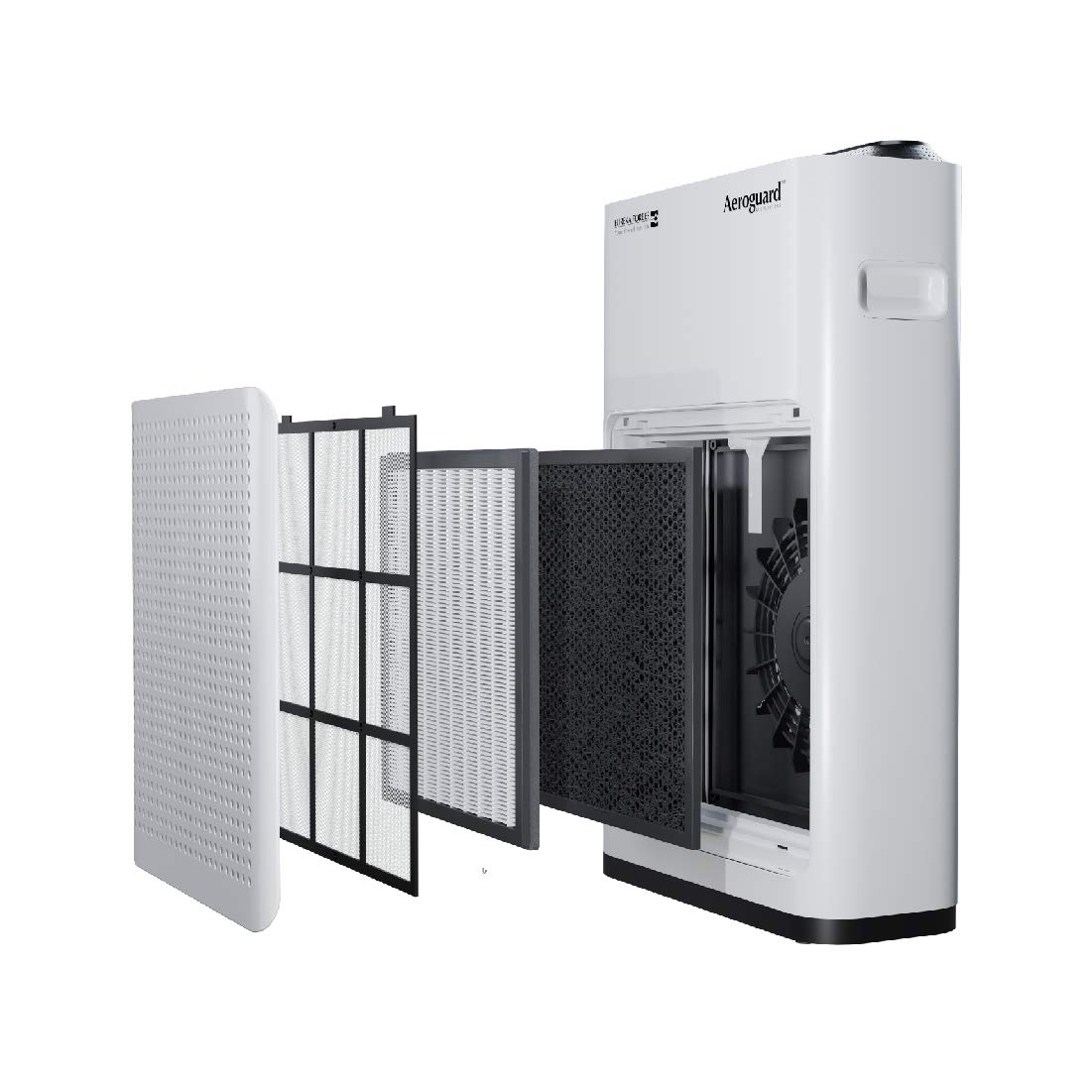
Image: Exploded view of the Aeroguard AP 500 showing the side panel removed and the three filter layers (Pre-filter, HEPA filter, Activated Carbon filter) being inserted into the unit.

Image: Diagram illustrating the three filter layers: Pre-filter, HEPA Filter, and Activated Carbon Filter, with arrows showing air passing through them.
Operating Instructions
Control Panel
The Aeroguard AP 500 features a touch control panel located on the top of the unit for easy operation.
Power On/Off
- To Power On: Plug the unit into a suitable power outlet. Press the Power button on the control panel.
- To Power Off: Press the Power button again.
Mode Selection
Your air purifier may offer various operating modes (e.g., Auto, Sleep, Manual Fan Speed). Refer to the icons on the control panel to select your desired mode. The Auto mode adjusts fan speed based on detected air quality.
Air Quality Indicator
The unit is equipped with an air quality sensor that displays the current air quality through a color-coded indicator or numerical display on the control panel. Different colors or numbers represent varying levels of air purity.
Child Lock Function
To prevent accidental changes to settings, the Aeroguard AP 500 includes a child lock feature. Activate this function by pressing and holding the designated button (often indicated by a lock icon) for a few seconds. Repeat the action to deactivate.

Image: A child playing near the Aeroguard AP 500, highlighting the "One touch child lock to keep your kids safe" feature with a lock icon.
Maintenance
Regular maintenance ensures optimal performance and extends the lifespan of your air purifier.
Filter Replacement
Filters have a limited lifespan and must be replaced periodically. The frequency depends on usage and air quality. The unit may have an indicator light to signal when filters need replacement. Always use genuine Eureka Forbes replacement filters.
- Pre-filter: Clean regularly (e.g., monthly) by vacuuming or washing. Replace every 6-12 months.
- HEPA and Activated Carbon Filters: These are typically combined or replaced together. Replace every 6-12 months, or as indicated by the unit. Do not wash these filters.
To replace filters, follow the same steps as initial installation (refer to "Setup and Filter Installation" section).
Cleaning the Unit
- Always unplug the air purifier before cleaning.
- Wipe the exterior surfaces with a soft, damp cloth. Do not use abrasive cleaners or solvents.
- Gently vacuum the air intake and outlet grilles to remove dust accumulation.
Troubleshooting
If you encounter issues with your air purifier, refer to the following table for common problems and solutions.
| Problem | Possible Cause | Solution |
|---|---|---|
| Unit does not turn on. | Not plugged in; power outage; faulty power cord. | Ensure unit is securely plugged in. Check power supply. Inspect power cord for damage. |
| Weak airflow. | Blocked air intake/outlet; dirty filters. | Clear any obstructions. Clean or replace filters as needed. |
| Unusual noise. | Loose filter; foreign object inside; unit not on a flat surface. | Check filter installation. Ensure no foreign objects are present. Place unit on a stable, flat surface. |
| Persistent odor. | Saturated Activated Carbon filter. | Replace the Activated Carbon filter. |
| Air quality indicator always red/poor. | High pollution levels; dirty sensor. | Ensure filters are clean/new. Clean the air quality sensor (refer to specific instructions if available). |
If the problem persists after attempting these solutions, please contact Eureka Forbes customer support.
Specifications
| Brand | Eureka Forbes |
| Model Number | GAPDAP50000000 (AP 500) |
| Item Weight | 5 kg |
| Item Dimensions (LxWxH) | 51 x 17.2 x 32.5 Centimeters |
| Floor Area Coverage | 602 Square Feet |
| Controller Type | Touch Control |
| Included Components | Air Purifier, Filters, User manual |
| Colour | White |

Image: Diagram showing the dimensions of the Aeroguard AP 500 (51 cm height, 17.2 cm depth, 32.5 cm width) relative to a human figure.
Warranty and Customer Support
Your Eureka Forbes Aeroguard AP 500 Air Purifier comes with a 1 Year Warranty from the date of purchase, covering manufacturing defects.
For service, support, or to purchase genuine replacement filters, please contact Eureka Forbes customer care:
- Manufacturer/Importer: Eureka Forbes Ltd. B1/B2, 701, 7th Floor, Marathon Innova Marathon NextGen, Off Ganpatrao Kadam Marg Lower Parel, Mumbai - 400 013, India
- Customer Service Number: 18602661177 or 095943 25390
- Online Store: Visit the Eureka Forbes Store on Amazon