
Phonic POWERPACK415RW
Phonic POWERPACK415 Audio Kit User Manual
Model: POWERPACK415RW
Introduction
Thank you for purchasing the Phonic POWERPACK415 Audio Kit. This comprehensive system includes an amplified mixer, two 10-inch speakers, a dynamic microphone, and connection cables, providing a complete sound solution for various applications. This manual will guide you through the setup, operation, and maintenance of your new audio system to ensure optimal performance and longevity.
Important Safety Information
Please read and understand all safety instructions before operating this equipment. Retain this manual for future reference.
- Power Source: Connect the unit only to the specified power supply voltage. Ensure the power cord is not pinched or walked on.
- Ventilation: Do not block any ventilation openings. Install in accordance with the manufacturer's instructions.
- Water and Moisture: Do not expose this apparatus to rain or moisture. Do not place objects filled with liquids, such as vases, on the apparatus.
- Heat: Do not install near any heat sources such as radiators, heat registers, stoves, or other apparatus (including amplifiers) that produce heat.
- Servicing: Do not attempt to service this product yourself. Refer all servicing to qualified service personnel. Servicing is required when the apparatus has been damaged in any way, such as power-supply cord or plug is damaged, liquid has been spilled or objects have fallen into the apparatus, the apparatus has been exposed to rain or moisture, does not operate normally, or has been dropped.
- Cleaning: Clean only with a dry cloth.
Package Contents
Verify that all items listed below are included in your package:
- Phonic POWERPACK415 Amplified Mixer
- Two (2) 10-inch Passive Speakers
- One (1) Dynamic Microphone
- Two (2) Speaker Cables
- Power Cord
- User Manual (this document)
Product Overview
The Phonic POWERPACK415 system is designed for ease of use and powerful sound delivery. It comprises a compact amplified mixer and two robust 10-inch speakers.

Figure 1: The complete Phonic POWERPACK415 Audio Kit, showing the amplified mixer unit and the two 10-inch passive speakers.
Amplified Mixer (Phonic 410R)
The mixer features 4 mic/line input channels, a USB recorder/player, Bluetooth connectivity, and digital delay effects. Its compact design makes it highly portable.

Figure 2: Front panel of the Phonic POWERPACK415 mixer, highlighting the input channels (1-4), equalization controls, master volume, and USB/Bluetooth module.
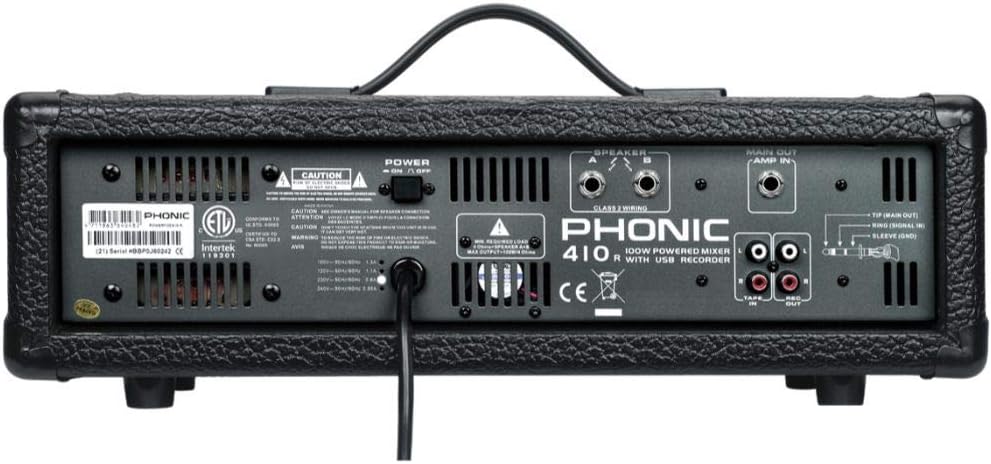
Figure 3: Rear panel of the Phonic POWERPACK415 mixer, displaying the power input, speaker outputs (Class 1 Wiring), Main Out/Amp In, and Tape In/Out connections.
10-inch Passive Speakers
The kit includes two durable 10-inch speakers with integrated handles and a 35mm stand adapter, designed for clear audio reproduction.
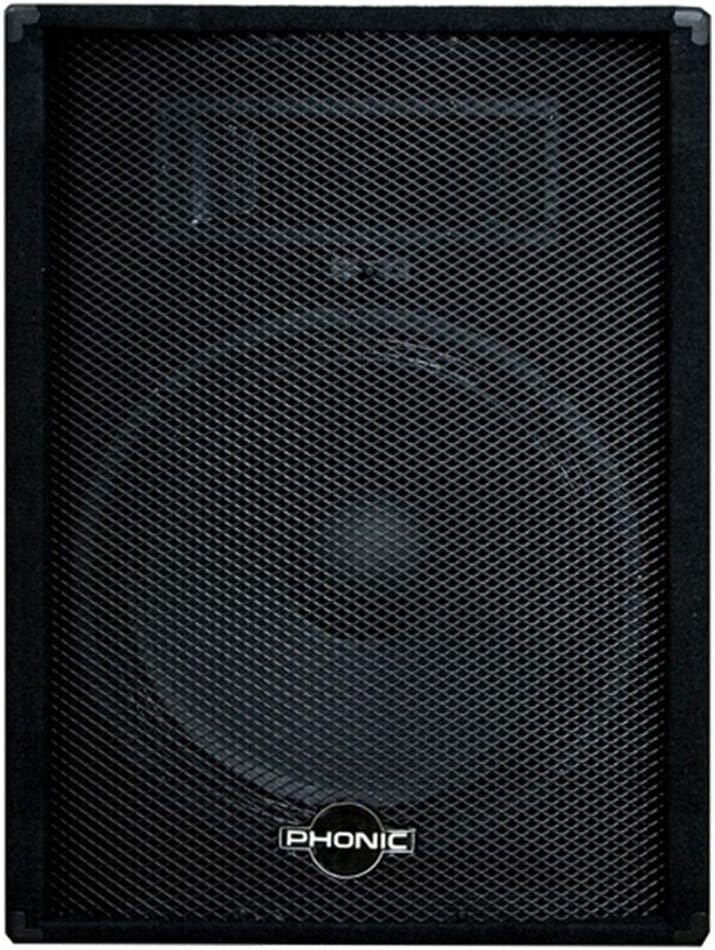
Figure 4: Front view of one of the 10-inch Phonic speakers, featuring the protective grille and Phonic branding.

Figure 5: Rear view of one of the 10-inch Phonic speakers, showing the speaker input jack and rubber feet for stable placement.
Setup
Follow these steps to set up your Phonic POWERPACK415 Audio Kit:
- Placement: Position the mixer on a stable, flat surface. Place the speakers on either side of the mixer, ensuring they are facing the audience or desired listening area. Speakers can be placed on the floor or mounted on compatible speaker stands (not included) using the 35mm adapter.
- Connect Speakers: Using the provided speaker cables, connect one end to the speaker output jacks on the rear of the mixer (labeled "SPEAKER") and the other end to the input jacks on the rear of each speaker. Ensure a secure connection.
- Connect Microphone: Plug the dynamic microphone into one of the XLR (Mic/Line) input channels on the front of the mixer.
- Power Connection: Ensure the mixer's power switch is in the "OFF" position. Connect the power cord to the mixer's power inlet on the rear panel, then plug the other end into a suitable electrical outlet.
- Initial Volume Settings: Before powering on, turn all channel volume knobs and the master volume knob down to their minimum (counter-clockwise) positions.
Operating Instructions
Powering On and Basic Operation
- Power On: Flip the power switch on the rear of the mixer to the "ON" position. The power indicator light will illuminate.
- Adjust Master Volume: Slowly raise the "MAIN" master volume knob to a low listening level.
- Adjust Channel Volume: For the microphone, speak into it while slowly raising the corresponding channel's "LEVEL" knob until the desired volume is achieved.
- Equalization: Use the "HIGH" and "LOW" knobs on each channel to adjust the treble and bass frequencies for the connected input.
- Digital Delay: The mixer features a variable digital delay effect. Use the "TIME" and "REPEAT" controls to adjust the characteristics of the delay. The "EFX MASTER" knob controls the overall level of the effect.
USB Recording and Playback
The integrated USB module allows for direct recording of your mix and playback of audio files.
- Recording: Insert a USB flash drive into the USB port. Use the controls on the USB module to initiate recording. Refer to the module's display for recording status.
- Playback: Insert a USB flash drive containing audio files (e.g., MP3). The module will typically auto-detect and allow you to browse and play files using its controls.
Bluetooth Connectivity
Connect your Bluetooth-enabled device (smartphone, tablet) to the mixer for wireless audio streaming.
- Activate Bluetooth: On the mixer's USB module, select the Bluetooth mode. The display will indicate it's ready for pairing.
- Pair Device: On your mobile device, go to Bluetooth settings and search for available devices. Select "Phonic" or a similar name that appears.
- Stream Audio: Once paired, you can play audio from your device, and it will be routed through the mixer and speakers. Adjust the USB/Bluetooth channel level on the mixer.
Maintenance
Proper maintenance ensures the longevity and optimal performance of your audio kit.
- Cleaning: Disconnect the power before cleaning. Use a soft, dry cloth to wipe down the mixer and speakers. Do not use liquid cleaners or aerosols.
- Storage: When not in use for extended periods, store the kit in a cool, dry place, away from direct sunlight and extreme temperatures.
- Cable Care: Avoid bending or kinking cables sharply. Store them neatly to prevent damage.
Troubleshooting
If you encounter issues, refer to the following common problems and solutions:
| Problem | Possible Cause | Solution |
|---|---|---|
| No sound from speakers |
|
|
| Distorted sound |
|
|
| Bluetooth not connecting |
|
|
Specifications
Detailed technical specifications for the Phonic POWERPACK415 Audio Kit:
| Feature | Detail |
|---|---|
| Mixer Output Power | 150 Watts |
| Speaker Woofer Size | 10 inches |
| Speaker Power Capacity (RMS) | 80 W RMS, 160W Program |
| Speaker Frequency Response | 65 Hz - 20 kHz |
| Speaker SPL | 96dB |
| Speaker Impedance | 8 Ohm |
| Input Channels | 4 Mic/Line channels |
| Connectivity Technology | Bluetooth, USB |
| Special Features | USB Recorder/Player, Digital Delay, Bluetooth |
| Power Source | Corded Electric |
| Dimensions (Package) | 77 x 70 x 41 cm |
| Weight (Package) | 3 kg |
| Model Number | POWERPACK415RW |
Warranty and Support
Phonic products are manufactured to the highest quality standards. For information regarding warranty coverage, technical support, or service, please refer to the warranty card included with your product or visit the official Phonic website. Keep your proof of purchase for warranty claims.
For further assistance, please contact Phonic customer support through their official channels.