
1. Introduction
This manual provides essential instructions for the proper use, setup, and maintenance of your XTREME XTM-1250 Over-Ear Headphones. Please read this manual thoroughly before using the product to ensure optimal performance and longevity. Keep this manual for future reference.
2. Product Overview
The XTREME XTM-1250 are wired over-ear headphones designed for comfortable audio listening. They feature a durable construction and a 3.5mm jack for universal compatibility with various audio devices.
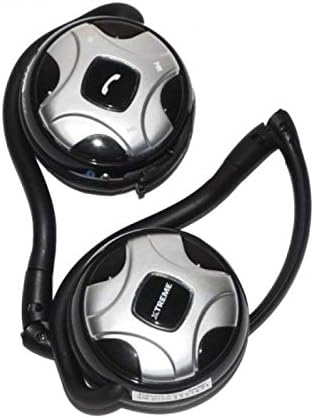
Figure 1: XTREME XTM-1250 Over-Ear Headphones, folded for storage. This image displays the XTREME XTM-1250 Over-Ear Headphones in a folded configuration. The earcups are silver and black, featuring control buttons on one earcup and the 'XTREME' logo on the other. The black headband and ear hooks are visible, indicating a compact design.
Package Contents:
- XTREME XTM-1250 Over-Ear Headphones
- Ear Cushions (pre-installed)
- Headband (integrated)
3. Setup
Setting up your XTREME XTM-1250 headphones is a simple process:
- Unfold Headphones: Gently unfold the headphones from their compact storage position until the earcups are correctly oriented for wearing.
- Connect Audio Cable: Insert the 3.5mm audio jack into the corresponding audio output port on your device (e.g., smartphone, tablet, computer, MP3 player).
- Adjust Fit: Place the headphones over your ears and adjust the headband for a comfortable and secure fit.
4. Operating Instructions
Once connected, your XTM-1250 headphones are ready for use. The headphones feature integrated controls on one earcup for convenient management of audio and calls.
Audio Playback:
- Volume Control: Use the volume up (+) and volume down (-) buttons on the earcup to adjust the audio level.
- Play/Pause: Press the central button (often marked with a play/pause symbol) to play or pause audio playback.
- Track Navigation: Depending on your device and the button configuration, you may be able to press the central button twice for next track or three times for previous track.
Call Management:
- Answer/End Call: Press the call button (often marked with a phone icon) once to answer an incoming call or end an active call.
- Reject Call: Press and hold the call button for approximately two seconds to reject an incoming call.
- Voice Assistant: A quick double-press of the call button may activate your device's voice assistant (e.g., Siri, Google Assistant).
5. Maintenance
Proper care will extend the life of your headphones:
- Cleaning: Use a soft, dry cloth to wipe the earcups and headband. Do not use harsh chemicals or abrasive materials.
- Storage: When not in use, store the headphones in a clean, dry place, preferably in their folded position to protect them from dust and damage.
- Avoid Moisture: Do not expose the headphones to water or excessive moisture.
- Cable Care: Avoid sharply bending or twisting the audio cable to prevent internal damage.
6. Troubleshooting
If you encounter issues with your XTM-1250 headphones, refer to the following common solutions:
- No Sound:
- Ensure the 3.5mm audio jack is fully inserted into both the headphones and the audio source device.
- Check the volume level on your audio source device and on the headphone controls.
- Test the headphones with a different audio source device to rule out device-specific issues.
- Poor Sound Quality:
- Ensure the audio jack is clean and free of debris.
- Try a different audio source or audio file to determine if the issue is with the content.
- Controls Not Responding:
- Ensure the headphones are properly connected to your device.
- Some older devices or specific applications may not fully support inline headphone controls.
7. Specifications
| Feature | Detail |
|---|---|
| Model Name | XTM-1250 |
| Brand | XTREME DIGITAL LIFESTYLE ACCESSORIES |
| Connectivity Technology | Wired |
| Headphone Jack | 3.5 mm Jack |
| Ear Placement | Over Ear |
| Form Factor | Over Ear |
| Noise Cancelling | No |
| Microphone Included | Yes (for call functions) |
| Color | Black |
| Material | Plastic |
| Package Dimensions | 16.2 x 14 x 4.4 cm |
| Weight | 164 g |
8. Warranty and Support
For information regarding warranty coverage, technical support, or service inquiries, please refer to the warranty card included with your purchase or contact XTREME customer service through their official website. Please retain your proof of purchase for any warranty claims.