
Introduction
This manual provides instructions for the INTECHING R025H Projector Remote Control. This remote is designed as a direct replacement for specific Christie projector models and requires no programming or pairing. Simply insert batteries, and it is ready for use.
Compatible with the following Christie projector models:
- Christie LW502
- Christie LWU502
- Christie LWU530-APS
- Christie LWU650-APS
- Christie LX602
Setup
Battery Installation
- Locate the battery compartment on the back of the remote control.
- Slide the battery compartment cover downwards to open it.
- Insert two (2) AA batteries (not included), ensuring correct polarity (+ and -) as indicated inside the compartment.
- Slide the battery compartment cover back into place until it clicks securely.
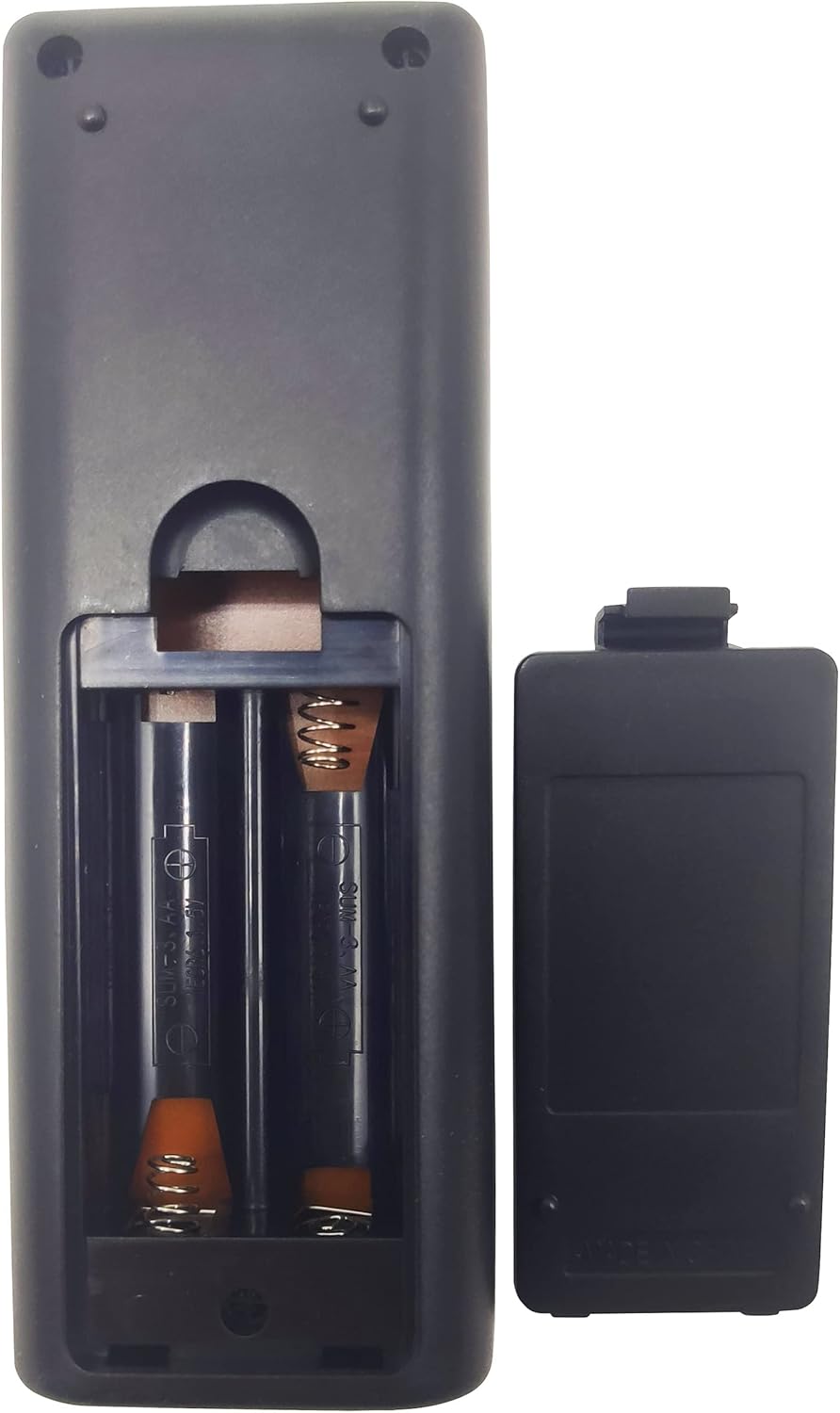
Figure 1: Battery compartment with batteries inserted.
Operation
Once batteries are installed, the remote control is ready for immediate use with compatible Christie projectors. No additional programming or setup is required.
Basic Usage Guidelines
- Line of Sight: Ensure there is a clear, unobstructed line of sight between the remote control and the projector's infrared receiver.
- Responsiveness: The remote is designed to be highly responsive to every key press, ensuring reliable operation of your projector.
- Power Button: Press the Power button (red button, top right) to turn the projector on or off.
- Navigation: Use the directional arrow buttons and the ENTER button for menu navigation.
- Volume Control: Adjust audio output using the VOLUME +/- buttons.
- Input Selection: Use the INPUT button to cycle through available input sources.

Figure 2: Front view of the R025H Remote Control.

Figure 3: Angled view of the R025H Remote Control.
Maintenance
- Cleaning: Wipe the remote control with a soft, dry cloth. Do not use liquid cleaners or abrasive materials.
- Battery Replacement: Replace batteries when the remote's responsiveness decreases or it stops functioning. Always replace both batteries at the same time.
- Storage: Store the remote in a cool, dry place away from direct sunlight and extreme temperatures. If storing for extended periods, remove the batteries to prevent leakage.
Troubleshooting
Remote Control Not Responding
- Check Batteries: Ensure batteries are inserted correctly with the correct polarity. Replace old or depleted batteries with new AA batteries.
- Line of Sight: Verify that there are no obstructions between the remote control and the projector's infrared receiver.
- Distance: Ensure you are within the effective operating range of the projector's infrared receiver.
- Projector Power: Confirm that the projector is powered on and not in standby mode.
Specifications
| Model Number | R025H |
| Brand | INTECHING |
| Compatible Devices | Christie LW502, LWU502, LWU530-APS, LWU650-APS, LX602 Projectors |
| Connectivity Technology | Infrared |
| Batteries Required | 2 AA batteries (not included) |
| Product Dimensions | 5.91 x 2.36 x 0.79 inches |
| Item Weight | 2.39 ounces |
| Special Feature | Energy Saving |
Warranty and Support
INTECHING provides the following warranty and support for this product:
- Refund Policy: A refund is available within 30 days from the order date.
- Replacement Policy: A replacement is available within 12 months from the order date.
- Customer Service: For any inquiries or support, messages will be replied to by a trained support team within 24 hours.


